Hi,
I’m going to try and save you a lot of time and headache.
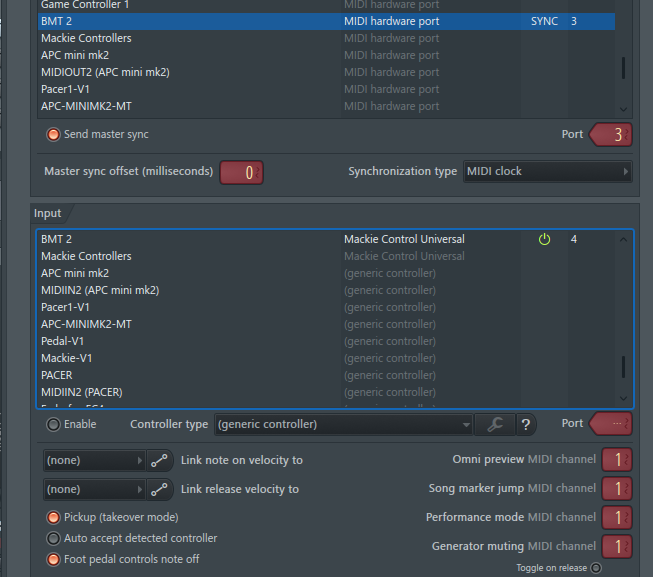
I did a little research and found that neither FL or Live handl MMC out natively. However I did find that if you set each for Mackie Control as a control surface you can pass transport message back and forth. Then you could define other control surfaces for other functions as normal.
Here is how I set up Ableton Live.



Here is how I set up FL Studio
I created a project file and set up my aliases as follows:
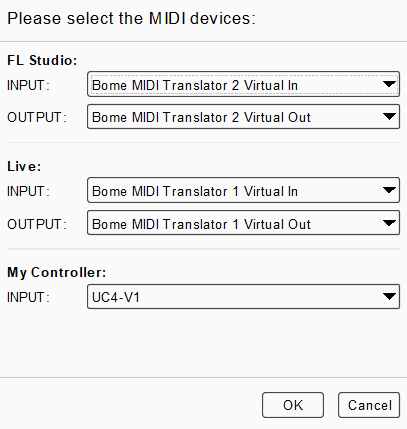
You can learn more about aliases from this tutorial.
I use presets to direct the traffic to the right ports.
For more information about device selection, see this tutorial.
In the project file the key things you might to change is to point the alias to your controller and then set translators 0.0 thru 0.2 to the MIDI messages your controller sends.
I only programmed Play and Stop at this point.
0.0 is simply a toggle to switch between which is the master (you cannot have 2 masters). It switches which other presets are active.
0.1 is for Start
0.2 is for Stop
Whichever is the master sends clock to the other DAW.
I did a rudimentary test and it worked.
I used the new Perform feature of 1.9.1 which allows me to use minimal MIDI IN programming and not have to change a lot of other stuff.
You can sync using the play and stop buttons on the current master or the programmed MIDI buttons on your controller.
Enjoy!
Live-FL-Transport.bmtp (4.8 KB)
Steve Caldwell
Bome Customer Care
Also available for paid consulting services: bome@sniz.biz