Yes, I can see this is rather complicated due to the shift and control keystrokes that you need.
The attached example should help get you started.
Preset 0 is part of my standard project initiation template. The only thing relevent here is that I set the global variable ga to a delay paramter for keystrokes in the rules of translator 0.2 (Preset 0 translator 2)
Translator 1.0 should focus your wmm application. Translator 1.1 was just used for testing with my editor since I do not have wmm on my system. I disabled it.
Translators 1.2 through 1.5 handle shift keys using the perform action which are called from rules of the translators 1.8 and above (when shift or control is needed)
Translator 1.6 looks at the incoming key and determines if it is a note-on or off and also captures the note number. If a shift or control is needed it is called in the rules (as I explained earlier)
Translatore 1.8-1.15 are the 4 keys that I programmed. You need separate translators for down and up actions in this case.
Each pair of translators looks at the note number in rules and if it is not the target will do nothing. If it is the target, it calls (in rules) control or shift as needed and send the keystroke.
I leave it to you to copy/paste and then modify the remaining 32 keys. You will need to modify
- The target key number in first rule of the translator
- The modifiers as needed in the rules
- The outgoing keystroke as well whether it is an up or down key.
Translator 1.8 , 1.9,1.12 and 1.13 do not use a modifier (shift or control)
Translators 1.10 and 1.11 use a shift modifier in rules
Translators 1.14 and 1.15 use a control modifier in rules
Hopefully, in studying this example, you will see the pattern.
I suggest you copy the translator pair for existing modifiers and paste and edit them for the remaining keys that need to be set up.
Since the outgoing action are computer keystrokes, no MIDI output is needed.
I tested using my LaunchKey Mini. Here is how I set up my alias. You will need to point it to your action MIDI keyboard.
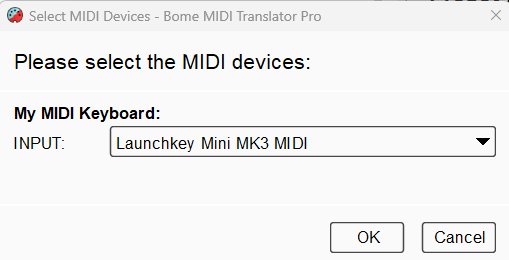
You can learn more about aliases from this tutorial.
For device selection, I set it up at the preset level so that if your keyboard changes, all you need to change is preset 1 and none of the translators within.
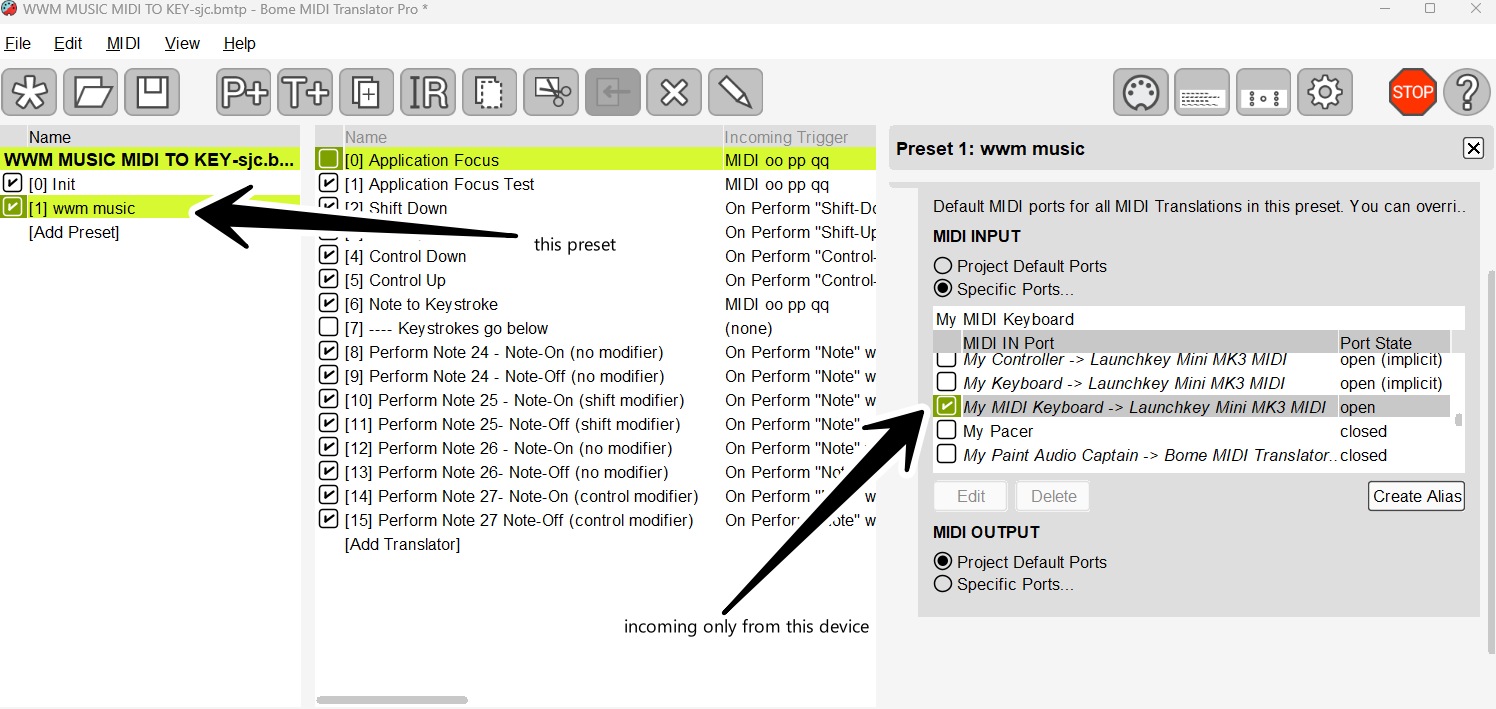
For more information about device selection, see this tutorial.
I can see how a new person would struggle with this. I’ve been programming in Bome MIDI Translator Pro for years and it took me a while since the keystrokes your application needs are quite unique (need modifiers) .
WWM MUSIC MIDI TO KEY-sjc.bmtp (7.8 KB)
Steve Caldwell
Bome Customer Care
Also available for paid consulting services: bome@sniz.biz