Hi and welcome back.
Some MIDI controllers you can assign a unique ID to. Sadly I don’t think the MIDI mix is one of them. If they don’t report themselves uniquely, it you just have to rearrange them until you get them on your desktop in order that you want them.
I’m told that if you use the same USB ports, they may keep their memory but I’m finding this is not very reliable.
Once you have them arranged correctly, you set up different port selection under each preset.
The attached example is how I have previously set up one to support 3 APC-MINI’s. You should be able to use it as a Model for any controller of the same type that uses MIDI CH 1. The key things you should do is to define you own aliases. I have mine as follows (for testing) but you will want to make them for your own devices.
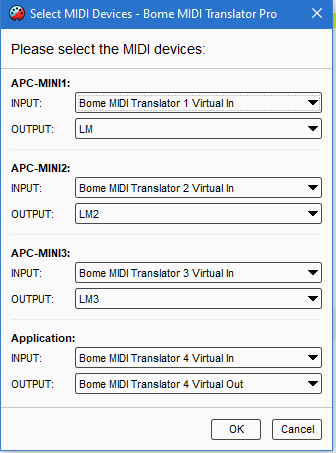
You can learn more about aliases from this tutorial.
On APC to Application I have set the device inputs and outputs at the preset level.
On Feedback I put the input all on one port and then differentiated the output destination at the translator level. Note that the 2nd and 3rd devices to translation in the translators so that the Application sees MIDI CH 1 for the first (no translation), MIDI CH 2 for the second, and MIDI CH 3 for the third.
On return, we translate all back to MIDI CH 1 for their respective device.
For more information about device selection, see this tutorial.
3-APC-MINI-2023-11-19.bmtp (2.4 KB)
Steve Caldwell
Bome Customer Care
Also available for paid consulting services: bome@sniz.biz