Just want to report back here that the @SteveC 's scheme was spot on. During startup, I do a quick protocol (hit a MIDI pad, then select my ‘Mix1’ unit, and Bome MIDI Translator ‘remembers’ which is Mix1 and which is Mix2. During the selection, 4 presets out of 8 are activated …
Since the diagram from This Post was so helpful, I did my own:
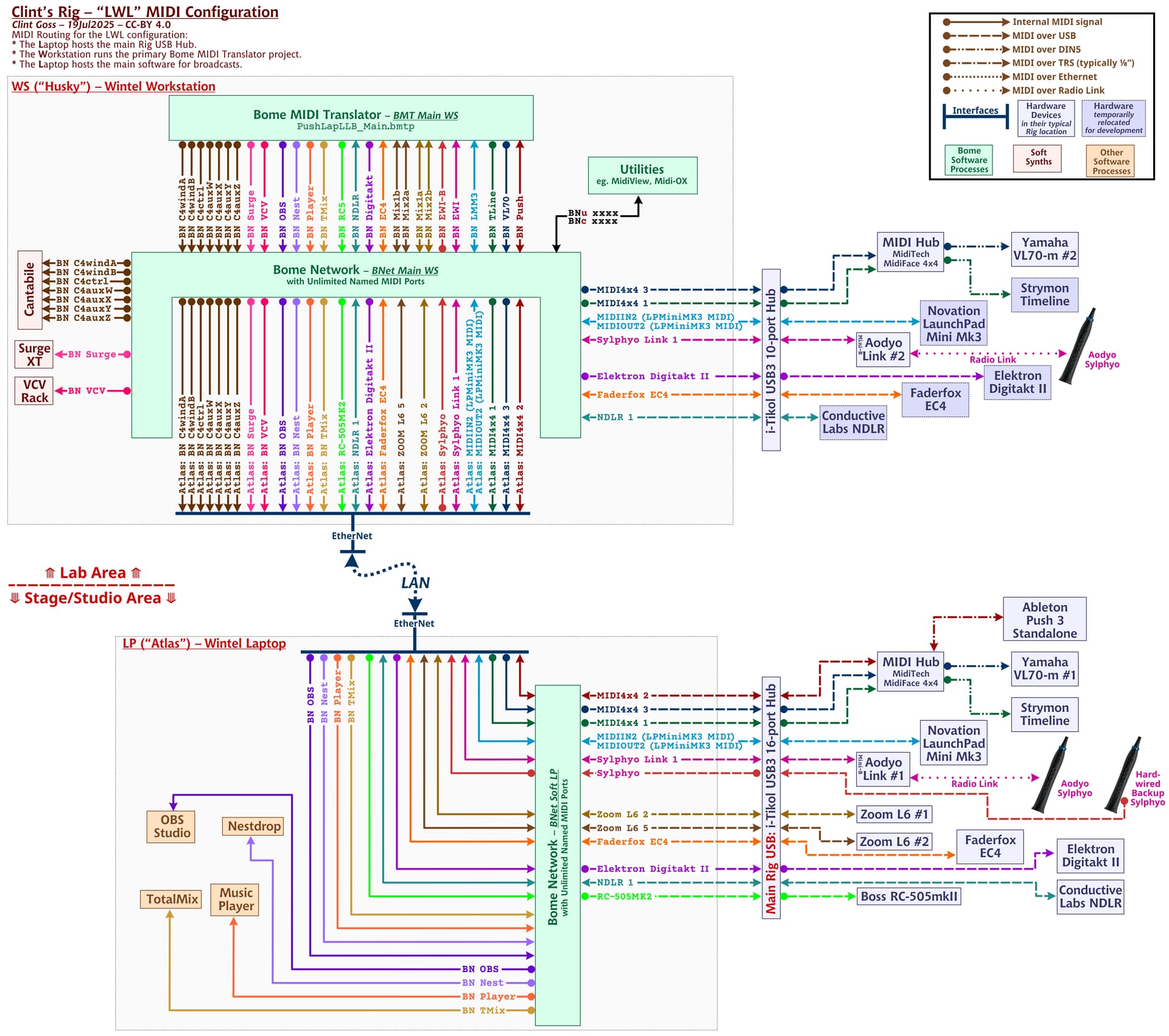
A major requirement of mine is to be able to move hardware units from the Studio Area to the Lab Area for focused development. I stand in the Studio area and use a laptop. I sit in the Lab area and have 3 42" screens. Big difference.
Bome Network not only makes it easy to move hardware, it also allows me to use my BomeBox (or not) or to put any software component on the Main Workstation (in the Lab) or on the Laptop (in the Rig in the Studio area). I literally can do this live, and everything just works …