Low latency (sync’d) overdubbing on audio recordings for analog techno music production. The intended use of the BomeBox is to translate MIDI from 1990’s hardware to 2010’s hardware.
The setup:
-1990’s Alesis HD24 (multitrack hard disc recorder). This is where the MMC / MTC signal originates.
-Elektron Octatrack DPS-1 (Drum machine) This is where the MMC / MTC signal needs to go.
-Bome Box and Bome Midi Translator Pro
What I know:
The Alesis HD24 can generate 30 fps Midi Time Code.
While running BMTP (Bome Midi Translator Pro ), I routed the Alesis HD24 to my computer (via a midi to usb cord). I can see the midi messages in the Log Window on BMTP from the Alesis HD24 when I push the start and stop button. This confirms that the Alesis HD24 is sending midi and BMTP can see it and recognize it.
The Elektron Octatrack DPS-1 can receive Midi transport and clock.
The Problem:
When using BMTP and connecting to the BomeBox via wifi I do not see the Alesis HD24 or the Elektron Octatrack DPS-1 in the Project Default Midi ports.
How do I create a project on BMTP that will take the incoming Start / Stop MTC from the Alesis HD24 and send them to the Elektron Octatrack DPS-1?
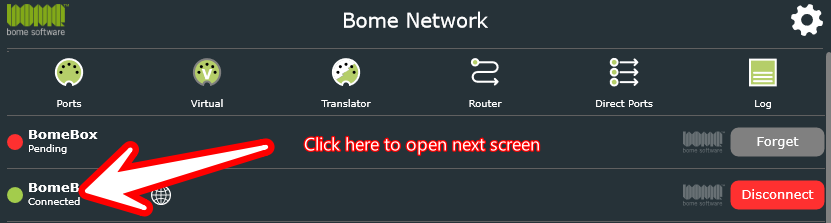
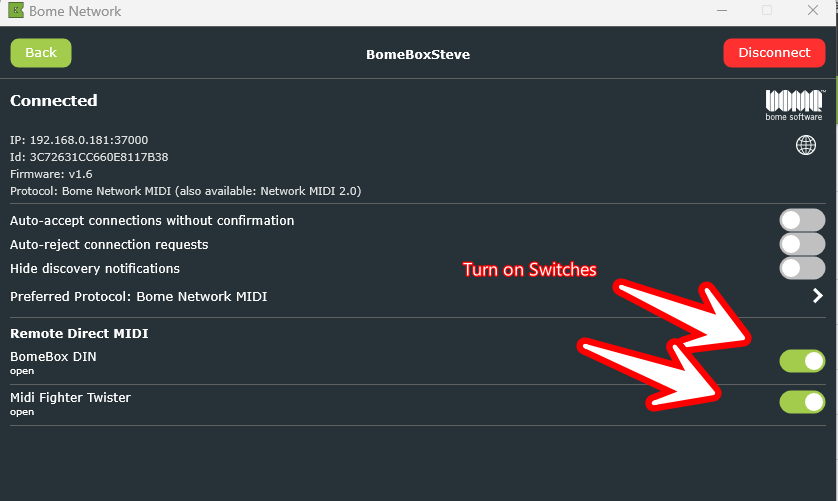
If you are using BomeBox firmware version 1.6 or later you should be able to use Remote Direct MIDI to enable access to any MIDI devices attached to your BomeBox.
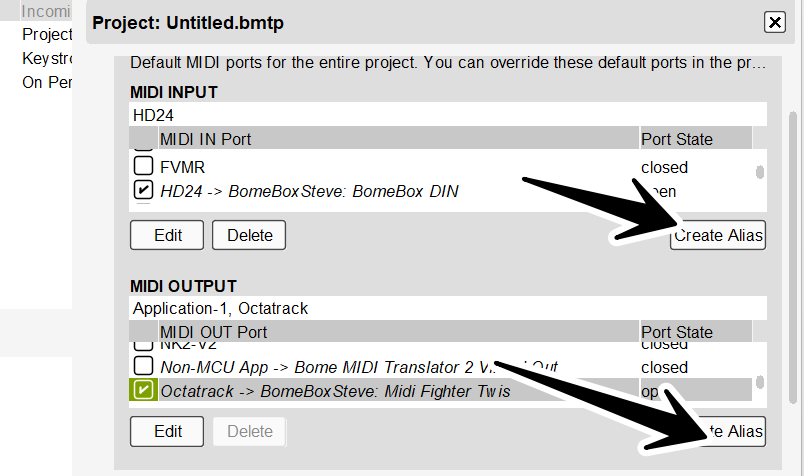
In my Case I have the normal DIN connectors as well as a MIDI Fighter Twister attached. If I turn the switches on as shown here, you can see the devices on your computer.
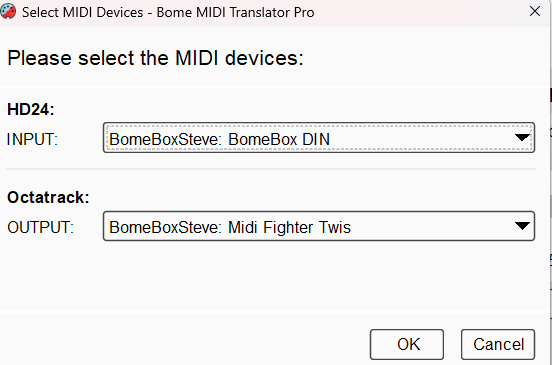
You can learn more about aliases from this tutorial.
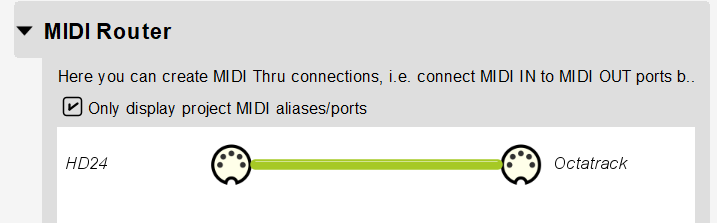
If you create a MIDI thru route, all incoming messages from the incoming port will pass through to the outgoing port unless you have translators set up to do otherwise.
Otherwise, you can set up translators to change alter the outgoing messages as you like.
If you later upload the project to BomeBox. You can re-assign the aliases with theBomeBox web interface. Note that you need to have the paid version of Bome MIDI Translator Pro in order to use projects on the BomeBox as the trial version does not sign projects and BomeBox requires signed projects only.
Steve Caldwell
Bome Customer Care
Also available for paid consulting services: bome@sniz.biz
Thank you Steve! You’re instructions have indeed lead me closer to my goal.
Here is where I’m at currently:
I have successfully achieved:
Uploading a project to the Bome Box using Bome Midi Translator Pro.
Start / Stop communication between the HD24 and Octatrack.
Projects for both directions Octatrack →BomeBox→ HD24 or HD24 →BomeBox→ Octatrack.
Issues:
If I route the HD24 →BomeBox→ Octatrack and attempt to overdub, the audio playback on the HD24 lags behind the Octatrack by approximately 10 milliseconds; an issue I did not expect to encounter. It seems that the Alesis HD24 internally offsets the audio playback ever so slightly. I am really not sure there is a way to solve this. Maybe I need to send MTC from the Octatrack to the HD24? I have yet to figure out how to do this because the Octatrack sends MTC as “F8” and the Alesis HD24 uses a series of hexadecimal numbers for MTC. Alternatively, the Alesis HD24 has ADAT Sync in / out ports.I know there are a few midi to ADAT synchronizers out there, maybe this would resolve the millisecond delay?
Current solution:
The routing is currently Octatrack → BomeBox → HD24. I am successfully able to control the “play” function on the HD24 with the “Play” button on the Octatrack. YAHOO. In order to overdub I found a work around by utilizing the “auto record” function on the Alesis HD24, I programed it to start recording 10 seconds after the “Play” function has been activated. Somehow, it works. A MIRACLE (explainable by someone more knowledgeable than I), as long as I set up my recording format in this way the audio is synchronized and overdubbing is achievable. This current solution is not how I envisioned, but its something! and that counts… for something!
Thanks again Steve! Send my regards to the rest of the Bome team.
Well I’m not sure how you solved the delay but generally anything to do with digital sound processing is subject to some delays while the sound engine converts from digital audio back to analog. Latency largely depends on buffer size. The lower the buffer size you can use the less latency. With that said, if the audio processor is not fast enough to keep up, you will get audio artifacts (clicking and popping) if the processor cannot keep up. In the audio world usually 7-8 ms delay is usually deemed acceptable as it is not usually noticable by the human mind. This is similar to a delay you would get if you were on a large stage as the sound travels from one end of the stage to another.
Anyway, I’m glad you seem to have it solved!
Steve Caldwell
Bome Customer Care
Also available for paid consulting services: bome@sniz.biz