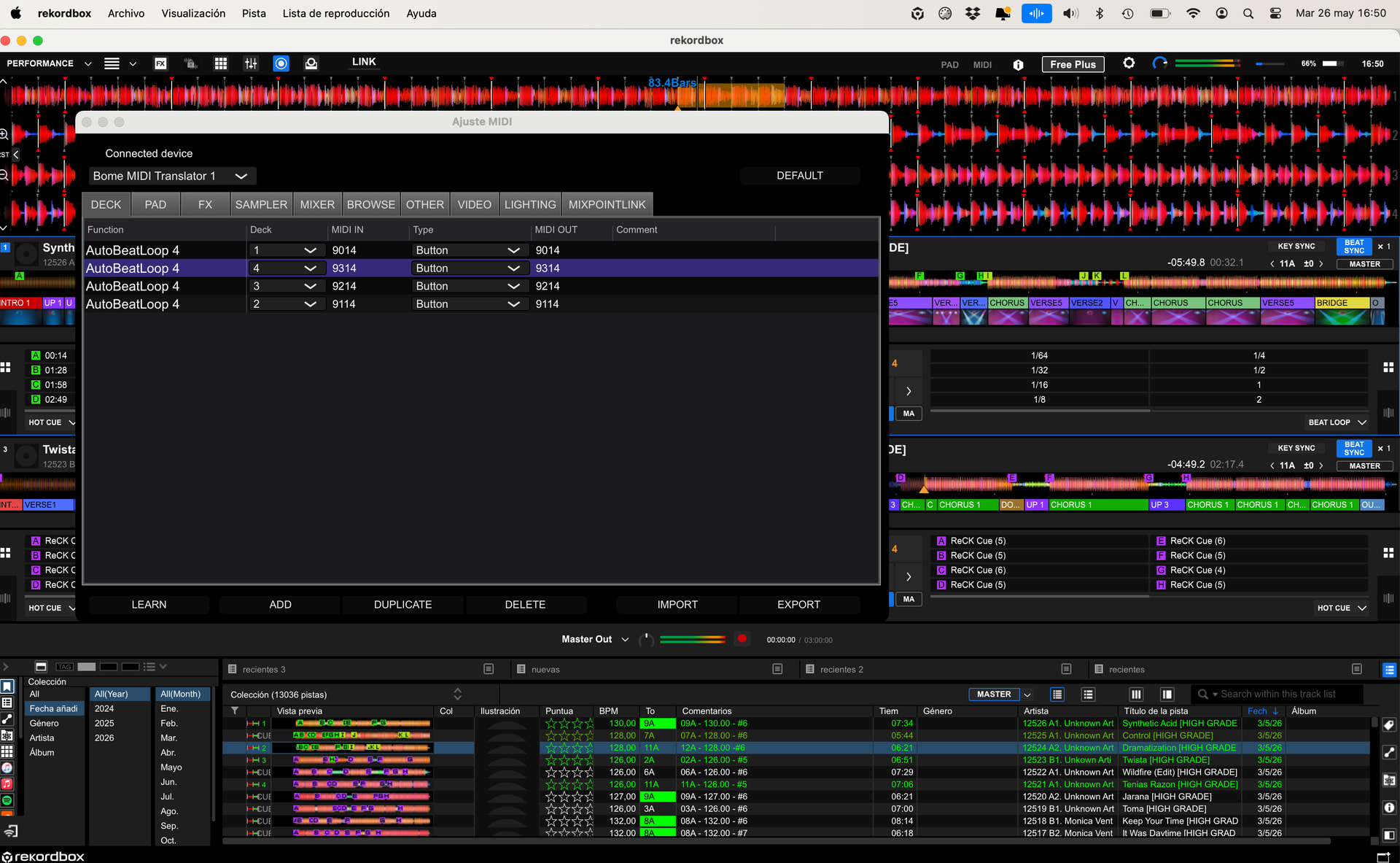
4-beat loop simultaneously on Decks 1, 2, 3, and 4 in Rekordbox.

Hello, good morning everyone.

I’m using Rekordbox DJ software, version 7, connected to a DDJ-XP2 controller. Everything is working correctly. The controller has different performance pads and also a Browse knob that is normally used to navigate and select tracks inside Rekordbox.

What I would like to do is use Bome MIDI Translator Pro to give this Browse knob a completely new functionality, while keeping the rest of the controller working exactly as it does now.

Specifically, I would like the following behavior:

  • When I press the Browse knob once, I want it to instantly create a 4-beat loop simultaneously on Decks 1, 2, 3, and 4 in Rekordbox.

  • When I press the Browse knob again, I want those loops to be released/disabled simultaneously on all four decks.

  • When I rotate the Browse knob to the right, I want the loop size to increase simultaneously on all four decks.

  • When I rotate the Browse knob to the left, I want the loop size to decrease simultaneously on all four decks.

  • When I hold the Shift button and rotate the Browse knob, I want it to control Beat Jump:

    • Shift + turn right → Beat Jump forward

    • Shift + turn left → Beat Jump backward

Very importantly:

  • I want to preserve all the other pads and controls of the DDJ-XP2 exactly as they currently work.

  • I only want to change the functionality of the Browse knob itself.

  • I also want the normal Shift behavior to remain intact for everything else, except for this new Browse + Shift behavior.

I would like to know exactly:

  • Which MIDI messages or commands I need to create inside Bome MIDI Translator Pro

  • Which translators/rules I should use

  • How to configure the incoming and outgoing MIDI

  • And how to map everything correctly in Rekordbox 7

Thank you very much.
Hi, thanks for reaching out! We don’t offer this type of support for free but I can advise you on the steps you would need to take.

  1. Install Bome MIDI Translator Pro and create routes between your controller and the application. Your controller should be routed to a virtual port for input to your application and then your application needs to use a virtual port to route back to your controller.
  2. Then operate your controller with the MIDI log window on so that you can see MIDI messages. Move controls on your controller that perform the desired function and using the monitor, track what the proper MIDI message is for each of the functions that you want.
  3. Using the desired MIDI messages logged from step two, create translators that convert the incoming MIDI message from your controller to the desired output to perform the functions that you recorded in step 2. If it is a complex set of MIDI messages, you should be able to use raw MIDI to handle multiple outgoing messages from a single incoming message on your controller.

Note, if your application cannot select the virtual MIDI ports set up in step 1, then it might not be possible to use Bome MIDI Translator Pro as it needs to be between the controller and the application to perform the necessary MIDI routing and translation.

If you want me to do this for you, I would need a DDJ-XP2 and Rekordbox and would follow the steps above. This would be as an independent consultant for a fee. I would need you to also supply the controller and the software or pay me to procure it.

If you want to pursue this route, please private message me or send email.

Steve Caldwell
Bome Customer Care


Also available for paid consulting services: bome@sniz.biz

Here is a template project that might help you get started.

The first preset (Init)is housekeeping stuff and won’t be discussed here.

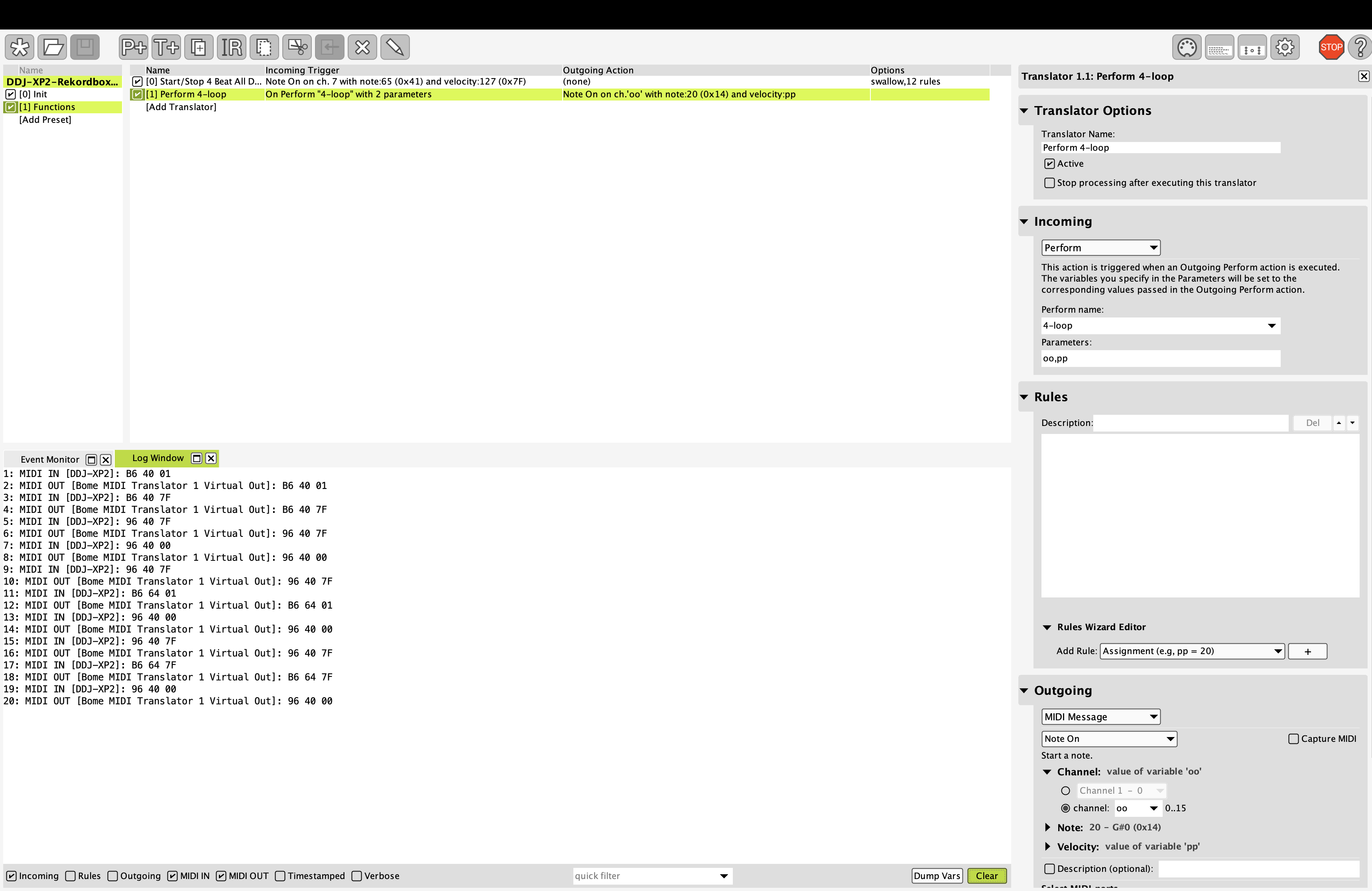
The second preset (Functions) has 2 translators. The first one takes input from your controller push knob, toggles the value of global variable “ga” and then calls the second translator 4 times in rules with a different parameters each time. The first parameter is the MIDI channel and the second parameter is either on (value 127) or off (0) depending on the state of ga.

This should give you your first desired function.

I also have MIDI thru paths set so anything without a translator will be passed through untouched.

My aliases are setup as follows:

You will need to set your to the controller and the virtual port you are using.

You can learn more about aliases from this tutorial.

I pulled this information from the below document which seems to show the MIDI messages for various functions.

DDJ-XP2 MIDI Messages

Here is the project file.

DDJ-XP2-Rekordbox-2026-05-18.bmtp (2.9 KB)

Steve Caldwell
Bome Customer Care


Also available for paid consulting services: bome@sniz.biz

Hello Steve,

Thank you very much for the template project and for taking the time to explain how everything works. I really appreciate your help and the effort you put into guiding me in the right direction.

If I understand correctly, this project already covers the first function: pressing the Browse knob toggles a 4-beat loop on/off across Decks 1, 2, 3, and 4, while the MIDI thru paths allow the rest of the DDJ-XP2 controls to continue working normally.

That is exactly the behavior I wanted for the Browse knob press.

I still have a few questions about completing the rest of the setup:

  1. How should I add the Browse knob rotation functions?

    • Turn right: increase loop size on Decks 1, 2, 3, and 4.

    • Turn left: decrease loop size on Decks 1, 2, 3, and 4.

  2. How should I add the Shift + Browse rotation functions?

    • Shift + turn right: Beat Jump forward.

    • Shift + turn left: Beat Jump backward.

  3. Should the original Browse rotation MIDI messages also be blocked from reaching Rekordbox, so the knob no longer scrolls through the browser?

  4. In Rekordbox 7, should I map the outgoing Bome Virtual Port messages directly to the loop size and beat jump commands for each deck?

Regarding the remaining functions, I think the best thing for me now is to carefully study the Bome manual and watch the tutorial videos so I can better understand how the translators and rules are structured.

Once I have gone through all the documentation and experimented with the project myself, I will try to implement the remaining functions on my own. If I am unable to make it work correctly, or if I run into any doubts about the pending setup, I will come back and ask for further guidance.

Thank you again for all your help. It is greatly appreciated.

Best regards,
Emilio

Yes, you should test it because I have neither your controller or Reason (license that supports MIDI). I basically when of the document that I referenced.

The knob functions are shown below. Basically routate right unshifted is CC 64 on MIDI channel 7 with either value of 1-63 for positive movement or value of 127-64 for negative movement (where 127 = -1). This is from the document I provided a link.

image

The second line in the screenshot above shows that it is CC 100 on MIDI channel 7

In the above, these are the incoming messages but I’m not sure what the outgoing messages should be. You will have to manually perform that function with the log window open in Bome MIDI Translator Pro to see what the proper outgoing messages need to be for each deck.

If Swallow is turned on the for translator , then the original MIDI message will be blocked.

Yes

Sounds like a good plan. Thanks!

Steve Caldwell
Bome Customer Care


Also available for paid consulting services: bome@sniz.biz

Hello Steve,

I have one additional question regarding the loop function behavior across the four decks.

With the current template project, does the loop toggle function require all four decks to be active or currently playing in Rekordbox in order to work correctly?

For example:

  • If all four decks are active, then I would like the function to apply the loop to all four decks simultaneously.

  • But if only Deck 1 and Deck 3 are currently loaded or playing, while Deck 2 and Deck 4 are empty or inactive, I would like the function to act only on Decks 1 and 3.

In that situation, would the inactive decks simply be ignored automatically, or could this generate any kind of MIDI error, Rekordbox issue, or unexpected behavior?

Thank you again for your help.

Best regards,
Emilio

Hi, I’m not sure how RekordBox will react. You will need to test it. If it behaves badly, we may want to look at MIDI message coming back from RekordBox that light LEDs on which decks are active. We could then use those MIDI messages to not send to those decks. I would need to see what MIDI comes back from RekordBox when you activate and deactive a deck.

Steve Caldwell
Bome Customer Care


Also available for paid consulting services: bome@sniz.biz

Hi Steve,

Thank you for the clarification.

That makes sense. I will first test the current template as it is, sending the loop command to all four decks, and check how Rekordbox behaves when only some of the decks are loaded or playing.

If Rekordbox simply ignores the inactive or empty decks, then I think the current solution will be enough for my needs.

If I notice any unexpected behavior, I will try to capture the MIDI messages coming back from Rekordbox when activating and deactivating decks, especially any messages related to LEDs or deck status. Then I can send you that information so we can see whether Bome could use those messages to decide which decks should receive the loop command.

Thank you again for your help.

Best regards,
Emilio

Hi Steve,

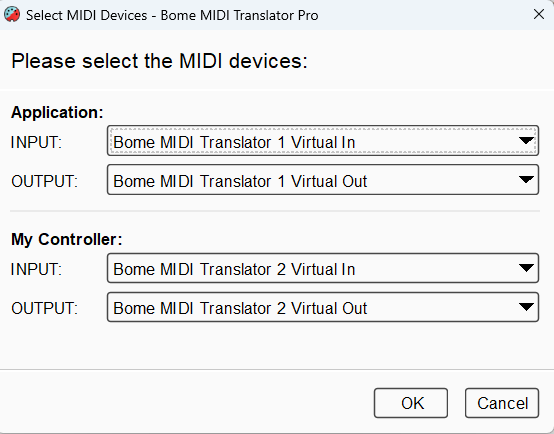
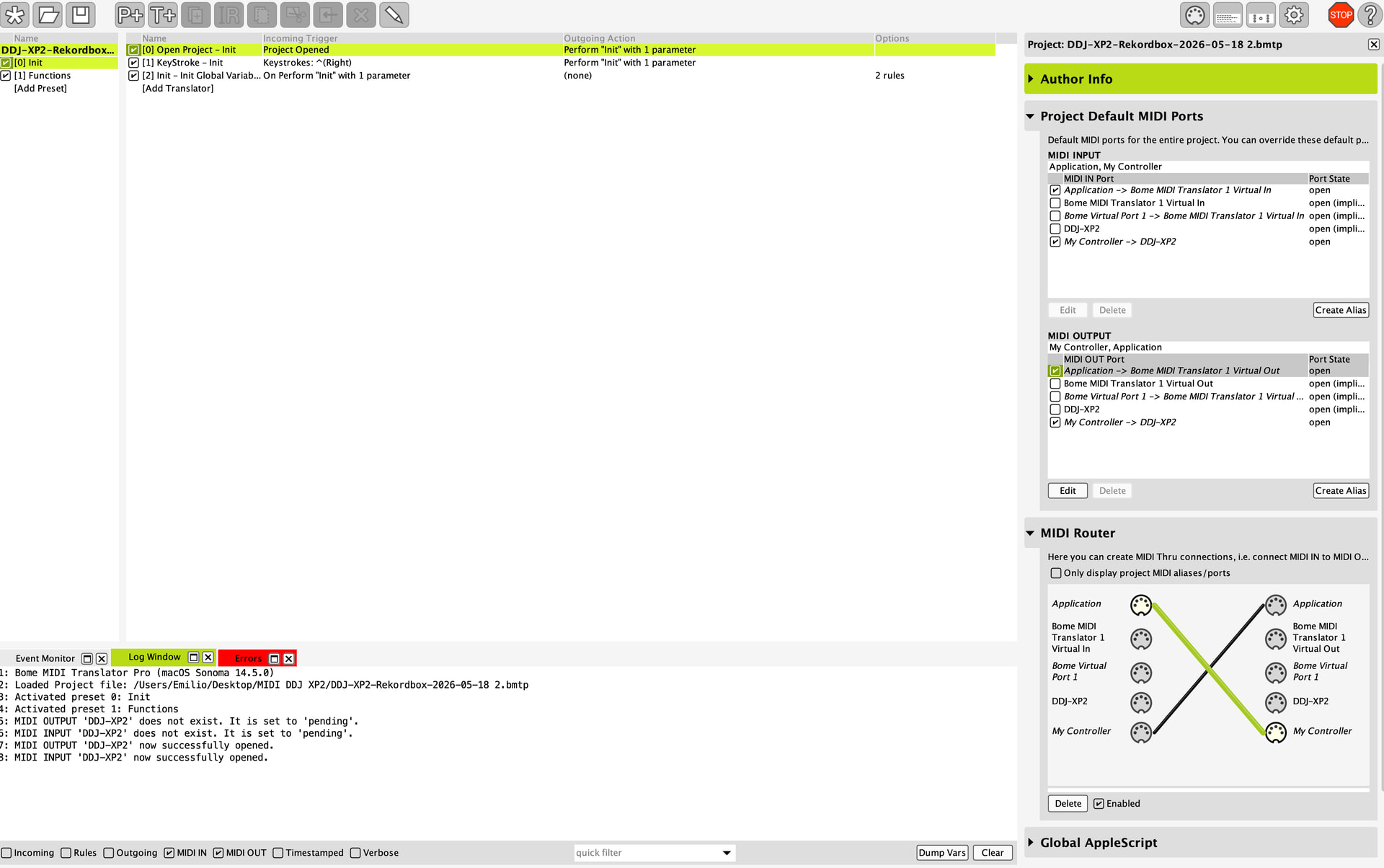
I wanted to explain the current MIDI routing setup I am testing and the issue I am having with Rekordbox not recognizing MIDI messages generated by Bome.

My goal is to use the DDJ-XP2 browse encoder/buttons through Bome MIDI Translator and then send custom MIDI messages back to Rekordbox for MIDI mapping.

Current setup:

  • Controller: Pioneer DDJ-XP2

  • Software: Rekordbox 7

  • Bome MIDI Translator Pro

  • macOS

What I configured:

MIDI INPUT aliases:

  • “My Controller” → DDJ-XP2

  • “Application” → Bome MIDI Translator 1 Virtual In

MIDI OUTPUT aliases:

  • “Application” → DDJ-XP2

  • “My Controller” → Bome MIDI Translator 1 Virtual Out

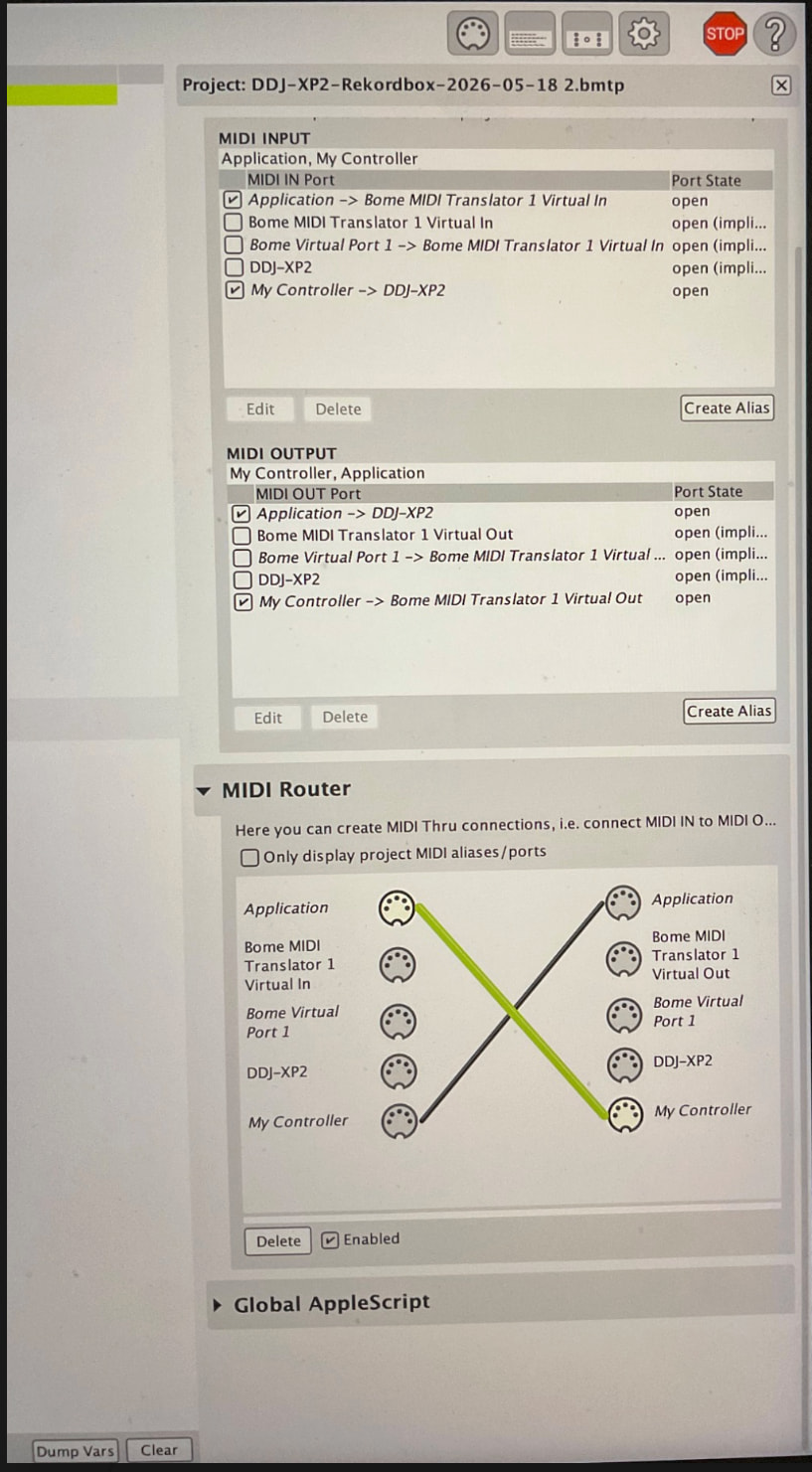
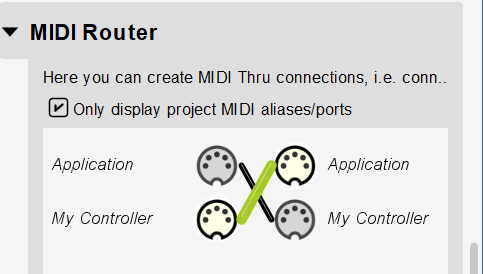
In the MIDI Router:

  • DDJ-XP2 is routed to My Controller

  • Application is routed back to DDJ-XP2

What is happening:

  1. Bome correctly receives MIDI from the XP2.
    I can see MIDI IN activity in the log window.

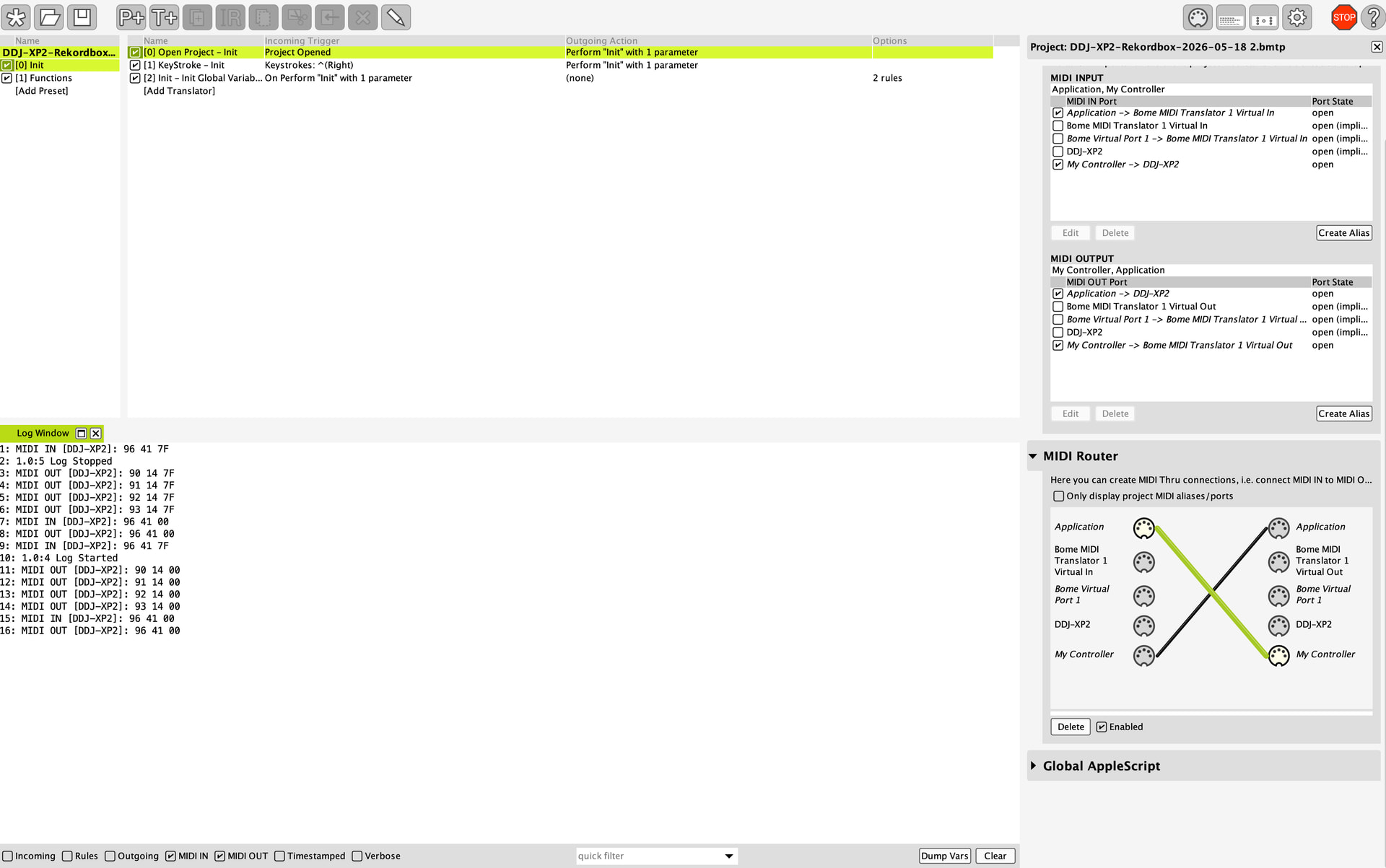
  2. Translators are generating MIDI OUT messages correctly.
    I can also see the outgoing MIDI messages in the Bome log.

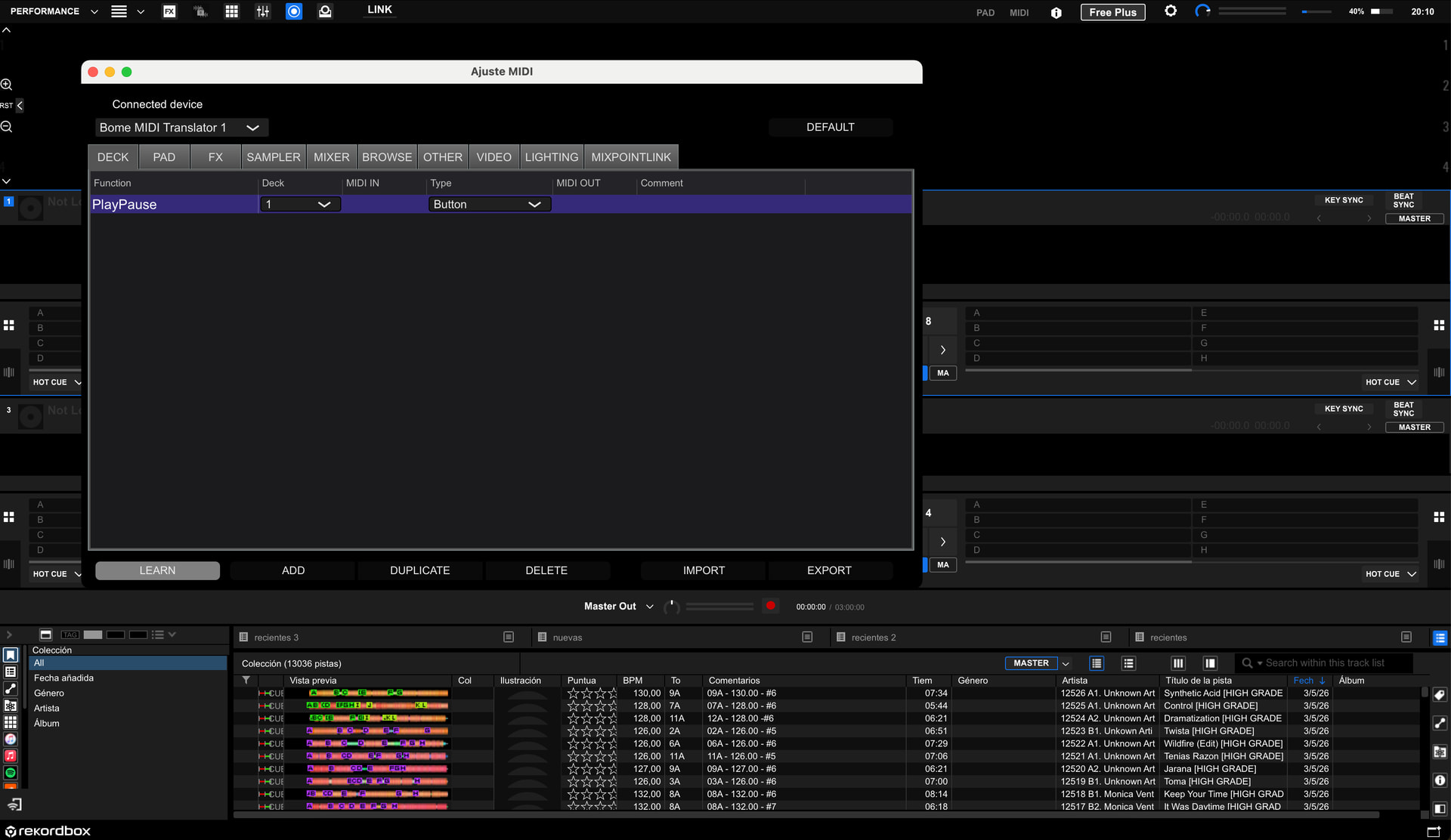
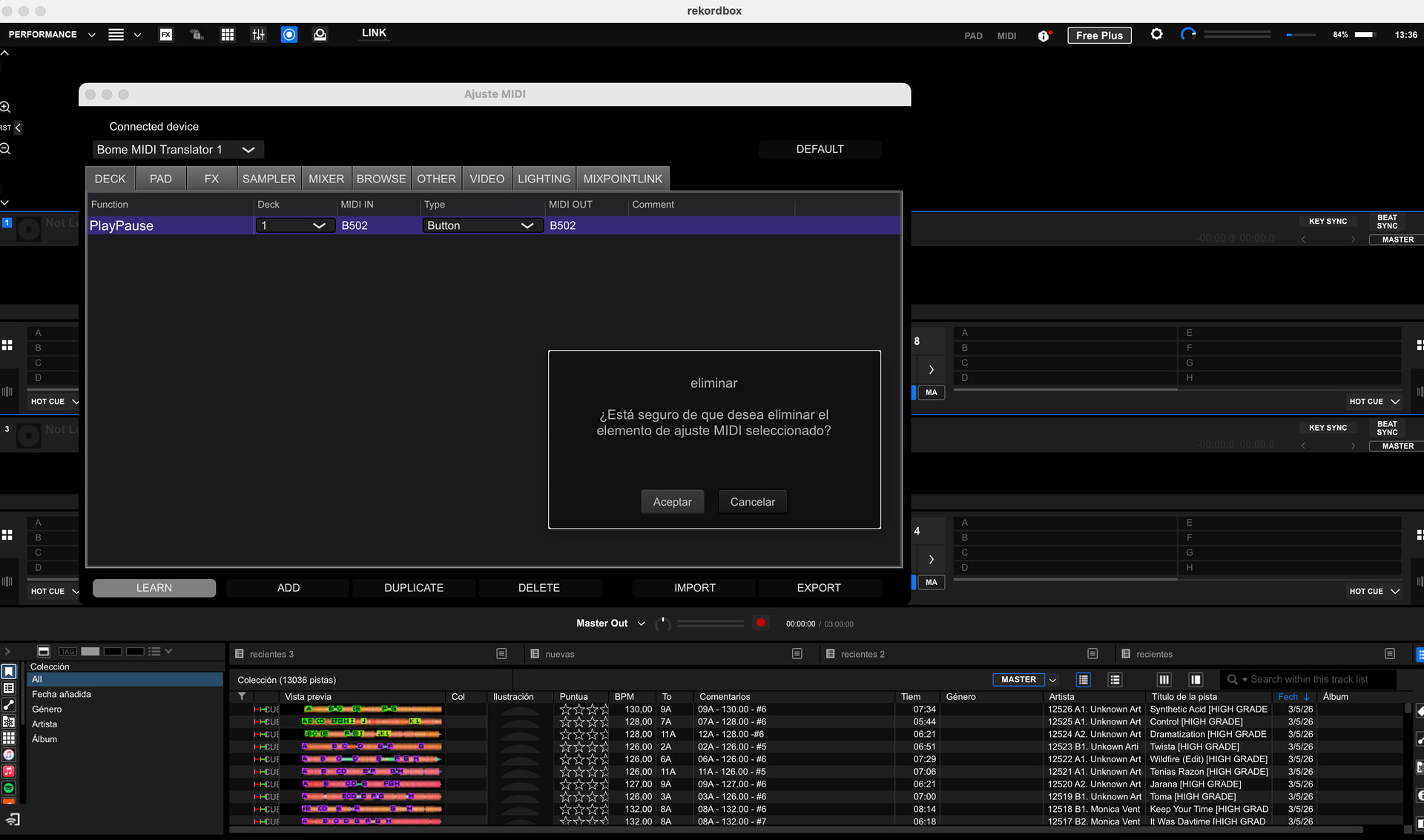
  3. Rekordbox detects “Bome MIDI Translator 1” as a MIDI device.
    I can select it inside Rekordbox MIDI settings.

  4. However, Rekordbox does not learn or react to the MIDI messages coming from Bome.
    When I press Learn and trigger controls/messages from Bome, nothing is detected.

So at the moment the MIDI flow seems to work inside Bome, but Rekordbox does not appear to receive or recognize the generated MIDI data.

One additional detail that may help diagnose the issue:

Inside Rekordbox MIDI settings, when I manually edit the MIDI IN or MIDI OUT fields, Rekordbox does allow me to type hexadecimal/alphanumeric MIDI values by hand.

This made me wonder whether:

  • Rekordbox is actually capable of using the MIDI messages generated by Bome,

  • but for some reason it is not automatically detecting them during MIDI Learn mode.

So I was also wondering if it could be possible to:

  • capture the exact MIDI messages generated by Bome from the log window,

  • and manually enter those values directly into Rekordbox as an alternative workaround.

At the moment, automatic MIDI Learn does not react to the incoming messages, even though the MIDI activity is clearly visible inside Bome.

I attached screenshots of:

  • MIDI aliases

  • MIDI Router

  • Bome log activity

  • Rekordbox MIDI settings

Could you please help me understand:

  • if my routing configuration is correct,

  • if I should be routing the virtual ports differently,

  • and whether Rekordbox may require a different type of MIDI message or virtual port configuration to detect Bome-generated MIDI?

Thanks a lot for your help.

Best regards,
Emilio

My Controller needs to be DDJ-XP2 on both input and output
Application needs to be BMT 1 got both input and output

RekordBox needs to be set for BMT 1 for both input and output.

Give that a try and see what you get.

Steve Caldwell
Bome Customer Care


Also available for paid consulting services: bome@sniz.biz

Hi Steve,

Thank you very much for your help and recommendations.

Your explanation about the aliases and routing configuration was exactly the key to solving the issue.

After configuring:

  • My Controller = DDJ-XP2 (input and output)

  • Application = Bome MIDI Translator 1 Virtual In/Out

and setting Rekordbox to use Bome MIDI Translator 1 for both MIDI input and output, Rekordbox is now finally recognizing the MIDI messages coming from Bome correctly.

This is a huge breakthrough and a great starting point for continuing the project. Now I can finally begin experimenting properly with the different Browse encoder movements, button presses, loop controls, and custom MIDI workflows I want to build.

I am attaching screenshots of:

  • the updated Bome alias configuration,

  • the routing setup,

  • and Rekordbox successfully receiving MIDI messages from Bome.

I also wanted to say that this information could probably help many other Rekordbox users who may run into the same situation in the future. Understanding how the routing and aliases should actually be configured between:

  • DDJ-XP2,

  • Bome MIDI Translator,

  • and Rekordbox

was absolutely essential.

Thanks again for your patience and support. It really helped me move forward with the project.

Best regards,
Emilio

Awesome, it looks like you are on the right path. I’m glad I could help!

Steve Caldwell
Bome Customer Care


Also available for paid consulting services: bome@sniz.biz

Hi Steve,

First of all, thank you very much again for all your help and recommendations. Your advice about the MIDI routing and configuring Rekordbox to use Bome for both MIDI input and output was a huge breakthrough for me. It finally allowed Rekordbox to correctly recognize the MIDI messages coming from Bome, and that completely changed the situation.

I wanted to update you on the progress I"ve made so far.

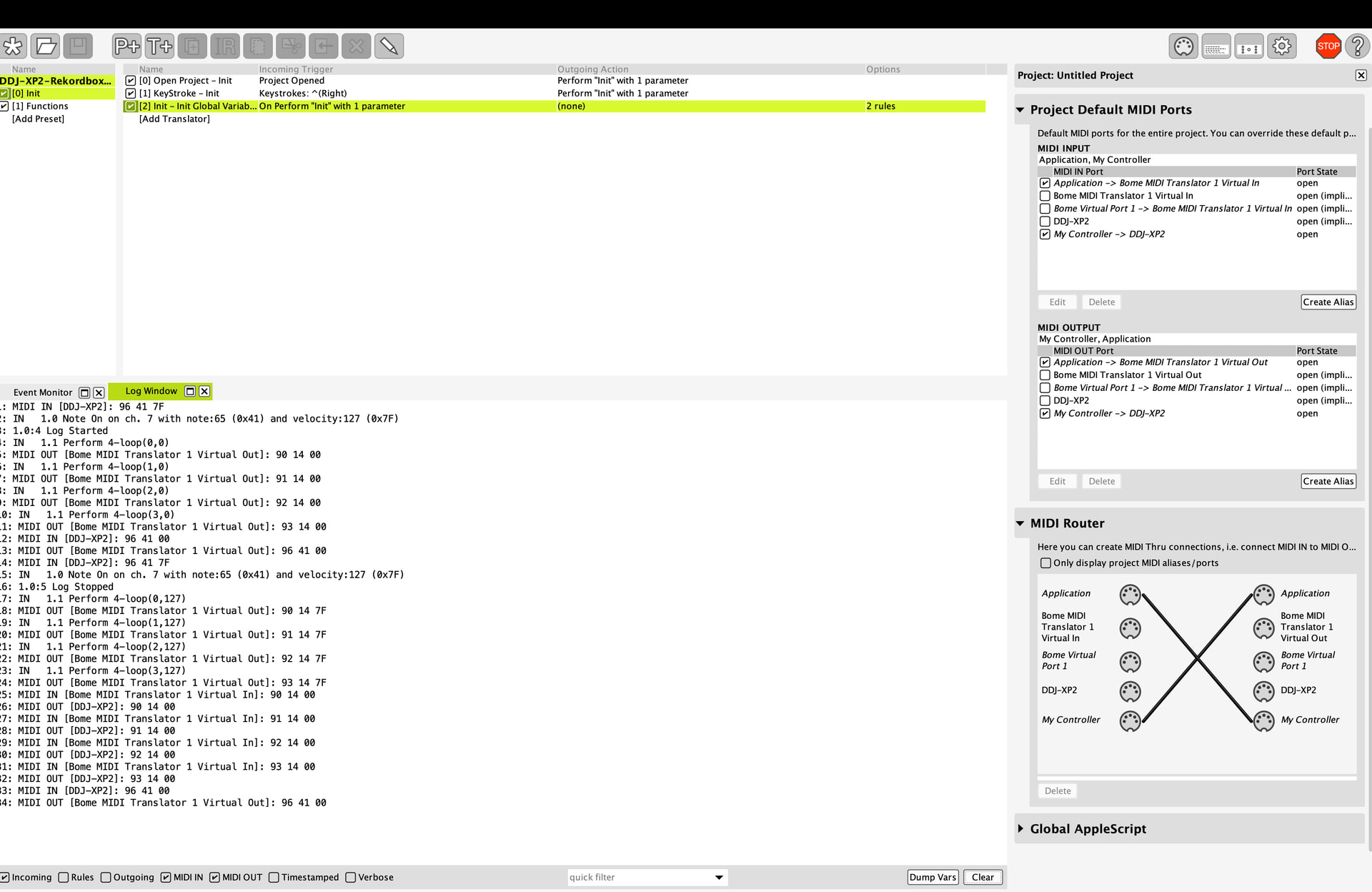
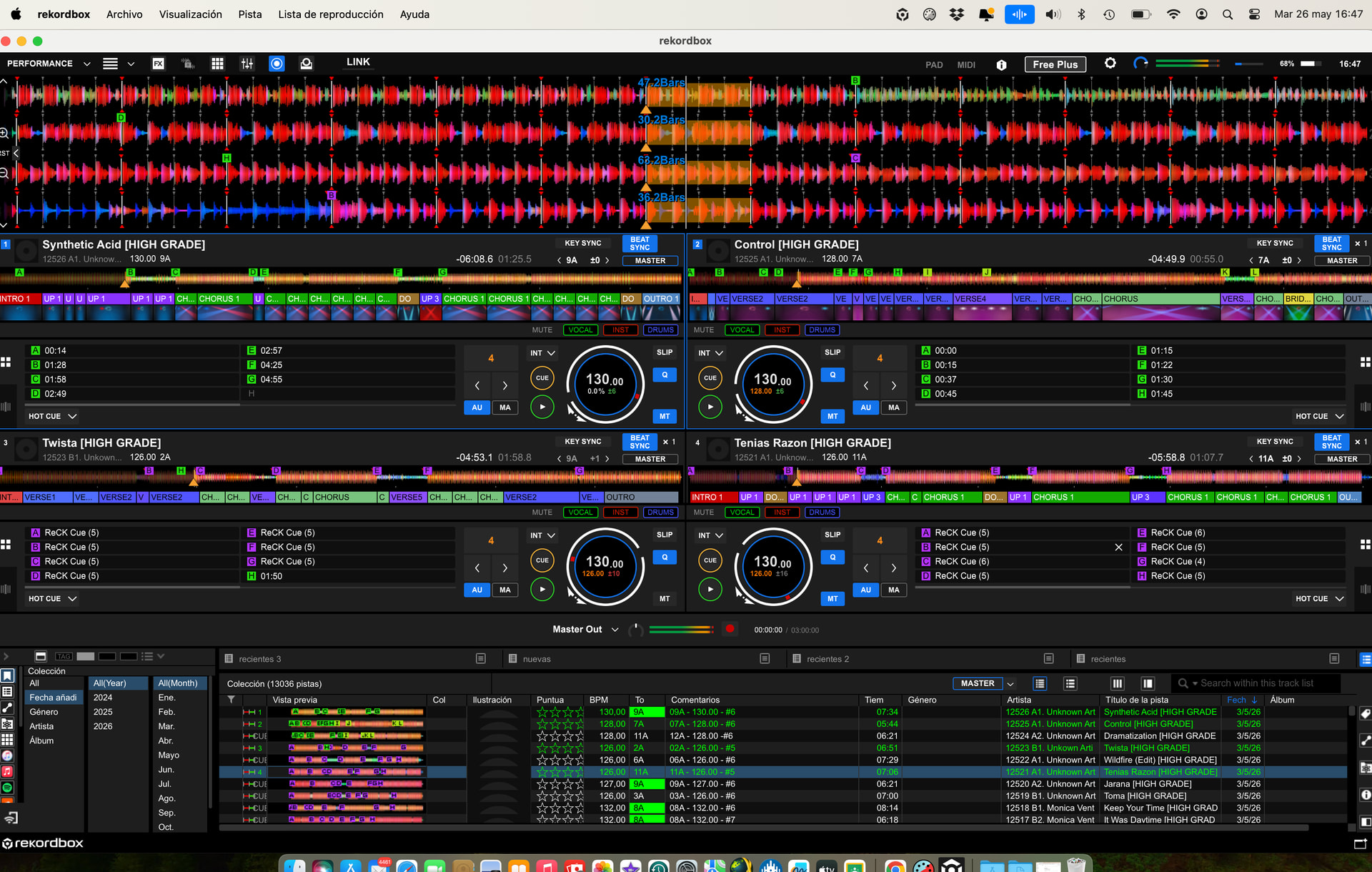
At this point, I have successfully linked the DDJ-XP2 Browse encoder push to trigger simultaneous 4-beat auto loops on Decks 1, 2, 3 and 4 in Rekordbox. I"m attaching screenshots showing the MIDI messages being sent from Bome (screenshot 1) , as well as another screenshot showing all four decks looping simultaneously (screenshot2) and the MIDI mapping with 9014, 9114, 9214 and 9314 in rekordbox (screenshot 3). I hope this can help another people with the same objetive.

An important thing I noticed is that if one of the decks is not currently playing or active, Rekordbox does not have any problem and the remaining active decks still loop correctly, which is excellent.

Right now, the main issue I still have is that I need to press the Browse button twice to activate the loops, and then another two presses to deactivate them. Ideally, I would like a single press to activate the loops and another single press to deactivate them.

I suspect this may be related either to the MIDI message type, toggle behavior, note on/off handling, possibly the attached screenshots showing the MIDI messages being sent from Bome may add some clue.

I"m also attaching another screenshot containing the MIDI messages captured from the XP2 for the next functions I want to implement (screenshot 4).

In that screenshot:

  • Lines 1 and 2 correspond to rotating the Browse encoder to the right.

  • Lines 3 and 4 correspond to rotating the Browse encoder to the left.

  • Lines 5, 6, 7 and 8 correspond to pressing the Shift button alone.

  • Lines 9, 10, 11, 12, 13 and 14 correspond to pressing Shift while rotating Browse to the right.

  • Lines 15, 16, 17, 18, 19 and 20 correspond to pressing Shift while rotating Browse to the left.

My next goal is to implement:

  1. Increasing loop size when rotating Browse to the right.

  2. Decreasing loop size when rotating Browse to the left.

  3. Loop move / beat jump forward using Shift + Browse right.

  4. Loop move / beat jump backward using Shift + Browse left.

I believe the logic should be very similar to the method already used for triggering the four simultaneous loops, but adapted for these new functions.

If possible, I would be extremely grateful if you could help me create at least one of the new functions, for example:

  • Browse rotate right → increase loop size
    and

  • Shift + Browse rotate right → loop move / beat jump forward

Then I could try to replicate the same logic myself for the left rotation functions.

This project is becoming really exciting for me and your guidance has honestly made all the difference.

Thanks again for all your help and support.

Best regards,
Emilio

Hi,

Please find the attached.

Translator 0.3 and 0.4 control the shift functions switching enablement and disablement for presets 1 and 2.

Translator 1.0 deactivates preset 2
Translator 1.1 will send the Unshifted message which you will have to define

Translator 2.0 deactivates preset 1
Translator 2.1 will send the shifted message again you will need to define the message send to RekordBox

Shift Logic - Preset changes.bmtp (2.5 KB)

Steve Caldwell
Bome Customer Care


Also available for paid consulting services: bome@sniz.biz

Hi Steve,

Thank you very much once again for your help and for sending the new project file and shift logic structure. I really appreciate the time and effort you are putting into helping me understand all of this.

After carefully reviewing your explanation and trying to understand the project structure better, I believe I now understand much more clearly what you are trying to achieve with the presets and translators.

From what I understand:

  • Preset 1 is intended for the normal Browse functions (unshifted state).

  • Preset 2 is intended for the Shift + Browse functions.

  • Translators 0.3 and 0.4 manage enabling and disabling the correct presets depending on the Shift state.

  • Translator 1.0 disables the shifted preset.

  • Translator 1.1 is where I should define the unshifted Browse message.

  • Translator 2.0 disables the normal preset.

  • Translator 2.1 is where I should define the shifted Browse message.

I also now understand that this new project is probably not intended to completely replace my original project, but rather to provide a cleaner and more professional “layer switching” architecture between normal Browse behavior and Shift + Browse behavior.

So my understanding is that the final structure should probably be something like this:

MAIN preset:

  • Browse Push → simultaneous AutoBeatLoop 4 on Decks 1-4

NORMAL preset:

  • Browse Right → Loop Double

  • Browse Left → Loop Half

SHIFT preset:

  • Shift + Browse Right → LoopMove Right / Beat Jump Forward

  • Shift + Browse Left → LoopMove Left / Beat Jump Backward

And then your preset logic dynamically enables/disables the NORMAL and SHIFT presets depending on whether Shift is pressed.

This makes much more sense to me now and honestly seems like a much cleaner and more scalable solution than trying to manage everything with variables alone.

Before modifying anything, I"m going to:

  • backup my original project,

  • study the translators and presets carefully,

  • and then try integrating your preset logic into my existing project rather than replacing it entirely.

I also wanted to ask if this new preset structure could potentially solve the issue where I currently need to press the Browse push twice to activate the 4-beat loops, and then another two presses to deactivate them again.

My hope is that separating the shifted and unshifted functions into different presets may prevent duplicate messages or conflicting translators from being triggered simultaneously.

Thank you again for all your guidance and patience. I"m learning a huge amount through this project and your help has been incredibly valuable.

Best regards,
Emilio

Yes, it looks like you have a good handle on it. My thoughts about browser push is that it is probably a toggle so maybe trigger it whether it is note-on or note-off. Toggle buttons are hard to fix though primarily because the controller itself might be performing some internal function.

Steve Caldwell
Bome Customer Care


Also available for paid consulting services: bome@sniz.biz