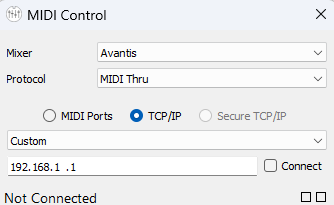
I am controlling Pro Tools faders with my A&H Avantis through their MIDI Control App over IP.
The problem is that there is no way to bank up and down into Pro Tools so the Avantis has 24 Faders and I can only control the first 24 Pro Tools faders.
The A&H Support didn´t find a way to do this although their lower price mixer SQ Series does do bank up/down in Pro Tools…
The Avantis has MIDI Custom Keys where I could define some MIDI Message but Pro Tools does nothing
From A&H:
This may be different for HUI, but for Mackie Control (Using MIDI channel 1):
Bank Up - 90 2F 7F 90 2F 00
Bank Down - 90 2E 7F 90 2E 00
and then he said:
I did find that the message I sent you is what we use to send a command to our driver; the driver then translates this to the following messages for the DAW:
Bank up: B0 0F 0A B0 2F 43 B0 0F 0A B0 2F 03
Bank down: B0 0F 0A B0 2F 41 B0 0F 0A B0 2F 01
this means Chinese to me or… midi? HUI? who knows. I am lost.
The HUI messages you showed are correct, however I’m not sure if the A&H tool (Allen and Heath MIDI Control) supports this. I’m also not clear how ProTools supports bank up and bank down when using multiple MIDI ports (non banked) configuration.
My first recommendation is to contact Allen&Heath with this question to see how Allen and Heath MIDI Control tool behaves in this situation and request this feature if they don’t support it. Having this supported in their tool would make more sense if they can add this.
From your posting, it looks like you have already followed this path.
My alternative recommendation is to try using the Allen and Heath in “MIDI Thru” mode instead of “HUI” mode and then use Bome MIDI Translator Pro to create translators and then test the conversion of these MIDI messages and see how ProTools behaves. It may be that you will need to create a Bome MIDI Translator Pro project to handle the conversion instead of using their HUI emulation function of the tool.
I assume you want to support 64 input faders since it appears that this is what Avantis supports.
If you want to follow the Bome MIDI Translator Pro path. I can provide an example project file to test with but I cannot test it because I have neither ProTools (excep for the free version with only 8 channel support) nor the Avantis Mixer.
The tool would be set up similar to the below but maybe a different IP address.
Then translators written to support up to 64 faders. Could you check with AVID if Pro-Tools would allow for 8 HUI devices without using bank up and bank down? If not, the translators would need to be set up for allow banking and you would only be able to control faders in the current bank. (You would not be able to use fader 1 and fader 48 simultaneously because they would be on different banks)
For free support I can just provide guidance but not a full solution as this would be fairly complex (hence my recommendaion to request that A&H suppotr this).
I do, however, provide for independent paid consulting services however the limitations of not having an Avantis mixer would limit my abilities.
Steve Caldwell
Bome Customer Care
Also available for paid consulting services: bome@sniz.biz
I did try with A&H and I asked for the feature but who knows if and when they are going to do something about this…
the Avantis can handle 64ch of audio. It only supports 32 MIDI Strips. I only need 24 because the mixer has 24 Faders… so there is a bank of 8 HUI pheriferals available in Pro Tools that I am not using.
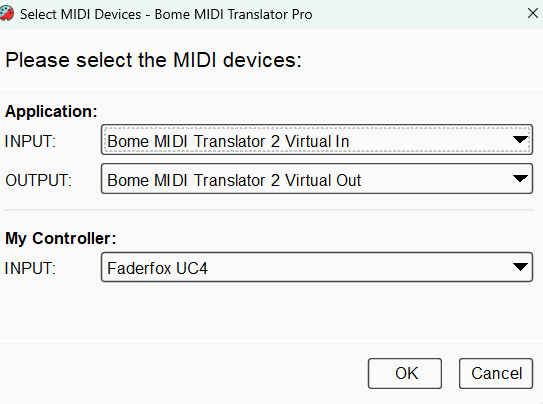
My Idea is to try and get the midi input from the console throug their midi app into Bome using MIDI capture and output the translated bank up/down from Bome into Pro Tools, maybe using the 8 HUI control channels that I dont need for the Avantis. Do you think this is somehow possible?
I tried running on Windows and in the past would get new virtual ports created when connecting to a device like “MIDI Control 1” etc but it doesn’t seem to be working with the new Windows 11 MIDI stack? Are you experiencing a similar problem.
If we can get the MIDI port issue squared away then, yes this should work but as I said, you would need to use “Pass-thru” and then manually map all of your controls using Bome MIDI Translator Pro instead of using the native Avantis conversion provided by the Allen&Heath tool.
Steve Caldwell
Bome Customer Care
Also available for paid consulting services: bome@sniz.biz
I am on Mac Tahoe. I dont think I have that issue.
mapping the hole console again is a pain and I dont have the nerve and skill to do it.
Buying the license for Bome was an option hoping there was a way to sneak in a message for Pro Tools to bank up and down somehow. More time and budget into this is not worth it for me.
Maybe ask Allen&Heath if there is some way to pass thru just unmapped MIDI messages in their tool.
Alternatively, check if the A&H tool can run two instances, one in “HUI” mode and the other in in “Pass-Thru” mode. Then you could use the “Pass-Thru” instance and Bome MIDI Translator Pro to handle a custom MIDI message handled by Bome MIDI Translator Pro .
While I was at it, I reported to them the problem with ports now showing up on the new Windows MIDI stack.
Steve Caldwell
Bome Customer Care
Also available for paid consulting services: bome@sniz.biz
The MIDI commands that A&H provided for HUI are correct so if you can get the desired MIDI command from your A&H via USB to Bome MIDI Translator Pro you should be able to convert that message to send to ProTools.
Edit
Or maybe just send it through the same virtual port as the A&H tool is sending to Pro-Tools via the first HUI device.
Steve Caldwell
Bome Customer Care
Also available for paid consulting services: bome@sniz.biz
I asigned the midi softkeys from Avantis into sending a midi message. I captured it as input into Bome so I know that it does arrive. And then wrote as output under “raw midi / system exclusive “ the message A&H gave me (B0 0F 0A B0 2F 43 B0 0F 0A B0 2F 03) but Pro Tools does nothing.
on the output modes from Bome if I choose “bank change” instead “raw midi / system exclusive” Pro Tools does something. Not what I need but something. So there is a connection there. I Just need to figure out what is the correct message for Pro Tools…
You are sending the right MIDI for Bank Up. Are you sending it to the right MIDI port? It has to go to the first HUI port in ProTools. It will likely be DAW Control MIDI1.
Maybe you can enable the log view and check MIDI IN, Incoming, MIDI OUT, and Outgoing and show it to me to see if the translator is behaving correctly?
Steve Caldwell
Bome Customer Care
Also available for paid consulting services: bome@sniz.biz
Steve thank you for the File. I will take a look further into this but I am going to be out of town the next 10 days. I will let you know if this worked out when I come back. Thank you again