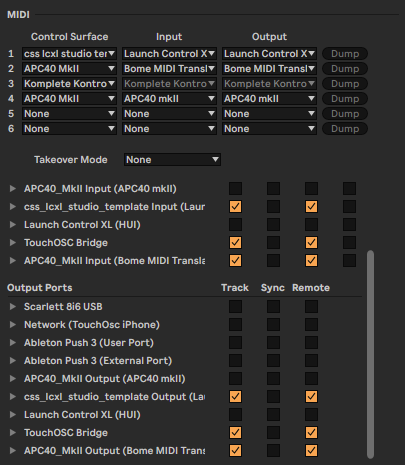
So I bought MT Pro today for the purpose of making sure that the volume faders on my APC40 mkII will stop at 0 db - thanks to the guys in this old thread for making that script for me! It works very well, but I’ve noticed that whenever I restart Live (even after rebooting and making sure that Bome is in the macOS login items), the default script for the APC will be reloaded and the functionality is lost. In the Live Preferences menu, the default script spontaneously appears again in the fourth slot down:
Is there any way of preventing this so that I won’t have to manually fix this every time I open Live? Or is that the price I must pay for the benefits this software gives me?
I’m using the latest version of MT Pro (as I just installed today) on the latest version of macOS Tahoe.
You may need to remove the default Ableton Script for the APC40 mkII or move it into a different location so that Ableton won’t load it at startup. You can check with Ableton on the location of the MIDI remote script.
Steve Caldwell
Bome Customer Care
Also available for paid consulting services: bome@sniz.biz
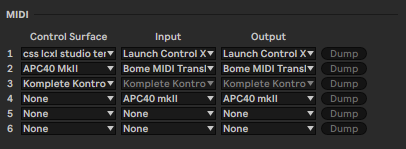
I GOT IT TO WORK!! On this archived thread I found a screenshot of the proper Ableton MIDI settings; what I had to do is load the I/O for the APC’s default script in a different slot, but without the actual control surface loaded: