Alternative to Loop Midi? - Setting up a Note as a SHIFT function

Can the Boom Midi Translator pro act as an alternative to loopMidi by **Tobias Erichsen?
if so how can I set it up?
Say I want to Create 2 virtual Midi In/Midi Out ports
StreamDeck2DawTrack
DawTrack2StreamDeck

I want to assign this in my StreamDeck Midi Plugin.**

Hi,
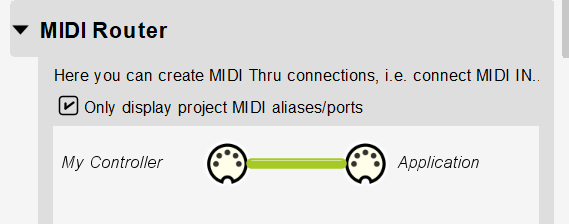
Not exactly. With the virtual ports of Bome MIDI Translator Pro one end has to be Bome MIDI Translator Pro and the other end needs to be anything but Bome MIDI Translator Pro . You would have to route everything through Bome MIDI Translator Pro using it’s MIDI router and then it would work. You would need to use the port names that Bome MIDI Translator Pro uses and could not use your own names.

I would suggest instead that you get Bome Unlimited Named MIDI ports which could be an add-on to Bome Network. You don’t need to use the network functions of Bome Network to do this. In addition, you could do more advanced routing between ports as shown here.

You could use the free version of Bome Network if you don’t need to communicate between computers (or iPad), otherwise, you would need the paid version (Bome Network Pro).

You can download the free version of Bome Network here.

Since Unlimited Named MIDI Ports was released, I usually no longer use loopMIDI. It is a bit trickier to set up new ports, however, befcause in addition to creating the ports, you need to also create the routes as these ports are not simple pipes like loopMIDI.

Steve Caldwell
Bome Customer Care


Also available for paid consulting services: bome@sniz.biz

Thank you.

Is it possible to use two incoming MIDI triggers, where one acts as a Shift modifier?

For example, when I press CC120 / 127 (momentary) together with Note 40 / 127, it sends an outgoing action CC1 / 127.
Pressing CC120 / 127 + Note 41 / 127 sends CC2 / 127.
Pressing CC120 / 127 + Note 42 / 127 sends CC3 / 127, and so on.

In this setup, CC120 / 127 functions as a shift key.

If Note 40 / 127 is pressed on its own simply pass through.
If CC120 / 127 is pressed on its own simply pass through.

The following should get you close. Since you need translation, your best option for virtual ports is to use Bome MIDI Translator Pro.

You can download a trial copy of Bome MIDI Translator Pro here. It is fully functional but times out every 20 minutes.

Translators in preset 0 are basicall my standard template and not directly related to your requirements.

Translator 1.0 (Preset 1 translator 0) handles the shift function and sets or resets the value of the global variable “ga” depending on the value. It does not send any MIDI output so i acts as a shift key. The incoming trigger is CC120 on MIDI CH1 with any value.

Here are the rules:

// set the value of global variable ga based
// on the incoming value (shift function)
if qq==127 then ga=1
else ga=0

Translator 1.1 will translate the incoming note but only if the shift is on (ga=1). We start with note 40. Incoming is note-on any note on MIDI CH 1 set value to local variable pp. The rules adjust pp in the the local variable tt for the outgoing CC.

Here are the rules:

// if not shifted (ga!=0 then let the
// MIDI router pass through the message
if ga==0 then exit rules, skip Outgoing Action
// Start with note 40
if pp<40 then exit rules, skip Outgoing Action
// Set tt as the offset for the outgoing CC#
tt=pp-39

Well since we are using this as a shift key, we cannot tell whether the next MIDI message will be a note or not so it would be difficult to tell when to suppress and when not to suppress the outgoing MIDI message. If this is required, I suppose we could set a timer and if we don’t get a note message within a given time, we could send it through but there would be a delay based on the value of the timer. Is this what you want?

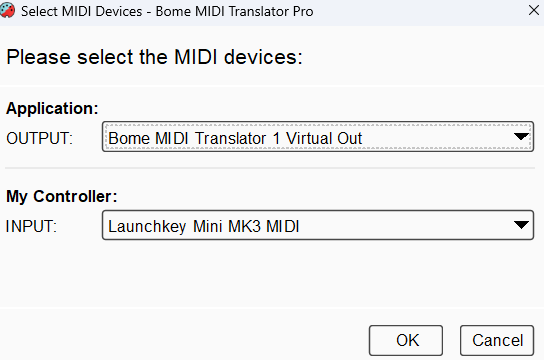
I used aliases in this example as follows:

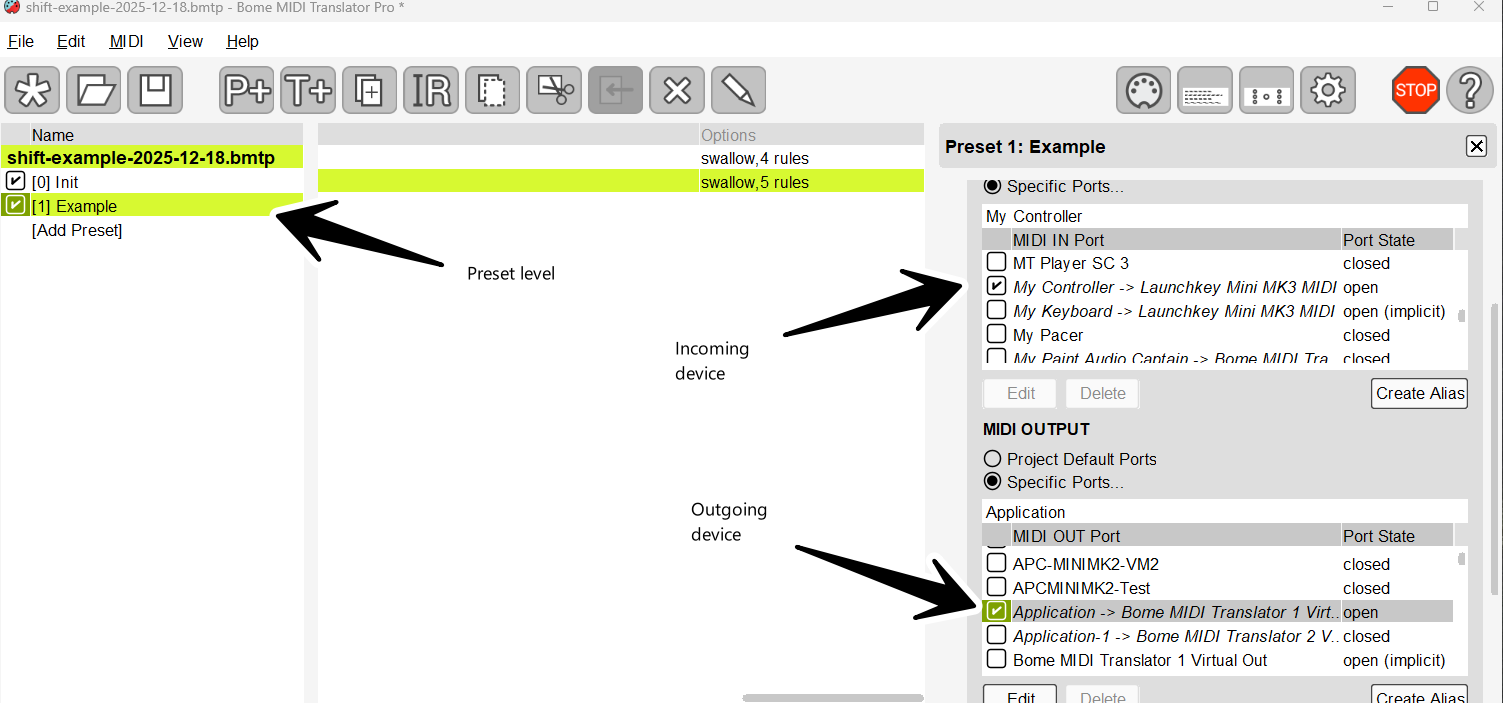
You will need to assign them to your desired physical MIDI ports. You will be prompted when opening the project.

You can learn more about aliases from this tutorial.

I set up translator routing at the preset level.

For more information about device selection, see this tutorial.

Anything not handled by a translator is passed through untouched using the Bome MIDI translator Pro MIDI router.

shift-example-2025-12-18.bmtp (3.0 KB)

Steve Caldwell
Bome Customer Care


Also available for paid consulting services: bome@sniz.biz
The BMIDI can be an alternative to Loopmidi?

That would be for development of your own application.
It is a driver that you can purchase as a Software Development Kit to enable MIDI for an application you have that does not have existing MIDI support.

Steve Caldwell
Bome Customer Care


Also available for paid consulting services: bome@sniz.biz
Gotcha