Hi and welcome to the Bome community!
Well I’m going to send you a new project that is simpified to just the faders.
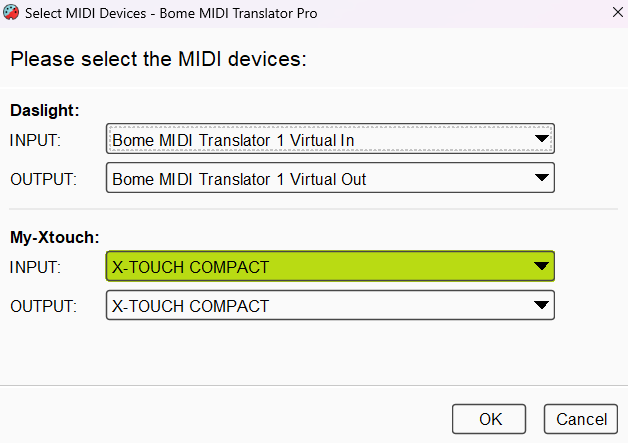
I have my aliases set up as follows:
You can learn more about aliases from this tutorial.
I am select ports (devices) at the preset level except translator 1.2 which job it is to update the faders on the X-touch.
For more information about device selection, see this tutorial.
Preset 0 handles housekeeping project start.
Preset 0 translator 2 (0.2) initializes global variables used in this project.
Preset 1 handles all traffic coming from the X-touch and going to Daslight.
1.0 sends fader values to Daslight translating from Mackie MCU (pitch bend) to CC (70-78). I have stop processing set so other translators (that are not pitch bend) will not be activated later.
1.1 updates the faders with the preset is activated by triggering a timer.
1.2 is the timer that sends all fader message back to the X-Touch
1.3 and 1.4 suppresses the touch and release from the X-touch respectively.
Preset 2 handles all activity from Daslight back to X-touch.
2.0 converts CC70-78 to pitch bend and sends it back to the X-touch. If Daslight does not send feedback, it will not work.
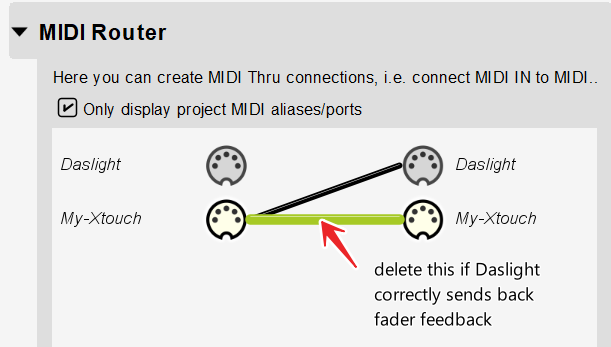
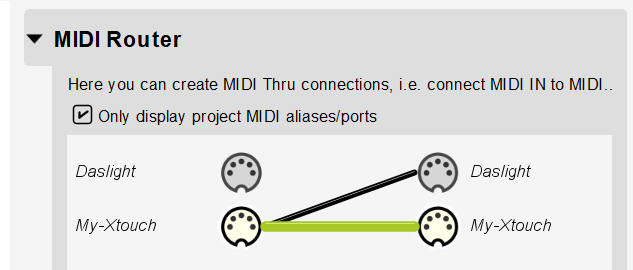
I have a MIDI thru path set to allow for local feedback if Daslight doesn’t send feedback. It can be removed if Daslight is working correctly.
I also have a MIDI thru path set from My-Xtouch to Daslight for anything that does not go through a translator.
I only have 1 pages set at this time. You will need to add translators to switch pages (change presets) . I will leave it to you to figure out how to switch pages. I did this because the focus of your question was fader feedback and not page switching.
Good luck!
X-Touch-MCU-Daslight-Faders.bmtp (4.0 KB)
Steve Caldwell
Bome Customer Care
Also available for paid consulting services: bome@sniz.biz