I just set up a new Mac Mini to handle some LightKey tasks. Installed Bome Network Pro Version 1.6.0. The Mac is running macOS 15.6, has an M2 chip, and Bome Network establishes a connection to the other computer (a Windows 11 PC). However, the Mac is not receiving any MIDI in from the Windows 11 machine. Other computers are, but not the new Mac mini. There is no firewall currently on the Mac mini. Any help would be greatly appreciated. Thanks!
Hi,
Sorry you are having trouble!
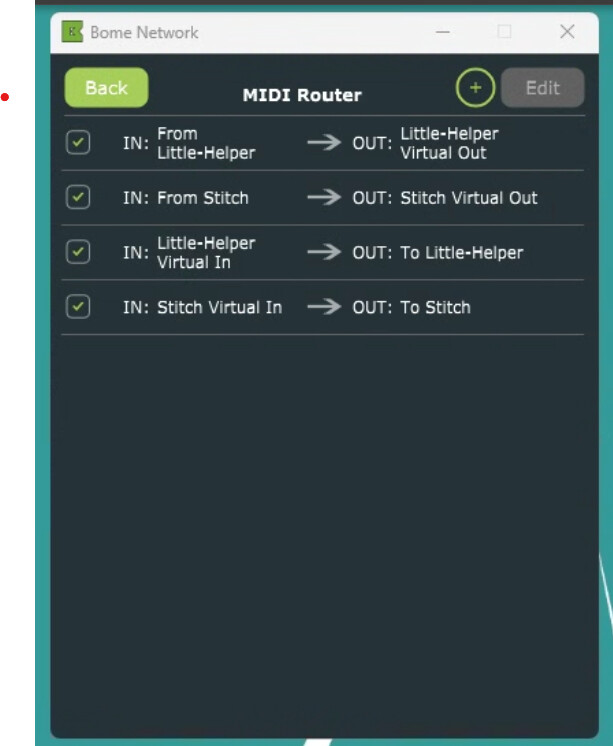
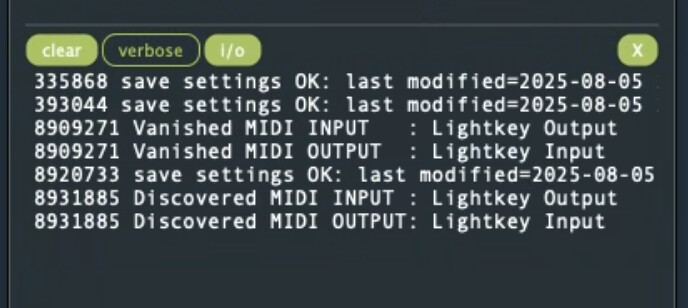
Could you show me the log on the Windows 11 machine when you are sending MIDI. Also show the MIDI routes, if any.
If you don’t see any MIDI on the Windows 11 machine. Make sure no other MIDI applications are using the MIDI port as only one application at a time can access a given MIDI port. If you need to split the MIDI to two locations, you would need to create a virtural MIDI port and then set up routes to go to both.
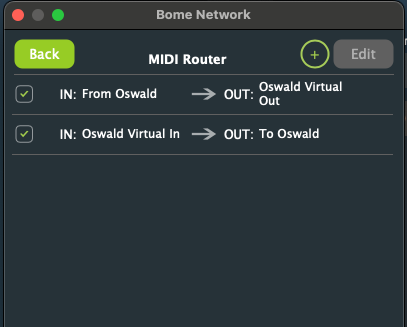
Then show the log on the Mac MINI and again any routes. Also show me if you are using Remote Direct MIDI on the Mac.
Steve Caldwell
Bome Customer Care
Also available for paid consulting services: bome@sniz.biz
Yes, please upgrade to 1.6 on the Windows machine.
Steve Caldwell
Bome Customer Care
Also available for paid consulting services: bome@sniz.biz
All computers are updated. This is the log from the Win11 (Oswald) machine that should be sending 90 48 7F to the Mac Mini Little Helper.
2240405 MIDI IN Stitch Virtual In 90 48 7F
2240405 MIDI OUT To Stitch 90 48 7F
2240406 MIDI IN Pongo Virtual In 90 48 7F
2240406 MIDI OUT To Pongo 90 48 7F
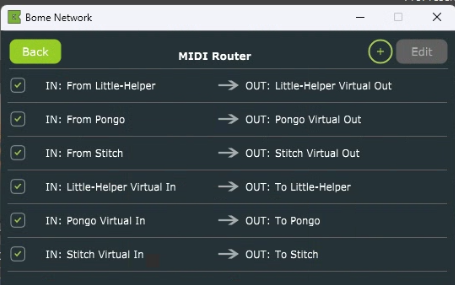
These are the routes from the Win 11 machine.
There are two possible ways to fix the issue.
- Using Remote MIDI Direct
On your Bome Network tool on Litle Helper (Mac MINI) , click on Oswald to view available Oswald ports and turn on the switch and you should see a port called Stitch Virtual.
Then in Lightkey select the port Oswald:Stitch for your input MIDI port
or
- Set up the following route on Oswald
IN: From Stitch → OUT: To Little Helper
Then in Lightkey, select Oswald for Input
Usually using Remote Direct MIDI (method 1) is more intuitive unless you also want to send Stitch on your Windows PC to another port on Windows PC. Then you would set up another route to the another virtual port on your PC that you want to send to.
This tutorial explains Remote Direct MIDI ports.
Steve Caldwell
Bome Customer Care
Also available for paid consulting services: bome@sniz.biz
Thank you so much for looking into this. The problem was not with the Bome Network. The software ProPResenter, which sends the MIDI signals, was not connecting to all of the networked devices. devices.
Screenshot from ProPresenter settings:
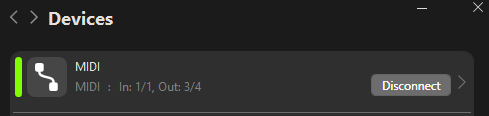
For anyone else who may come across this, you can’t edit or view the MIDI settings in ProPresenter while the MIDI is connected. You first have to click disconnect and then you can click on MIDI and see/edit the settings.
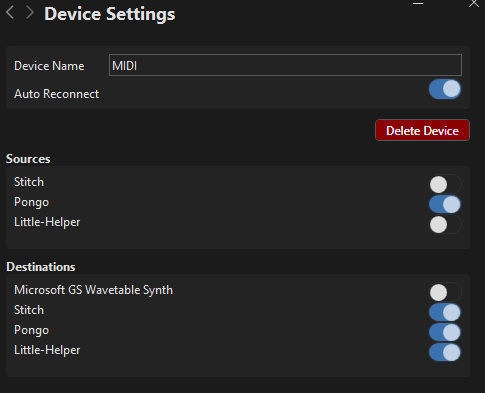

Activate Little Helper as a destination and connect MIDI, and everything works.
So sorry for the bother.
Interesting so Pro-Presenter was effectively not sending anything because MIDI needed to be disabled and re-enabled. Thanks for sharing your solution!
Steve Caldwell
Bome Customer Care
Also available for paid consulting services: bome@sniz.biz