I need help to create arpeggio-like sequences…0,3,5,8,3,0 for example…that can be triggered by keys of my MIDI keyboard. For example: If I play C4 it would output C4, E4, G4, C5, G4, E4, C4. If I next play C#4, it would output C#4, F4, G#4, C#5, etc.
My programming and piano skills are essentially non-existent. Back in the Commodore Amiga days I gave voice lessons successfully via Bars n Pipes Pro, running on an A500. Today, my granddaughter wants Opah to give her voice lessons and I’m pretty much stumped. I have a decent i5, Windows 10 system running FLStudio and Bome Midi Translator Pro. Bome MTP looks to be my best bet to duplicate that ancient success, but I’m struggling with the learning curve. I’m hoping that some Bome programming wizard in this forum will take pity on me and ease my pain.
Any and all assistance would be deeply appreciated.
Yes, thank you, I have. You made that tutorial, didn’t you? There’s a ton of info in there…sadly most of it went right over my head.
I’ve been trying, so far without success, to figure out how to translate that project into what I need. The example given is a pattern triggered by a fixed value keystroke. I need to trigger my pattern(s) to play in the key of an incoming keystroke, not quite the same critter.
Working on my Project: ‘Teaching’, Preset: ‘Scales’, Translator: ‘Trigger’.
In ‘MIDI Input, Incoming’ I tripped over the setting: ‘Note: trigger on any note’. Sounds good. Can I use this to trigger sequences chromatically? If yes, how should I program the Rule(s)?
Hey, wow! Thanks for getting back to me so quickly. To answer your questions:
In this case, it’s notes of a major scale. (Root, third, fifth, octave…, fifth, third, root. See attachment)
Duration varies in different vocal exercises. Can I program note duration individually or does it depend on duration of the input keypress? I don’t know how to specify that parameter.
One shot.
After a fifth viewing of your tutorial, I came up with the attached for the scale: 1-3-5-8-8-8-8-5-3-1. Obviously every scale I use for teaching, like 1-5-3-8-5-3-1-5-3-8-5-3-1… and 1-3-5-8-10-12-11-9-7-5-4-2-1 would have to be individually programmed. That’s no biggie, just takes time, which this old retiree has lots of.
See the rules for translator 1.0 to set your paramters.
// Number of notes in the sequence
gc=12
// Sequnce counter
gs=0
// Delay between notes in ms
ga=100
The rules of translator 1.2 and 1.3 calculate the note numbers. The are calculated in semitones.
if gs==0 then pp=gb
if gs==1 then pp=gb+4
if gs==2 then pp=gb+7
if gs==3 then pp=gb+12
if gs==4 then pp=gb+7
if gs==5 then pp=gb+4
if gs==6 then pp=gb
if gs==7 then pp=gb+7
if gs==8 then pp=gb+4
if gs==9 then pp=gb+12
if gs==10 then pp=gb+7
if gs==11 then pp=gb+4
if gs==12 then pp=gb
Thanks Steve, I see what you’ve done here and I have a couple questions:
Can I configure a timer for each note? If I’m remembering correctly, way back when I learned to program machine language, Fortran and COBOL, way back in the early ice age, I would have written this as an IF-THEN-AND statement. But Bome doesn’t do ANDs. I’d need some kind of workaround.
Thinking about that, does the sequence counter increment with each rule completed? What if I didn’t specify the delay globally in translator 1.0, but rather specified it in translator 1.1, for each note in a separate rule? Something like: if gs==0 then ga=420, if gs==1 then pp=gb and so on, assigning a different delay, from ga to g?, for each different duration note?
In your attached script, am I correct that after rule ‘if gs==12 then pp=gb’ is completed execution passes to the next translator, if there is one? IE: The sequence plays as a ‘One shot’ and it’s unnecessary to stop any timer, as with your arpeggio tutorial?
In use, I would play the base note, let’s say it’s C4, and a sequence, like C4-E4-G4-C5-G4-E4-C4 would play through, one time. If I then played D4 the sequence D4-F#4-A4-C5-A4-F#4-D4 would be executed. Is that correct?
At this point in time I have six vocal exercises/sequences that I need to program. I assume that each exercise would require a separate project, is that correct?
Thanks again! I deeply appreciate your assistance,
I’m not sure why you would want additional timers. See this post about more complex logic. It is not pretty but it works. having more complex boolean logic is on our list of possible future enhancements. With that said, it is been on the list for a while which is why I posted the workaround.
I believe this would work but I haven’t tried it. Take care to save you file between tests as working with timers might be tricky and if you make a mistake, you might end up in a race condition causing Bome MIDI Translator Pro to hang.
The sequence ends at 12 based on the rule that you stated. The way it is set up the arpeggio will play through its entire sequence. The increment of gs happens after the completion of each note in the rules of translator 1.3. The outgoing action of 1.3 needs to change to kill timer instead of perform play and should be a safety net. The translators execute in sequence unless called out of sequence with perform. In this example, it is unecessary to stop the timer because we gave it a count.
Yes that is correct.
No, you could duplicate the preset and the modify the new preset to the sequence that you want. You would then make preset 0 as an ‘always on’ preset and you could add a traslator there to switch presets to the sequence that you want to use.
Happy to help!
Steve Caldwell
Bome Customer Care
Also available for paid consulting services: bome@sniz.biz
I still have some questions about this project, but thanks to your assistance I think I have the tools now to make it work. It’s time to build this puppy and take her out for a few turns around the test track to see how she handles. I’ll let you know how it goes.
Here is a project that does what you ask that doesn’t use timers. It uses the new Perform function that was introduced a few years ago so it may not work if you havent update Bome MIDI Translator Pro software for a few years.
Well sir, I’m some kind of frustrated. I’ve spent the entire day trying to figure out how to get this blasted software to do what I need…without success. I feel like I’m no closer now than when I started. Am about ready to chuck this program and ask for a refund. Blasted thing is really wonky!
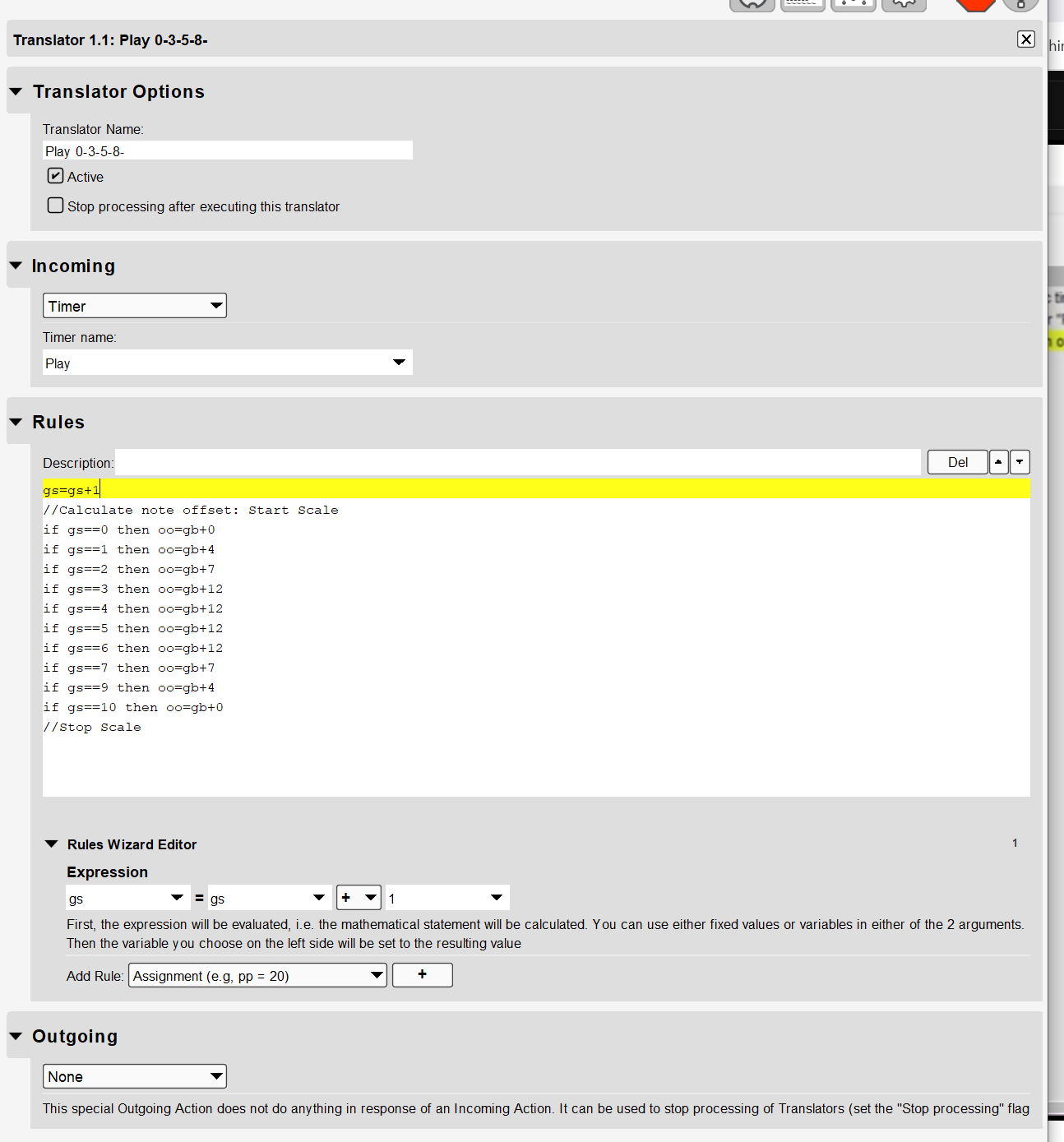
The attached project is where I’m at. No matter what I’ve tried, the note duration (ga) and velocity(gv) variables just flat don’t work according to how they’re set in Preset Init; they execute too short and too soft, respectively. Then there’s a lovely hum between repetitions of the sequence…which I need to be a one-shot. And how the blazes do I get it to re-init to the top after stopping it with the ‘down’ key?
Oh yes…and what’s with that ‘gs=gs+1’ rule in translator 1.2.1? That makes no sense to me whatsoever. If I take it out the pattern doesn’t play. I figured out a work-around, but it bugs me.
Forgive me for being such a grump, but I’m losing hope that this program can enable me to deliver on the voice lessons I promised my daughter and granddaughter.
That was entirely too easy! And it’s PERFECT!!!
How can I thank you? Tell you what, if you’re ever in the Texas Hill Country, near Austin, please let me know. I’d love to buy you dinner. I know some outstanding BBQ joints.
God bless you Steve! I owe you! My girls will be so happy!