Hi Steve, Firstly thank you very much for your response, and so speedy!
That definitely gets me to the box, I think I can see two potential issues that any help is appreciated with:
There seems to be no movement once the box is reached. The input field is designed to be approached by a mouse pointer and clicked, and then dragged either left or right. Which parameter should I adjust to get the desired level of direction?
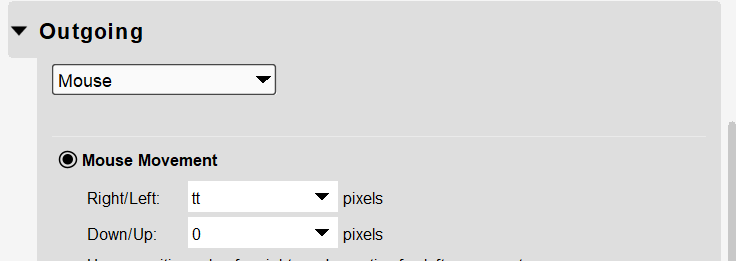
I also have the problem of my Values being interpreted as numbers. Is there some code I could input to set it to either going slight right or slightly left.
There were only a few modifications, required, changing the outgoing action of translator 0.1 and also changing the drag amount as set in the folowing rules.
// Determine the drag amount depending
// on the incoming value of the CC
if qq<=64 then tt=5
else tt=-5

Log "Mouse Drag %tt%"
if zz!=0 then exit rules, skip outgoing action
Ah, that’s a lot better. It’s moving nicely now. I presume I just need to duplicate that one and reverse it for the action to go the other way? Sorry for so many questions, I can see the software is great, I just am still trying to get grips here. Thanks for help
If your encoder is a relative value, it should work in both directions. If it is absolute it will only work in one direction. I recommend that if your controller can be programmed to make it a relative encoder. Right now it is set for left value (127-65) to go in one direction and right value (1-63) to go in the other.
Steve Caldwell
Bome Customer Care
Also available for paid consulting services: bome@sniz.biz
Ok, I will presume it’s absolute as it was outputting value numbers when I monitored it. I will look into re-programming it be relative. Thanks for all your help