midi newb here, i would like to change scenes/ songs on an allen and heath dlive console, the band will program the midi stuff in abelton, i just need to know how to setup the bome box to do this, and what messages he needs to send to switch scenes on the d live.
Hi and welcome to the Bome community!
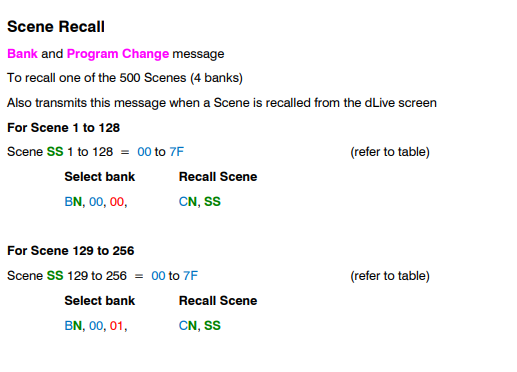
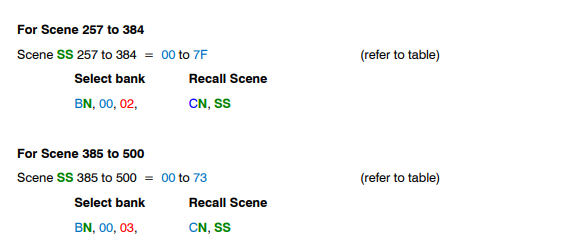
Please refer to the Allen & Heath dLIVE MIDI protocol manual for the necessary information that the dLive needs. On page 4, I see the following. The value “n” represents the MIDI channel number for your dLive mixer.
For Ableton Live, I would recommend that you set up an outgoing MIDI track to control your scenes and then use different note number depending on which scene that you want selected.
Then use Bome MIDI Translator Pro to translate note numbers to scene selection. One you have that working, then you can upload the project file to the BomeBox and run it there. When you are developing the project, you would run Bome MIDI Translator Pro on a computer and use it for translation. Note also that you need a purchased copy of Bome MIDI Translator Pro in order for your project file to work on the BomeBox. Projects created with the trial version of Bome MIDI translator Pro will not work on teh BomeBox.
In the attached example I’m using MIDI CH 12 for my dLive. I have my aliases set up as follows:
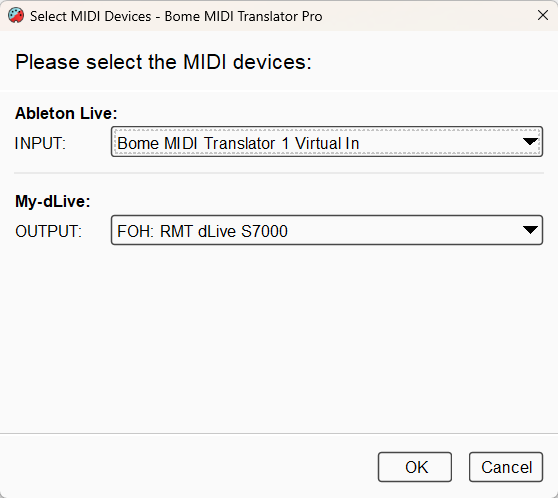
You can learn more about aliases from this tutorial.
My Bomex Name is “FOH” and the dLive is reported a RMT dLive S7000 (I’m using a simulator not an actual mixer).
I have the following checked within the Bome Network tool, this allows me to access the dLive remotely from my PC.
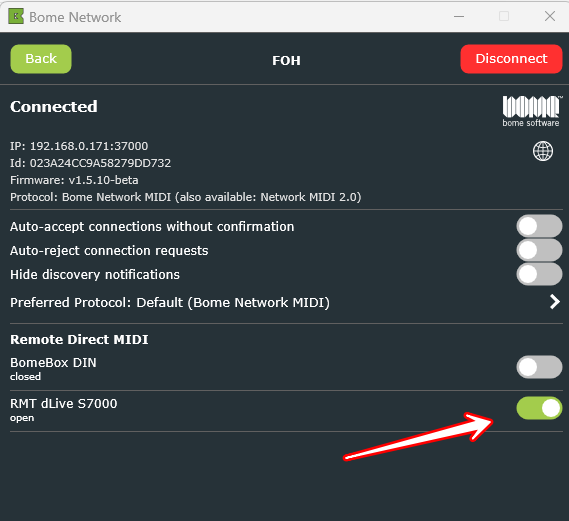
Once, I upload the working file to the BomeBox, then on the BomBox I will redefine my aliases. On your computer, you may then select the BomeBox network port for output instead of Bome MIDI Translator Virtual Port 1.
The first preset I add to all of my projects for housekeeping purposes. It has nothing to do here with your requested function.
See this tutorial on best practices.
The translator 1.0 in the second preset (preset 1 translator 0) handles the note-to Bank/PC conversion for Bank 0. (scenes 1-128)
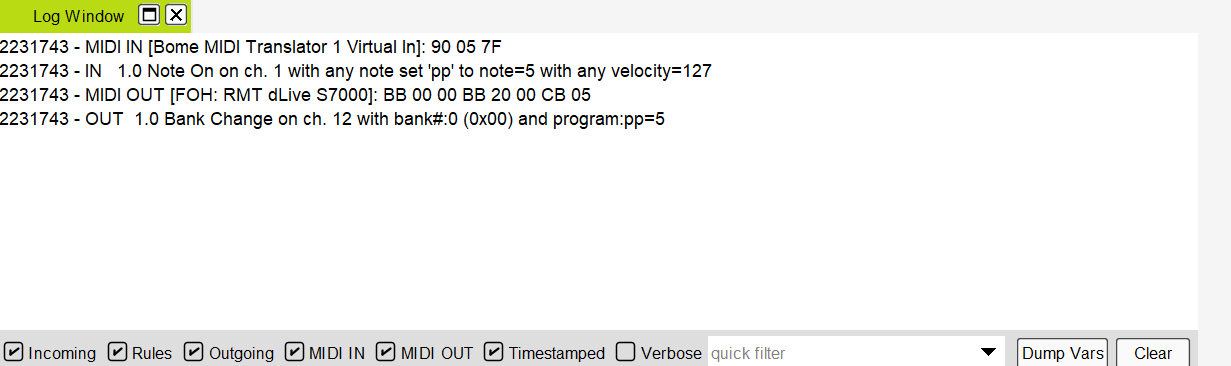
In Ableton Live you would set it up to send note 0-127 on MIDI CH 1 to an outgoing track for scenes 1-128 respectively. The translator converts this to PC 0-127 on on MIDI Channel 12.
When viewing the log window in Bome MIDI Translator Pro, you will see it looks like this. (Scene 6 or note 5)
This tutorial should help you get set up with configuring your BomeBox on the network with your dLive console or mixer.
Ableton-to-dLive-Note-to-Scene-2025-12-08.bmtp (2.3 KB)
Edit: Original project file had wrong bank number. I fixed it and then uploaded the corrected project file.
Steve Caldwell
Bome Customer Care
Also available for paid consulting services: bome@sniz.biz
hi steve,
firstly thank you for the information, unfortunately i have not been able to get this working. i have little to no understanding of midi and this is my first time trying to do anything with it, so i am a total nube. is there a template file or something i could use to do this ? i have a bomb box and midi translator pro. i just cant get it working, one of the band guys is using midi and has a good grasp of it but he is stumped as well.
i was hoping someone else has done this before and i could use there setup, i am sure once i see a working setup i can adapt it to my needs.
thanks
chris tyler
Hi,
The template and instructions I provided should be able to get you there so I’m not sure how far you got. Have you been able to connect to your dLive?
Please show screenshots of the following BomeBox web pages with the project file loaded.
- MIDI Ports
- Allen & Heath
- MIDI Translator
- Network (Ethernet)
- Network (WiFi)
- Network MIDI
The first thing to test is if your dLive and Ableton Live are connected to the BomeBox. Then the next step would bet to see if the project file is loaded and working properly.
If you friend is more MIDI knowledgeble, perhaps you should involve him in the conversation.
Steve Caldwell
Bome Customer Care
Also available for paid consulting services: bome@sniz.biz
Thanks steve, i will keep at it