I am considering adding some programming to my existing BMT project. This will require more Global variables than will be available, despite the many Globals added since the inclusion of ox, px,qx … etc.
Two possibilities have crossed my mind:
-
Change projects during a performance. This is a tempting approach because I could reuse the same globals over again after a project change. I’m not sure how I would change projects though. Is there a way to send a Midi command from my controllers to BMT that makes it load and execute a new project?
The downside of this approach is that it would make it difficult to know exactly which project contained the global assignments I desire. I’ll explain the project more fully after stating the other possibility, because you may have an alternate solution. -
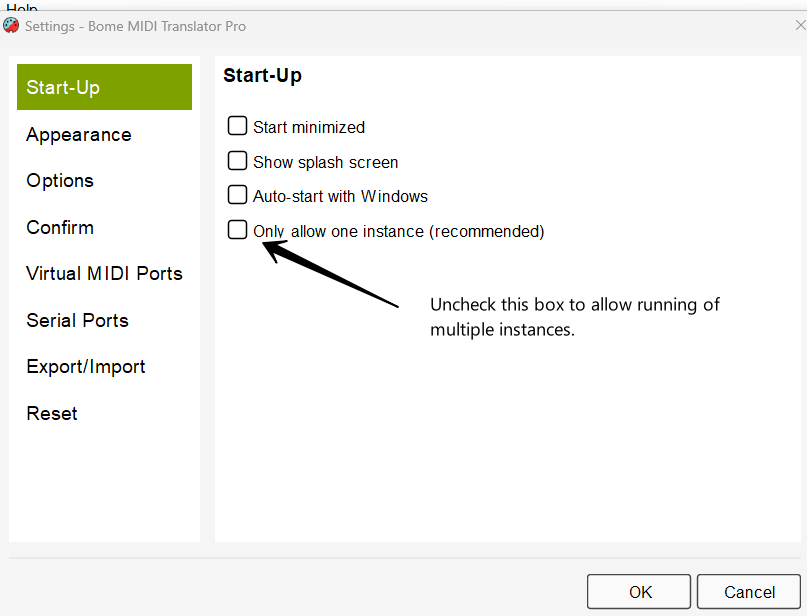
Run two instances of BMT simultaneously. I’m not sure how this would work. Is it possible to activate one or the other of two instances while leaving the other inactive. Same downside as above.
What I’m intending to do with this addition to my BMT project:
- Currently, I send MIDI Program Change information to various effects devices in Ableton Live 12 audio tracks.
- I have roughly 70 devices in 24 audio tracks.
- I do this manually, sending one program change message to one targetted device in one audio track at a time.
- I execute the program change by sending it to a MIDI track, which then sends the program change message to an effect device in a corresponding audio track.
This works, but Variations (a new M4L device in Live 12) makes it easy to take a snapshot of an entire Live set and then change parameters like volume settings, eq settings, delay settings… essentially every setting in an Live set… and then recall a desired snapshot. Unfortunately it does not include program change information.
My workaround will be to build a routine in BMT that receives a MIDI command from one of my controllers, and in response, sends out Program Changes to each of my effects devices sequentially. In order to do that, I will need to store the desired Program Change numbers in a matrix of some kind in BMT, but if I do a strict one to one Global per Program Change, I’d need more globals than I have available at this point. Thus the desire to launch different BMT projects during the course of a performance.
I would synchronize selection of MTP project with selection of Variations Snapshot by having both respond to a command sent from my MIDI controllers.
Is either of my two approaches doable?
I’ve used ChatGPT to suggest approaches to this problem and have found it useful (and eye opening to it’s amazing capabilities. I can send you a distillation of that advice in a project report ChatGPT created if that would be of any use.