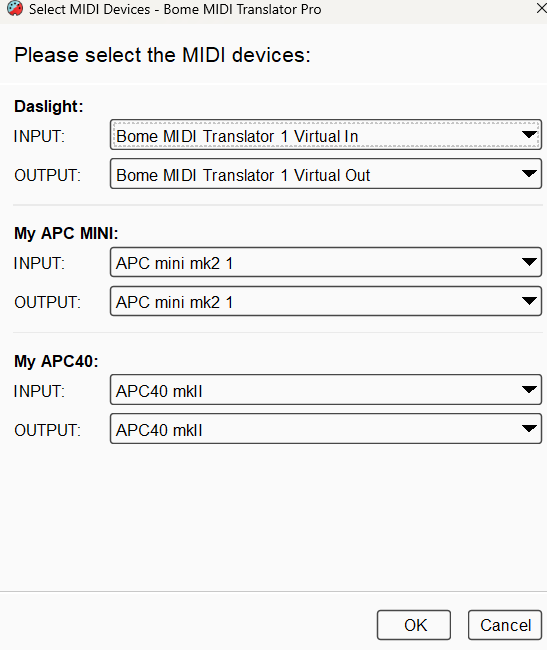
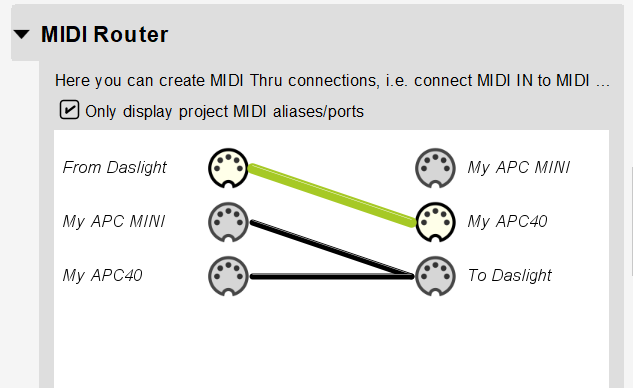
In your case, I recommend using a different preset for each device and then through device selection determine how you want to make it work. You may need to actually use two MIDI ports to send to Daslight IE
APC-40 MK2 → BMT 1
APC-MINI (MK2?) → BMT2
If Daslight cannot distinguise between MIDI ports, you may need to map the APC-MINI to output on MIDI channel 9 as the APC-40 MK2 uses MIDI channels 1-8.
For more information about device selection, see this tutorial.
Steve Caldwell
Bome Customer Care
Also available for paid consulting services: bome@sniz.biz
I’ve tried your way - can’t set it up. I’m new to Midi configuration and for shure in manipulating them.
Today i had an other idea. But at this moment it gets the same problem like thier is no translator active.
I used the file from the previos named thread and deleted the all ports (in the left area of the window. So now there only is APC Mini 1 and APC Mini 1 - Reverse….
I thought that i can rout the APC40mk2, but as it shows it doesn’t work at all.
My main problem is that i have only some days left to bring this setup to life. To dive into the hole thing of MIDI - i think i need more time.
Can you or some german colleagues help us on this?
I set the input and output ports at the preset level to the devices that I want the translators to use.
For more information about device selection, see this tutorial.
For the return path of the MINI MK2 I translate the MIDI CH for the pads to make them brighter. I also translate the on an off velocities for the proper color if they are notes,
Finally I add a blocking translator so that notes meant for the APC-MINI don’t go to the APC40 (Translator 1.1). I also block MIDI feedback on the APC-MINI for faders since they can’t do anything.
For the return path of the APC-40, I just translate the on and off velocities.
I also add a blocking translator so that returns for the APC-MINI don’t go through the MIDI thru path.
I hope I got everything right. Translator 1.0 has the return colors for the APC-MINI in this segment.
// set off color (white)
tt=12
// Set the color (red)
if qq!=0 then tt=5
qq=tt
Translatror 2.0 has the return colors for the pads APC40 in this segment.
//red
if qq!=0 then tt=5
//white
else tt=3
qq=tt
Label "over"
The return velocities for the non-pad buttons are not addressed with either controller. They just pass through what comes through from Daslight.
it is working after using chatgpt for the rules (sorry for this, but time is running).
The only thing i’m not able to bring to life is the Colormapping for the Buttons.
I have found some threads to this but nothing what is helping me on this.
I only mapped the apc mini - the apc40 is doing it’s job without Bome.
Everything works - if i push a button on the Mini i get an input in Daslight from BMT1. Great.
After i mapped a sequence in Daslight with a color and pushed the button afterwardes, the button is flashing - on - off - on - off ….. in yellow (i mapped red), not really bright like the apc40. And it’s not possible to push it again to turn the LED off.
I wan’t it to work like the apc40 (example: off blue, on realy bright blue). please find attached the working file.
Sorry, we passed our messages. Please see my latest which has some color mapping.
Most of what was done is really beyond the scope of free support but if you are in a bind and what more help you can either email or PM me for paid services.
Steve Caldwell
Bome Customer Care
Also available for paid consulting services: bome@sniz.biz