I am sure this has been covered before, but I don’t know how to search for it.
What I am looking for is a turn knob 0-127, it does -something from 0-64 and +something from 64-127 but it does not do -something 65-127 and not +something from 0-64. Not even sure if I explained it properly. It’s a novation LaunchControl XL and I am using it for CaptureOne mainly. So for example I want to increase Exposure, I want it to only Increase going from center position to right and only decrease going from center to left. At the moment I am having to click outside the window to reset to 0 and it’s quite tedious.
I’m using the top left knob for controlling.
The first translators (1.0) will kill the timer “turn-timer” if the value of the knob is greater than or equal to 60 and less than or equal to 70.
Here are the rules of 1.0.
// Start the timer if out of range
if qq<60 then Goto "turn"
if qq>70 then Goto "turn"
//  kill timer in center area
ga=0
exit rules, execute Outgoing Action

Label "turn"
if qq<60 then ga=-1
else ga=1
Perform "start-turn"
// Do not kill timer
exit rules, skip Outgoing Action
The turn timer is used for sending repeated keystrokes and is triggered when outside of the range spcified range. We look at the value of the global variable “ga” to determine which keystroke we send Left (translator 1.2) or right (translator 1.3). Only one of those translators will fire depending on the value of “ga”.
Translator 1.1 starts the timer. First it calls Perform ‘Focus’ (translator 1.4 ) which focuses the desired application. In my case, since I don’t have Capture One, I’m just sending “L” and “R” keystrokes and using Editplus as my outgoing application. You will need to set the focus of translator 1.4 to 'Capture One instead.
If you use different keystroks than “L” and “R”, then change the outgoing action of translators 1.2 and 1.3 respectively to the keystrokes that you want.
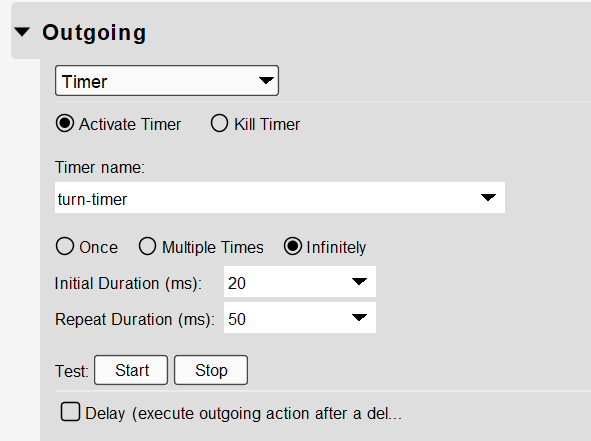
If the keystrokes are too fast you can set the duration in the outgoing action of translarot 1.1. I give the application 20ms to focus before starting keystrokes, and then sens them at 50ms intervals.
Thank you for the swift reply. However it does not seem to work, I currently remapped it to Left and Right (previous and next image in CaptureOne) and it sticks to looping Left or counterclockwise turn. Focus works it … somewhat works. Doesn’t reset in the middle or 12 o’clock position nor does it go Right. Even if the initial turn from 0 (or 12 o’clock) is actually Right or clockwise, it goes the other way and get stuck in a loop.
I’m not sure you understand the logic behind what I did.
It is set to put out left commands every 50 ms when you turn left of center.
It sends right commands every 50ms when you turn right of center.
In the center position it doesn’t send anything to re-center, it just stops sending left and right commands. Maybe you want a one shot timer instead to send left (previous) and right (next).
What is the keystroke Capture One wants for previous and next?
Is there some sort of center command?
Steve Caldwell
Bome Customer Care
Also available for paid consulting services: bome@sniz.biz
Oh yes now I understand, I might have explained poorly.
What you proposed works for what you thought even though it does not really pick up center/pause to be honest.
What I was looking for is turn knob to the left, each increment does a single keypress. Turn it back to the right, each increment does nothing until reaching 12 o’clock or Zero.
Turning to the right over 0 (or 64, if the value is 0-127 in MIDI), each increment does a single keypress.
So let’s say my modifier is Exposure that goes from -4 to +4. Turning left I would like it to go to -4 but not increase until I pass 12 o’clock or 0 position again. Meaning I don’t have to manually reset to zero if I choose another image to do the adjustments to.
Lets say I pick an image, turn the knob left 2 clicks, it modifies the Exposure -0.2 or whatever my stepping is. I select the next image, I can either go back to zero without it affecting the image and turn left gain 2 clicks OR I can increase it from 0 to +0.2.
I hope I explained my thoughts more clearly this time!
P.S I just picked previous and next to test because it was the easiest and most obvious way, the function as such doesn’t really matter, they are rebindable hotkeys. This would/should work on several different parameters that serve a similar purpose.
We compare the incoming value with the last value and if it is less than 64 and going negative we use Perform “left” to send a left keystroke (translator 1.1).
Likewise, we compare the incoming value with the last value and if it is greater than 64 and going positive we use Perform “right” to send the right keystroke (translator 1.2).
Before we do that we use perform “focus” to focus the desired application (translator 1.3).
Again, you will need to adjust the application of translator 1.3 and the outgoing keystrokes of 1.1 and 1.2. If you use a different knob than the top left, you will need to adjust that incoming message as well.
Here are the rules of translator 1.0.
Perform "focus"
// if qq<64 and ga>qq
if ga<qq then skip next rule
if qq<64 then Perform "left"

// if ga>64 and ga<qq
if ga>qq then skip next rule
if qq>64 then Perform "right"

// for next iteration
ga=qq