If you want to run your project on a computer but your devices on a BomeBox, this is how the aliases would be set up. However VERY IMPORTANT. Before you start.
- Turn off any projects currently running on BomeBox
- Disable all MIDI routes (turn off automatic routes) on the BomeBox MIDI Router Page.
- Disable Automatic Routes on the Allen & Heath page.
- Set up Remote Direct MIDI on your computer.
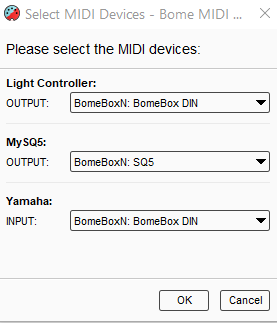
BomeBox N is the name of my BomeBox. Substitute that for the name of your BomeBox.
The project is the same project I sent last time but I just enabled Remote Direct MIDI and then repointed my aliases to the BomeBox ports.
Yamaha-SQ5-Lights.bmtp (1.4 KB)
I don’t have any thing routing back from your SQ5 to anything else. I’m not sure what you need there.
Steve Caldwell
Bome Customer Care
Also available for paid consulting services: bome@sniz.biz