I'm having a problem with my Akai Advance 61 keyboard. It's called ghosting. When I press the C and D keys simultaneously, the keyboard sends a message that the C, C#, and D keys were pressed :( Is it possible to block the C# input? I wanted to check this before purchasing the program, but I'm at a loss.
Hi and welcome to the Bome community!
Do you want it only to block C# if both C and D are pressed and still allow C# if it is pressed separately?
Do you want to want to do this for all octaves or just a given octave? If just a given octave, I would need to know the note number for C for the octave that you want to use.
If more than one octave, what is the behavior you want if you press C on one octave and D on a different octave.
Steve Caldwell
Bome Customer Care
Also available for paid consulting services: bome@sniz.biz
Hello. note number is C - 36. The error is only when I press C (36) and D(38) - then I can also hear C (37). In this situation, I would like only C and D to be in the midi message. Thank you in advance for your answer. Best regards
OK, translator 1.0 sets a bitmap based on the incoming note-on number. We only allow notes 36-38
Translator 1.1 sets a timer to give it time to evaluate the bitmap (translator 1.3)
When note on is pressed we start a 10 ms timer to evaluate the bitmap (Translator 1.3). I have to give it a little time to stablize the bitmap if you don’t hit the keys at the exact same time.
Translator 1.2 clears the bitmap and sends the note-off message.
We use the global variable ga for the bitmap
You may want to play around the the delays in translators 1.1 and 1.4
In translator 1.4, if the incoming note is 37 and the bitmap is 7 (all three notes on) then we suppress the outgoing note.
We don’t bother suppressing the note-off for note 37 however. We just pass it through using translator 1.1.
My aliases are set up as follows:
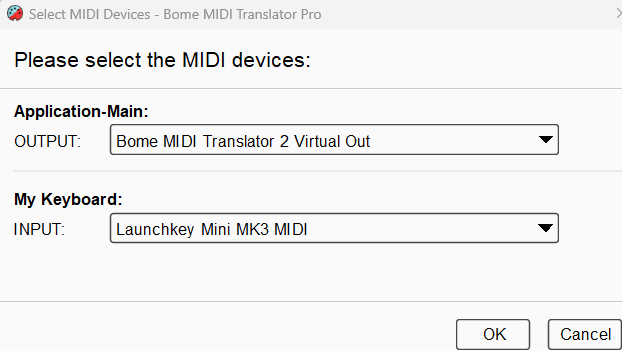
You can learn more about aliases from this tutorial.
I set up the default dvice selection for translators within preset 1 at the preset level.
For more information about device selection, see this tutorial.
Suppress-Shadow.bmtp (3.3 KB)
Steve Caldwell
Bome Customer Care
Also available for paid consulting services: bome@sniz.biz