I want to control Cubase channel volume using a qwerty keyboard.
I’ve managed to set a qwerty key to control change to set the volume to a default level (for me -10Db), using both BOME and Cubase midi remote. All good there.
However, I also want to control the volume using qwerty with a key for + and a key for - volume.
It’s possible to do that with key commands, but requires the mouse to bring the fader into focus.
I just want two keys on my qwerty to change the volume.
If anyone knows how to do this, your help would be greatly appreciated.
First of all, since the original incoming keyboard message is not suppressed, it will also go do the currently focused application. For this reason, I suggest you send a backspace so that they keystroke doesn’t interrupt things.
Then, I suggest you setup Cubase to recognize MIDI signals instead of keystrokes so that you don’t have to have Cubase focused. You may need to set up Cubase for the incoming message it needs.
In the example here, Translator 1.0 sends a backspace and in rules calls translator 1.2 which increments the value of ga by 1 (see rules). Then sends an outgoing message of CC7 with the current value of ga.
Likewise, translator 1.1 also sends a backspace and call translator 1.3 which decrements the value of ga by 1 and then also sends the value of ga.
I use Num+ and Num+ which is on the side keypad.
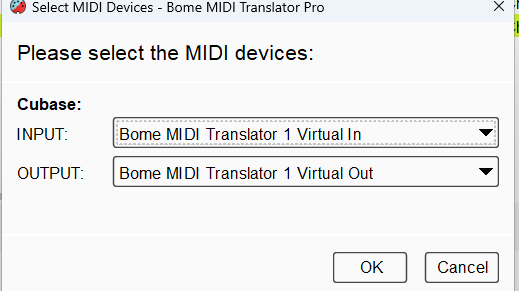
I set up my alias as follows. I set Cubase input to port “BMT 1”.
You will need to set Cubase output to a Virtual port and then set up translators to read the volume for each track into a different global variable. That way it can remember the value. Then your output translators have to use the same variable for that track. Again, you will need a different different global variable for each track.
You might also need a global variable to determine which is the current track so that when you press the keys it uses a different CC# and variable for the given track.
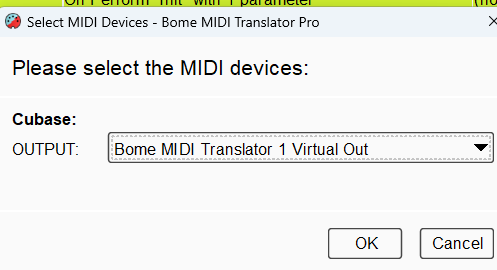
You also need to make sure you are selecting the correct input device.
For more information about device selection, see this tutorial.
Steve Caldwell
Bome Customer Care
Also available for paid consulting services: bome@sniz.biz
Thank you Steve for your help and link to the tutorial.
I’m struggling with this.
The Cubase track volume isn’t actually CC7. Not sure if its an internal parameter.
What I need is to press a key, that then pulls the parameter value of the track volume, adds 1 to it and sends it back. So, how would I syntax ga= cc 89 for example?
Hi, you have to have constant monitoring from Cubase.
You will need to analyze each incoming faders, message to determine which global variable to capture from each fader.
Once you’ve done that, then you need to have to make sure you send the same outgoing message back to Cubase based on the fader you last selected after incrementing or decrementing the value and again storing it in the global variable.
Steve Caldwell
Bome Customer Care
Also available for paid consulting services: bome@sniz.biz
I’m using midi remote in Cubase. It’s sending and receiving the channel volume through cc89.
I assume that this is easy to do in BOME, however I don’t know how.
When I press a qwerty key eg “B”, I need it to send a +1 to cc89. Cubase midi remote can be set up with transmit to hardware, in this case via a virtual midi port. Therefore I would have thought that BOME can read cc89, and increase the parameter by + or - 1.
If you could show me how to do this, that would be smashing.
OK, please find the attached. Each fader from a DAW will typically send a different CC number. In this example I monitor for CC89, 90 , and 91 and store their values in ga, gb, and gc respectively. I capture the last moved fader in g1 so that when I send keystrokes again, it will affect the last used fader in Cubase.
Preset 2 handles monitoring CCs from Cubase.
Then I modified the rules of 1.2 and. 1.3 to ensure the right CC and value is being sent. I increment or decrement the last known value, store it in the proper variable an send the new value.