Hi, my bome box has worked rock solid for around a year now but recently seems to have kicked the bucket. At first it was not connecting at all, but after updating the firmware to the latest (which I don’t think was relevant except insofar as it rebooted the device), I was able to connect again. however, now the box is intermittent. It is discoverable and connectable over http but using bome network is highly flaky - it’ll show up in the list and then not be able to connect. each time when I reboot the device, it will connect as it did before, for a while, but it consistently loses connection eventually requiring another reboot. Nothing has changed about my setup or connection since this began happening.
Hi, and sorry for you trouble. Maybe you have a bad ethernet cable (if connected via ethernet). It is also possible that there is a network problem if you have set it for fixed IP and your router is assigning via DHCP.
If it connecting via wireless, maybe check your network traffic or make sure the country is set up correctly on the BomeBox. You can also try moving from wireless to ethernet to see if the problem persists.
It might be a good idea to show you BomeBox ethernet settings and wireless settings pages.
Finally make sure on Bome Network the discovery port is set to 37000. It is on settings and then Network settings.
Steve Caldwell
Bome Customer Care
Also available for paid consulting services: bome@sniz.biz
So I’m not on WiFi - never got WiFi to work properly, there was always bad latency. And it’s not a dhcp or Ethernet cable issue. I do dhcp reservations for both bome network devices I have - and I know that the Ethernet is fine because that second device is a second raspberry pi running home network that discovers and functions fine.
The bome box is set to ethernet client, and I have a dhcp reservation on the Mac address of the bome box to ensure that it always has the same IP.
The other issues I am noticing with my bome box is that it is no longer showing any midi ports or routes from the USB in the bome config page. Despite them showing up in direct midi in bome network and functioning in that way. But I go to midi routes/ports in the web UI and nothing shows up. I suspect the box is failing.
Is this the firmware revision you are running on your BomeBox?

When it doesn’t connect, can you check the web interface and see what your ethernet settings are showing?
What version of Bome Network are you running?
This is more than likely a browser cache issue. Did you clear your browser cache, try another browser, or put your browser in incognito mode to see if this clears up. I don’t think this is related to network instability. This is a known issue that we are working on for the next firmware update.
Is Bome Network discover on port 37000?
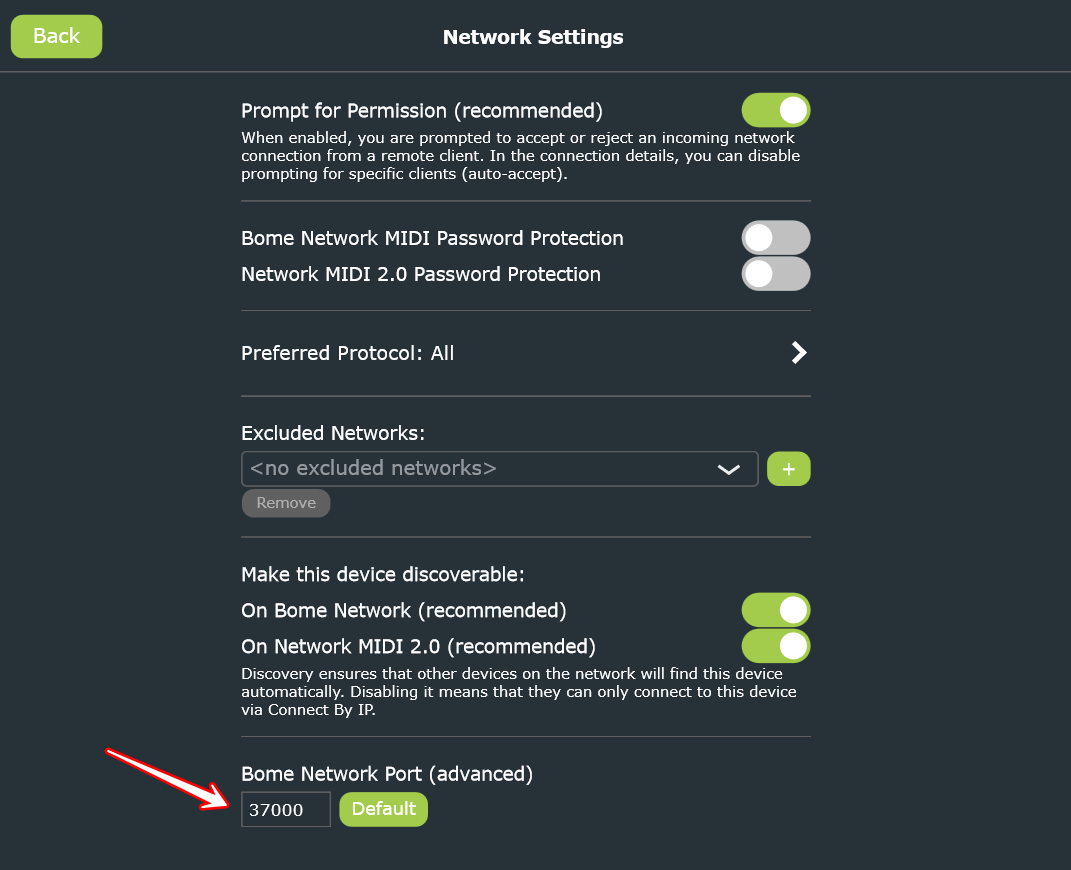
Steve Caldwell
Bome Customer Care
Also available for paid consulting services: bome@sniz.biz
I’m not sure why he can get to it via the web interface but doesn’t loses the MIDI connection. Any ideas?
Steve
-
There is a known bug in firmware v1.6.0 which can (under certain conditions) cause network MIDI connection loss. You can try to downgrade to 1.5.4 and see how that works. Downgrading is generally safe. Download here: Downloads – Bome Software
-
Regarding the web config, it seems a lot like the browser cache issue mentioned by Steve.
Both issues will be fixed in the upcoming firmware update v1.6.1.
This is an early notification that we’ve released BomeBox firmware 1.6.1, which fixes a bug which could lead to occasional loss of connection after a power cycle.
https://www.bome.com/products/bomebox#downloads
We will send out the announcement via newsletter in the next days.