§ key "Section" on UK-ISO keyboard is indicated as "9" and doesn't work

I’m on Mac OS Sequoia 15.6.1.
I can type the section symbol (AKA: section mark, double-s, “silcrow”) so I know it’s being picked up by the OS §§§§§.

Strangely, when I press the § key, BMT doesn’t trigger rules designed for the “9” key. Actually, the § key doesn’t trigger any rules, even when I set it using auto-detection under incoming.

Thanks!

On my US Keyboard I use Option 6 to get the silcrow.

My keychron Q1 HE ISO is recognized by macOS with this layout:

Option+6 produces a silcrow for me too. The issue is that BMT doesn’t seem to recognize the physical ±/§ key correctly. In the input field, it just registers as ‘9’, and the physical key cannot trigger any rules.

There’s a layer of OS meddling, because in the keymap.c file, the default (which I’m using) uses these names:

Mac Output QMK SETTINGS
§± KC_GRV: 0x0035 – Bome inputs the number 9.
`~ KC_NUBS: 0x0064
| KC_NUHS: 0x0032

I switched the Mac OS keyboard type temporarily, which swapped the effects of the GRV and NUBS keycodes, and when I did it also swapped which physical key was not recognized properly by BMT (still the key that was outputting a silcrow).


Another strange thing I’ve noticed that is causing trouble for my translation is that F20 is recognized as F1 in the BMT log, but it is recognized as F20 in KeyCastr. When I changed my rule to recognize F1, the rule was triggered (but I’m using F1 for something else).

Let me know if I’m doing something wrong or if these strange behaviours with key recognition on Mac are known issues.

Thank you,
Michael

Hi, looking into it. What version of Bome MIDI Translator Pro are you running on your Mac?

Steve Caldwell
Bome Customer Care


Also available for paid consulting services: bome@sniz.biz

Hi Michael,
excuse the late reply. I’ve been looking into this, but cannot reproduce it. I don’t have a keyboard with this extra §± key. It’s probably worthwhile for you to understand and try the different keystroke types in MT Pro:

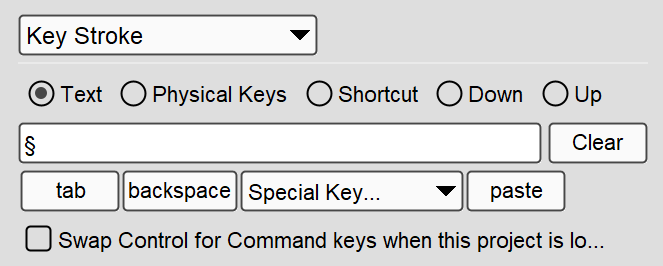
Text

Here, the focus is which letter/character/symbol is produced (or received for incoming action). Entering the § symbol here should always produce it when executed as outgoing action (and trigger when pressed as incoming action), if the keyboard has a keystroke (combination) to produce this symbol. MT Pro monitors the currently selected keyboard layout and finds the correct keystrokes to send/receive. On your keyboard, that would just be the special key, but if you switch to a a German keyboard layout, MT Pro will use ‘SHIFT+3’.

Physical Keys

Here, MT Pro will always reproduce/trigger on the entered keys, no matter what keyboard layout is selected. So, entering SHIFT(3) here will produce # if an English keyboard layout is selected, but it will produce § with a German keyboard layout.

Shortcut

Same as Physical Keys, but you can click together the key combination. Letters will be adapted to the currently selected keyboard layout, so entering Ctrl+Y here will always issue the keyboard shortcut Ctrl with Y, no matter where the letter Y is on the currently selected keyboard layout.

You can find more info in the User’s Manual.

You won’t believe how complex the keystroke handling is, due to the different keyboard maps and physical keyboards, and the ways MacOS treats keystroke events…

For physical keys, MT Pro records what it receives from MacOS. Sometimes, it fails presenting the correct representation (letter or symbol), but it will still trigger on the correct key (only). But here, we may need to add special handling for that key. I’ve added it as a bug report.

Probably a similar issue. I don’t have a keyboard with F20 key here, but record it as a bug.

Thanks again for reporting. We will post back here with any updates.
I have a keyboard with F20 and it works fine on my keyboard. Maybe you have a keyboard mapping application like Keyboard Maestro or similar running on your Mac?

Steve Caldwell
Bome Customer Care


Also available for paid consulting services: bome@sniz.biz