I bought the Bome Midi Translator Pro yesterday after trying the demo for some days. Totally awesome for my kind of use-case as a Liver Performer (Ableton).
I already programme few settings, really basic, but now I see that there´s more knowledge needed for “advanced” stuff. I watched some videos for sure, but as a “noob” I cannot really follow “the rules” that are used and what “pp”, “gg”, and so on means. I have good technical understanding, but I´m not into coding. Thought the application is easier.
How is it possible to let Buttons blink once, when pressed? Got it work to get them stay on (like shown in the tutorial video, but still don´t know what the parameters really stand for, I just copy and pasted). I own an old NI Traktor XI which works well for my setup, but can´t get LEDs work as I like
The two digit variable are either global or local variables.
oo,pp,qq,rr,ss,tt,uu,vv,ww and xx are local variables meaning the are only available to a given incoming trigger and only there for temporary purposes.
All other variables are global static variable and can be shared between translators.
You can read more about variables in the user guide which
is available by using the help menu or pressing F1 within Bome MIDI Translator Pro .
The attached example should give an idea on toggling LEDs.
Most controllers will light an LED when a note-on with the value of 127 is sent and turn off the LED with a note-off and a value of 0.
Translator 1.0 demonstrates this. I first toggle the state in global variable ga. Then I set the value of qq to either 0 or 127 depending on the state of ga. On output I send the same note-on message with the value of qq to either turn on or off the LED. I use the same note number for incoming and outgoing and send it back to the controller.
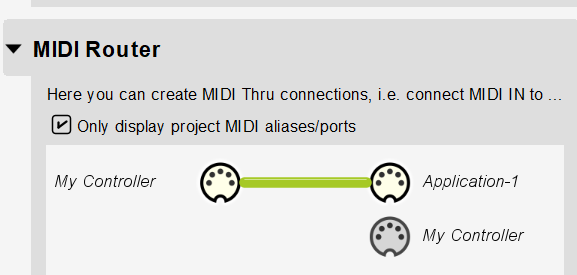
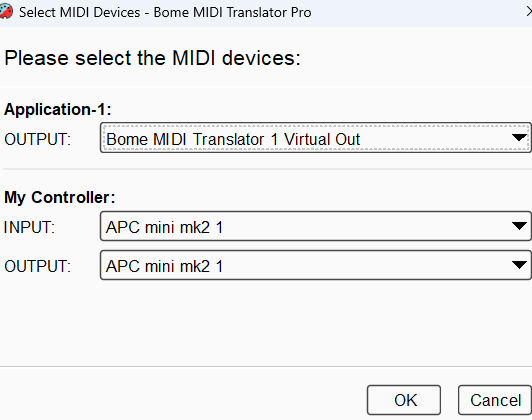
For the application I set a MIDI through path so that it goes through untouched as shown in the MIDI router.
Thank you Steve for your fast answer. I get an idea now, how variables work. Still need some practice I think. I got the parameters work for toggling now. Press = LED ON, Press again = LED OFF.
But I would like them to just light up shortly and then turn off again, just to notice I´ve hit them correctly
When I capture midi from the X1 Bome will show up ‘Control Change’ and not ‘note on’
OK, then it is likely that a CC with value of 127 is push (on) and a value of 0 is release (off). You might need to experiment as I couldn’t find a description in the user manual.
Steve Caldwell
Bome Customer Care
Also available for paid consulting services: bome@sniz.biz
Thank you Steve, I got it work. I created two translators in this case (maybe theres a better option?). One translator for "the button on (CC Velo.=127) then toggles on. And the other translator for ‘the button off’ (CC Velo.=0)
If you want it to work with all buttons, instead of hardcoding the incoming value you could set it to any value set to pp and the on output also use pp as the outgoing value. Then each LED should work.
Steve Caldwell
Bome Customer Care
Also available for paid consulting services: bome@sniz.biz