Hi @SteveC I appreciate your amazing support and many thanks to writing the program for my mad scientist creation, I still cannot get the program to work. I followed the instructions to create the aliases, renamed them Octopad and Microkorg2, changed all the ports to specific ports and used the newly named aliases for midi in and out. The end result with the translator is the same as if I plug the octopad midi directly into the microkorg2, I hear one note (whatever true note value is assigned to each pad from the octopad) for one second and then it stops. I can see the event happen on the log window for both midi and incoming/outgoing messages. The clock (F8) is spinning all the time. I had pocket midi to monitor the traffic, also tried not using it, both had the same result. I am not sure what I am doing wrong. If this borders consultation, I am still interested because I would like to see if my musical idea can be relevant
Hi and welcome to the Bome community!
Please open the log window, select MIDI IN, MIDI OUT, Incoming and outgoing and then send messages from your octopad (including sustain). Then post the log results here (copy and paste).
Also show me a screen shot of your aliases and post your modified project file.
My guess is that either the aliases are not set up correctly or the MIDI routing. Looking at this information would help me determine if that is the issue or if it is something else.
Steve Caldwell
Bome Customer Care
Also available for paid consulting services: bome@sniz.biz
Oh, and thanks for the kind words!
Hi @SteveC , I hope I got all the info you needed.
I clicked the midi in and out off when I took the screenshot because of the clock.
On the event monitor, it has midi in and router out lit up all the time from, Im guessing F8 and FE
Let me know if I missed anything
hold note-on with sustain_midi.bmtp (3.3 KB)
422636 - MIDI IN [MOTU M Series MIDI In]: F8
2422636 - MIDI OUT [MOTU M Series MIDI Out]: F8
2422659 - MIDI IN [MOTU M Series MIDI In]: F8
2422659 - MIDI OUT [MOTU M Series MIDI Out]: F8
2422662 - MIDI IN [MOTU M Series MIDI In]: 90 40 25
2422662 - IN 1.0 Note On on ch. 1 with any note set “pp” to note=64 with any velocity and “qq” to velocity=37
2422662 - MIDI OUT [MOTU M Series MIDI Out]: 90 40 25
2422662 - OUT 1.0 Note On on ch. 1 with note:pp=64 and velocity:qq=37
2422682 - MIDI IN [MOTU M Series MIDI In]: F8
2422682 - MIDI OUT [MOTU M Series MIDI Out]: F8
2422705 - MIDI IN [MOTU M Series MIDI In]: F8
2422705 - MIDI OUT [MOTU M Series MIDI Out]: F8
2422728 - MIDI IN [MOTU M Series MIDI In]: F8
2422728 - MIDI OUT [MOTU M Series MIDI Out]: F8
2422751 - MIDI IN [MOTU M Series MIDI In]: F8
2422751 - MIDI OUT [MOTU M Series MIDI Out]: F8
2422763 - MIDI IN [MOTU M Series MIDI In]: 80 40 40
2422763 - IN 1.2 Note Off on ch. 1 with any note=64 and any velocity=64
2422775 - MIDI IN [MOTU M Series MIDI In]: F8
2422775 - MIDI OUT [MOTU M Series MIDI Out]: F8
2422798 - MIDI IN [MOTU M Series MIDI In]: F8
2422798 - MIDI OUT [MOTU M Series MIDI Out]: F8
2422821 - MIDI IN [MOTU M Series MIDI In]: F8
2422821 - MIDI OUT [MOTU M Series MIDI Out]: F8
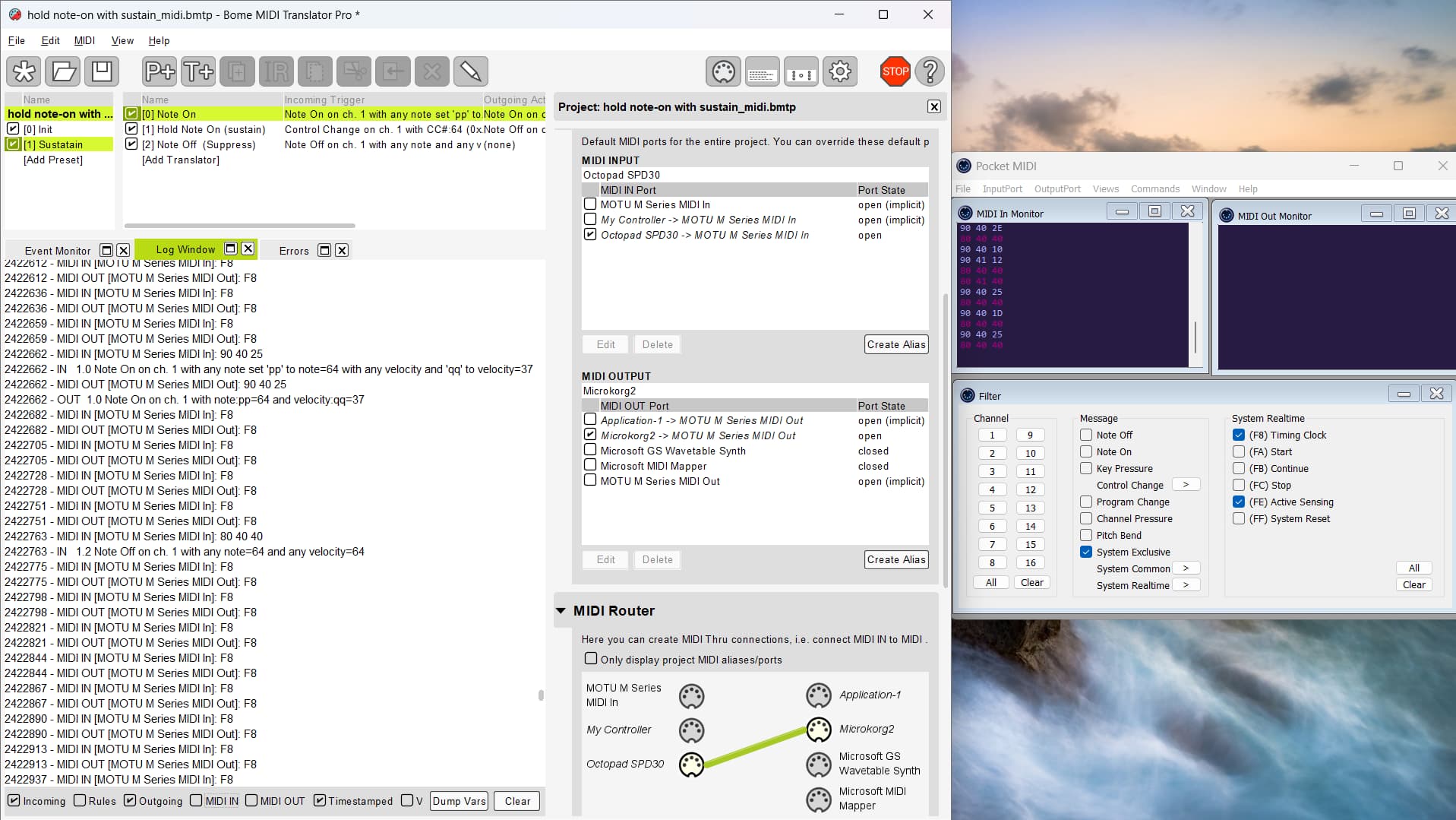
OK, since you want F8 (and maybe some other non-defined MIDI messages) to pass through, this is a bit more complicated,
First I am setting the aliases as follows. Please only use aliases and not the physical port. I do this so that as ports change around on different systems, I can just re-assign the aliases once instead of going through the whole project selecting different ports.
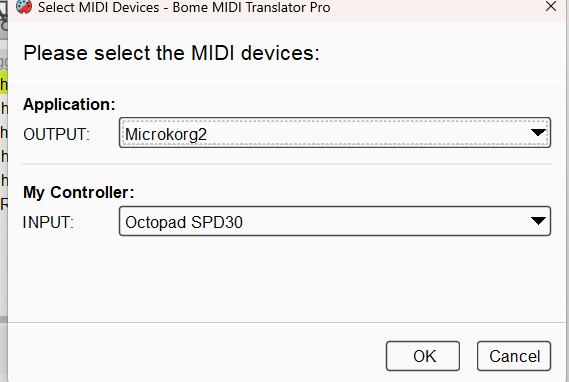
You can learn more about aliases from this tutorial.
Translator 1.0 sets the value of ga to 1 when held (sustain)
Translator 1.1 sets ga back to 1 when released
Transator 1.2 passes through note-on messages.
Translator 1.3 ensured note-off messages are suppressed when ga=1 (see rules). It is also set to stop processing so that translator 1.4 never fires.
Translator fires note-off messages if ga=0
Translator 1.5 is called by the rules of translator 1.1 and sends a note off for the last note played when sustain is released.
Note, that in this implementation, we only a note off for the last note played. If you need note tracking for every note held down when sustain is engaged, then I can help here but it is beyond the scope of free support.
You may need to alter translators 1.0 and 1.2 to the note numbers you want to engage and disengage sustain.
hold note-on with sustain_mid-sjci.bmtp (4.0 KB)
Steve Caldwell
Bome Customer Care
Also available for paid consulting services: bome@sniz.biz
Hi @SteveC
Once again, thank you for the great support!!
I was able to download the new file and it did the same thing again, which is playing a note without sustain or any change. Here is some troubleshooting I did to check my system.
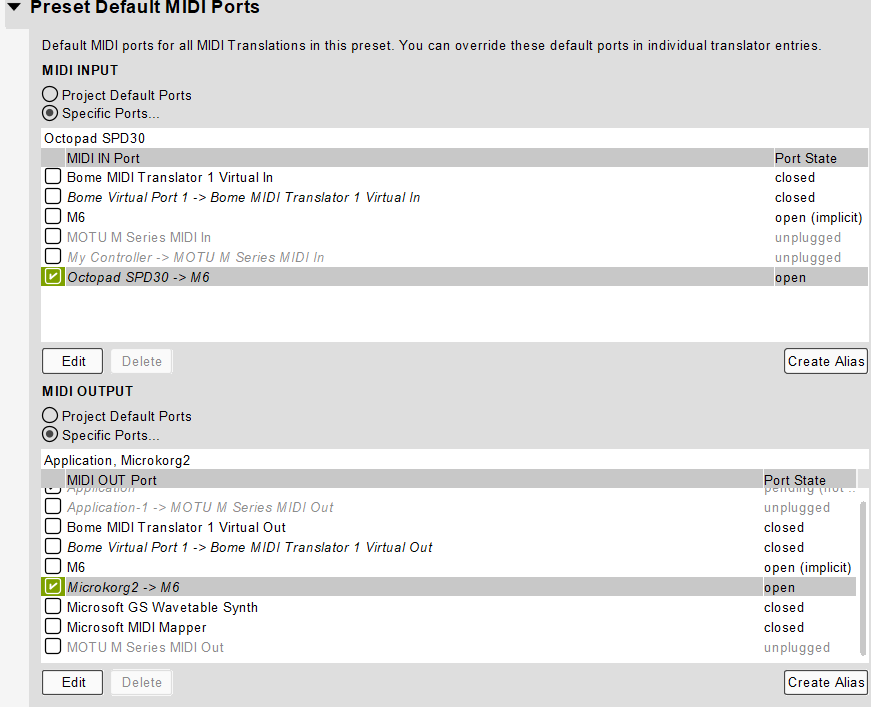
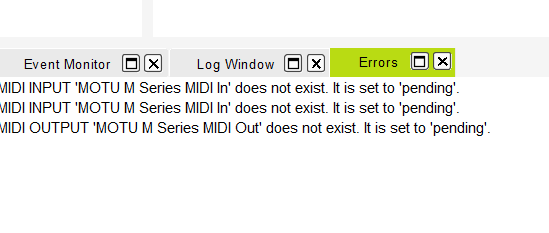
When I first loaded the new file, even before I made the aliases, the midi note was talking to the microkorg before the router was assigned. I checked the motu website, there was a firmware update available. Before the motu was updated, the only choice for midi aliases it gave me was motu m series midi in and out. After the update, that path was not recognized, bome gave me an error does not exist, set to pending. I did get a new path called m6. When I chose that for an alias the octopad started talking again to the keyboard. I used the m6 instead of the virtual port because of what you said in the tutorial. At this point there is still no sustain message to the keyboard. The midi messages looked different because in the log, I can see the midi and in out messages are different from the last time.
By the way, I didnt want to have the clock running all the time. If the program works better without the clock and there is a way to stop the clock, I would like to try it. I still do not know how to stop the clock messages, Ive tried to turn the source to external on both devices with no change in the message.
I am considering getting a dp-10 sustain pedal that plugs directly into the octopad and hopefully it should create the sustain I would like. If this makes the programming easier then Im happy. My main goal is to be able to assign different control changes to pads and have those control changes affect whatever note with sustain is being played.
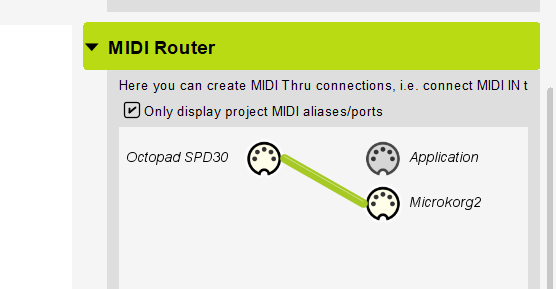
Please look at the screenshots and tell me if I missed anything on the setup
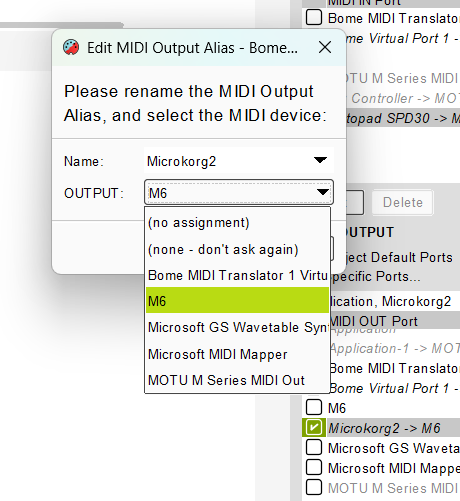
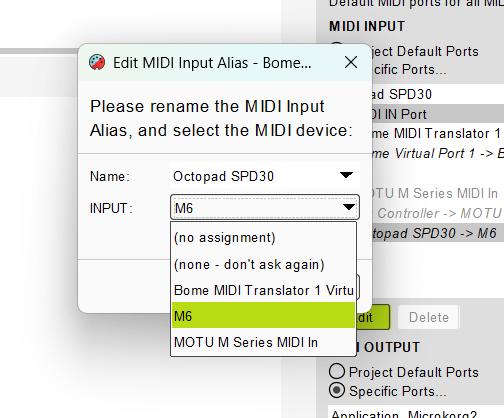
MIDI IN [M6]: F8
918297 - MIDI OUT [M6]: F8
918316 - MIDI IN [M6]: 90 40 1C
918316 - IN 1.2 Note On on ch. 1 with any note set “pp” to note=64 with any velocity and “qq” to velocity=28
918316 - MIDI OUT [M6]: 90 40 1C
918316 - OUT 1.2 Note On on ch. 1 with note:pp=64 and velocity:qq=28
918320 - MIDI IN [M6]: F8
918320 - MIDI OUT [M6]: F8
918343 - MIDI IN [M6]: F8
918343 - MIDI OUT [M6]: F8
918367 - MIDI IN [M6]: F8
918367 - MIDI OUT [M6]: F8
918390 - MIDI IN [M6]: F8
918390 - MIDI OUT [M6]: F8
918413 - MIDI IN [M6]: F8
918413 - MIDI OUT [M6]: F8
918416 - MIDI IN [M6]: 80 40 40
918416 - IN 1.3 Note Off on ch. 1 with any note=64 and any velocity=64
918416 - IN 1.4 Note Off on ch. 1 with any note set “pp” to note=64 with any velocity and “qq” to velocity=64
918416 - MIDI OUT [M6]: 80 40 40
918416 - OUT 1.4 Note Off on ch. 1 with note:pp=64 and velocity:qq=64
918436 - MIDI IN [M6]: F8
918436 - MIDI OUT [M6]: F8
918459 - MIDI IN [M6]: F8
918459 - MIDI OUT [M6]: F8
918043 - MIDI IN [M6]: F8
918043 - MIDI OUT [M6]: F8
918053 - MIDI IN [M6]: 90 40 1B
918053 - IN 1.2 Note On on ch. 1 with any note set “pp” to note=64 with any velocity and “qq” to velocity=27
918053 - MIDI OUT [M6]: 90 40 1B
918054 - OUT 1.2 Note On on ch. 1 with note:pp=64 and velocity:qq=27
918066 - MIDI IN [M6]: F8
918066 - MIDI OUT [M6]: F8
918089 - MIDI IN [M6]: F8
918089 - MIDI OUT [M6]: F8
918112 - MIDI IN [M6]: F8
918112 - MIDI OUT [M6]: F8
918135 - MIDI IN [M6]: F8
918135 - MIDI OUT [M6]: F8
918154 - MIDI IN [M6]: 80 40 40
918154 - IN 1.3 Note Off on ch. 1 with any note=64 and any velocity=64
918154 - IN 1.4 Note Off on ch. 1 with any note set “pp” to note=64 with any velocity and “qq” to velocity=64
918154 - MIDI OUT [M6]: 80 40 40
918154 - OUT 1.4 Note Off on ch. 1 with note:pp=64 and velocity:qq=64
918158 - MIDI IN [M6]: F8
918158 - MIDI OUT [M6]: F8
918181 - MIDI IN [M6]: F8
918181 - MIDI OUT [M6]: F8
The aliases I set up had “Application” as the destination which should have been the MicroKorg2. It is important to use only the aliases as otherwise, translators will be bypassed.
In this version I changed the destination to “My-MicroKorg” which points to the MicroKorg2 so should be less confusing
You should not have any other thru paths. If you want to stop other messages from getting through besides notes, you can simply delete the thru path.
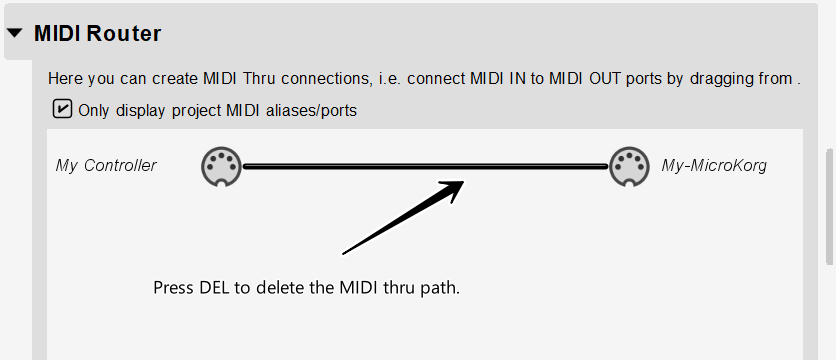
In this version, I went ahead and delted it.
Here are how your aliases should be set.
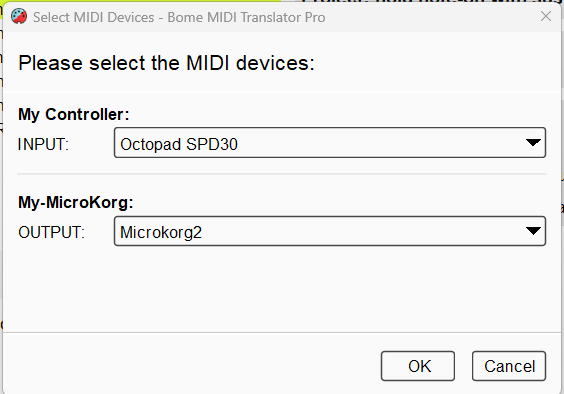
It sounds to me that you are bypassing Bome MIdI Translator Pro which is causing your notes to sound.
It is important that EVERYTHING goes through Bome MIDI Translator Pro and NOTHING goes through directly.
hold note-on with sustain_midi-sjc-2026-03-03.bmtp (4.0 KB)
Steve Caldwell
Bome Customer Care
Also available for paid consulting services: bome@sniz.biz