Hi and welcome to the Bome community!
The following project file should work with ProTools for fader 1. In ProTools set it up for HUI with input and output to ‘BMT 1’ (if you are using MT Pro short names) or ‘Bome Virtual MIDI Port 1’ (if you are using long names).
There are 4 translators. I have set it up as CC19 with the first 3 translators.
0.0 - Sends a touch command for fader 1 when you move the control.
0.1 - Sets a timer for fader release command after 100ms of non-activity
0.2 - Moves the Fader
0.3 - Send the fader release after the timer triggers
1.0 - Responds to a HUI Ping with Ping Response.
Here are my notes on how HUI protocol handles faders
Zone 0-7 is the fader number - There are only 8 faders and if you want more you need to have either another controller or use bank up and bank down messages.

B0 0z hh 2z ll
z is zone 0-7
hh is the MSB
ll is the LSB

Touch Fader
B0 0f 0z = Zone
B0 2f 40 = Port 0 On

Release Fader
B0 0f 0z = Zone
B0 2f 00 = Port 0 Off
I used an AKAIPro MIDI MIX fader 1 for this example.
Here is how I have my aliases set up.
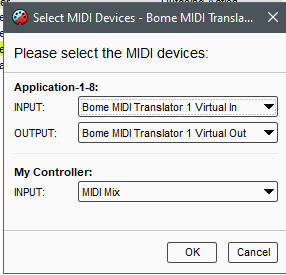
You can learn more about aliases from this tutorial.
CC- to HUI-Fader-Example.bmtp (2.1 KB)
Steve Caldwell
Bome Customer Care
Also available for paid consulting services: bome@sniz.biz