I want to control a handful of Eventide Factor boxes. First, I call up the preset, then I can send the other parameters. If I understand correctly, MTP processes all translators in parallel whenever possible. The devices buffer the incoming events, but I need to ensure that no parameters arrive before the preset is called. Perhaps it would be wise to introduce a time window anyway. Is it best to specify a delay for each output action, or is there another way to delay a group of translators within an MTP preset?
Hi, most outgoing actions have an option to add a delay. I assume your issue is whether a given Eventide box is ready to receive the new MIDI message when you switch presets.
I’m not sure how Bome MIDI Translator Pro would know to wait unless you just add a delay, however if the Eventide box responds to a given action with a MIDI message, then you could trigger that incoming MIDI mesage from Eventime to signal Bome MIDI Translator Pro thatthe Eventide box is ready to receive parameters.
In general there is an order to how messages are sent. See page 113 of the user manual.
The exception might be timers and perform actions where they happen more asyncronously. If calling perform in rules, then you can pass a delay argument to the perform translator and have it use that argument to delay the outgoing action. You could also do that with parameters in timers, starting with Bome MIDI Translator Pro version 1.9.2.
Maybe if you show an illustration of when this becomes problematic, I can provide further assistance
Steve Caldwell
Bome Customer Care
Also available for paid consulting services: bome@sniz.biz
I have read these parts of the manual, although I did not fully understand them. At the moment, we are talking about the initial setup of devices. All translators have incoming ‘on activation of this preset’. For each device, a Program Change is sent first, followed by a handful of parameters. However, I’m not sure whether MTP really runs through all translators in sequence from top to bottom within a setup, even if no incoming actions change the timing, because there are practically none.
You can see what I mean at a glance in the screenshot:
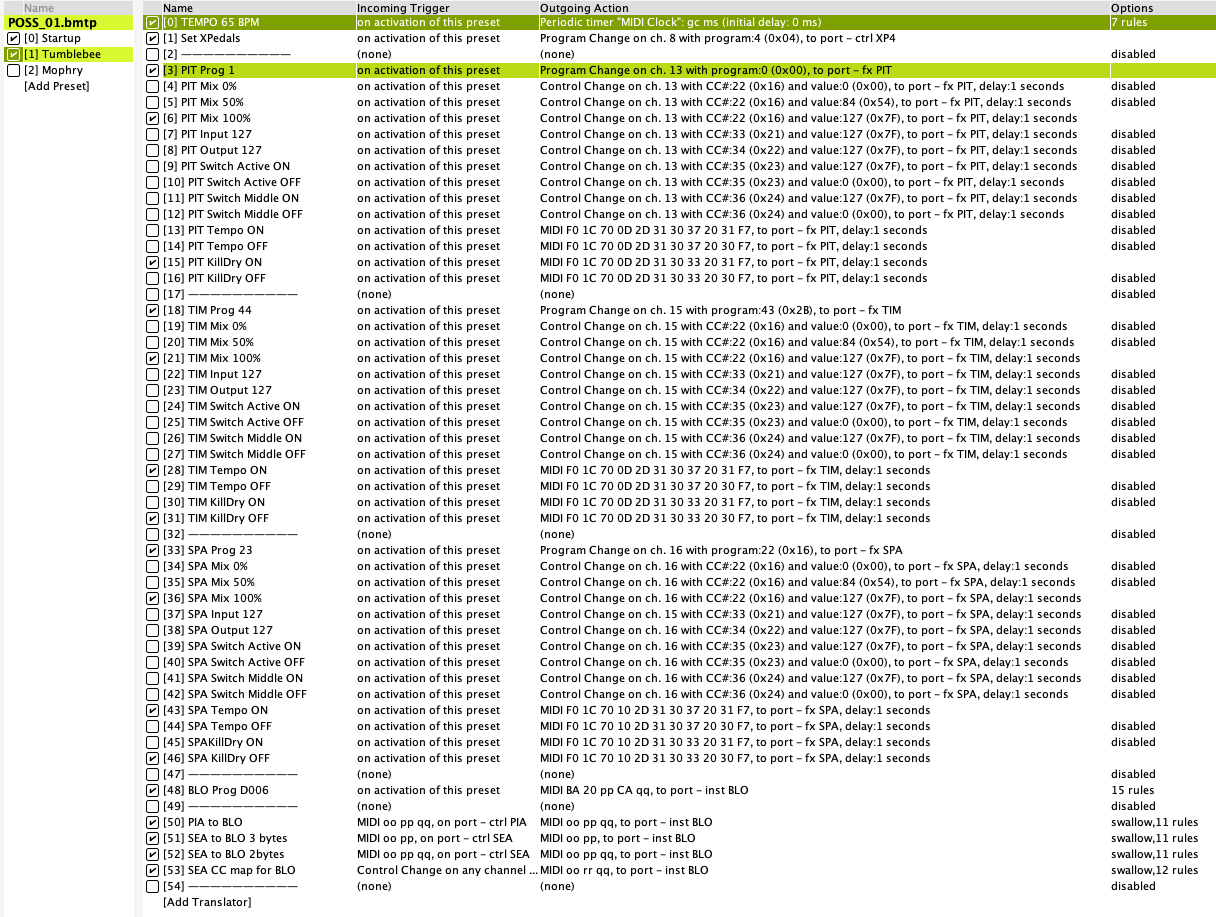
The grouping makes editing clearer, because I have such a Preset for each piece of music, a “song”, if you want. At the beginning of each Translator group, the device’s program number is called up, followed by the activated parameter Translators. If this were done from top to bottom, I wouldn’t have to care about timing. But I’m not sure if that is how it works. That’s why I gave each Translator except the Program Changes an outgoing delay of 1 second. Time is not an issue, but order is.
Initially, I wanted to send the Program Changes first, then pause, and then send all the parameters. But I couldn’t find anything that said ‘now please do nothing for 50 ms’. I don’t have to wait for the loading time of the devices, but the Program Changes have to be sent first for each device.
(The screenshot above is a prototype; in the final version, the presets will have approximately twice as many translators. And I may separate the “on activation” translators from the relatively few playing-related ones at the bottom, so that I can disable the setup after execution.)
These will execute in sequence, top to bottom. Keep in mind, that it will be extremely fast, so the timestamp in the log window might show the same but if you turn on incoming, you will see them trigger in sequence in the log window.
Usually when you send a SysEX message, you should give it some time to process (depending on the vendor), as the devices processing engine might take more time. It is really more up to the receiving device how long it will take to process MIDI messages.
Steve Caldwell
Bome Customer Care
Also available for paid consulting services: bome@sniz.biz
Related question:
As far as I know, BMT cannot read text files, and we cannot send data to it in any other way. All configuration must be done directly in BMT, correct?
As of version 1.9.2 you can read variable storage files which are in plain text format in the form of.
ga=2
gb=24
etc.
So now, you can set variable storage and then use the values there to configure Bome MIDI Translator Pro if necessary.
With that said, things like rules, etc cannot be imported into Bome MIDI Translator Pro, however if you set up multi instance support in setting, then you can copy and paste translators.
Steve Caldwell
Bome Customer Care
Also available for paid consulting services: bome@sniz.biz
If I understand correctly, you cannot create variables yourself. Then there are far too few. I would need 200 variables or more. Because I cannot load dynamically, I have to reserve each one for a specific action. I think that with this setup, I am outside the scope of BMT and BomeBox.
I think about another way: BomeBox for live playing data, i.e. controllers, notes and distribution of MIDI clock. A Teensy with Max as editor is ideal for the basic settings of the devices. It is easier to use and has controllable output. Division of labour seems appropriate here. Setup of all devices via Teensy —> BomeBox and playing data directly via BomeBox, where it shines. The Teensy can have a display and show various information on command from the BomeBox. That way, everyone does what they do best. I’ll think it through and test it, but that seems to be the way to go.
Thank you very much for your support, which is excellent as always.
Peter
You could create a text file with a standard editor to initially set the variables that you want and the have a translator read them in, modify them and write them back out as needed. Bome MIDI Translator Pro can handle up to 720 global variables.
Steve Caldwell
Bome Customer Care
Also available for paid consulting services: bome@sniz.biz
Very interesting. I will look into how I can integrate this into my system.
Thank you very much!