I have the network setup on 2 computers, a DAW (Sonar) and a computer running the VSL library (VSL Ensemble Pro). It’s a simple setup, midi data moves in one direction, from DAW to VSL. That’s it, no looping, no sending midi data to more than one port.
There are 5 midi ports, ports 1 and 2 are working fine, but 3 does not sound, port 4 isn’t currently being used, and port 5 is playing the instruments that should be playing on port 3.
Port 1=winds, port 2=brass, port 3=percussion, port 4=choir, port 5=strings. The strings are not sounding at all.
I set each port up identically, on the DAW (master):
In: MIDI Port 1 virtual in —–> Out: VSL: Winds Virtual.
In: MIDI Port 2 virtual in —–> Out: VSL: Brass Virtual
In: MIDI Port 3 virtual in —–> Out: VSL: Percussion Virtual.
In: MIDI Port 4 virtual in —–> Out: VSL Choir Virtual
In: MIDI Port 5 virtual in ——>Out: VSL Strings Virtual
I opened the 5 ports in the DAW and the 5 ports in the VSL computer.
Why is port 3 (percussion) playing on port 5 and port 5 (strings) are not playing at all?
On you VSL computer, remove the virtual ports you created.
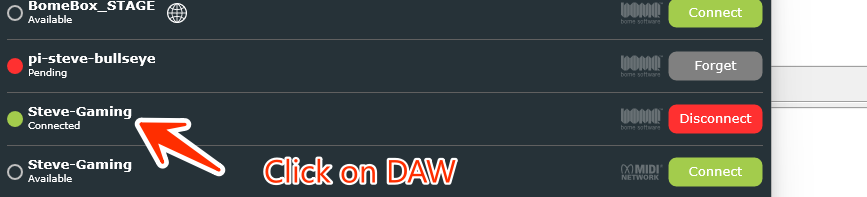
Once the 2 systems are connected,in the Bome Network tool on VSL, click on DAW
Check the green boxes for the 5 ports you created on DAW
You should see something like the below except it will your system will be called “DAW” instead of “Steve-Gaming”.
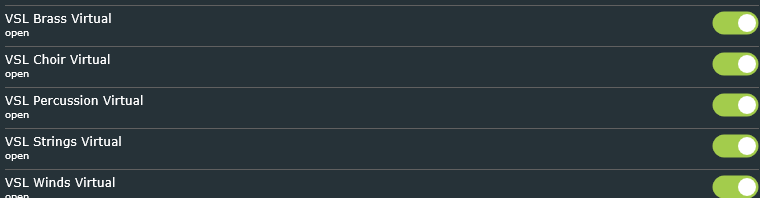
Now the ports on VSL should show up as shown within VSL should be avaiable The will be pre-pended with “DAW” which is your remote computer name. In the illustration below, they are pre-pended with “Steve-Gaming” which is my computer name.
In my case, I have them opened within Bome MIDI Translator pro for illustationh purposes. You might need to restart VSL Ensemble Pro to see them.
Steve Caldwell
Bome Customer Care
Also available for paid consulting services: bome@sniz.biz
Hi Steve, I deleted the virtual ports on the VSL computer. The 5 virtual ports created on the DAW are:
VSL Winds
VSL Brass
VSL Percussion
VSL Choir
VSL Strings
I turned on the ports I created in the VSL computer. I assigned these ports to VSL Ensemble. I play, but there is no sound, none of the ports are triggering MIDI messages, I confirmed this with a Microsoft MIDI utility called midi1monitor.
I’ve got it working now, but I had to use routing on the VSL computer. No routing, no sound.
Well, I’m glad you have it working, albeit a bit more complicated of a setup. The ports on VSL will typically not show up until you restart the VSL application which is part of a Windows 11 bug. I expect it will be fixed soon so eventually, you will not need to do that.
Steve Caldwell
Bome Customer Care
Also available for paid consulting services: bome@sniz.biz
OK, review my instructions carefully because I actually tested this configuration when I wrote them albeit different computer names and different applications.
Steve Caldwell
Bome Customer Care
Also available for paid consulting services: bome@sniz.biz
The only way I can get this to work is to set up 5 ports in the VSL Bome Network. Then I route them from the ports I set up in the DAW. If I don’t do this, VSL will not recognize the ports I made in the DAW’s Bome Network, even if I close and reopen VSL Ensemble Pro . I have no idea how you got VSL Ensemble to recognize the ports from another computer without this step..
The good news is it’s working now and I do not have to stop and restart Windows MIDI Services as I did with RTP-MIDI.
Yes, all 5 virtual ports on VSL Network are green, they have to be or it won’t work, as expected.
Yet even if I close and reopen VSL Ensemble, it will only receive MIDI data and send out audio if I create 5 virtual ports in the VSL computer Bome Network and route them from the 5 virtual ports on the DAW Network. I’m running VE Pro 7, so maybe that’s the issue, I have no need to upgrade to 8.
I tried following your exact instructions but VSL needs to see ports on the VSL computer, or it won’t see any MIDI messages.
So, in essence, I am using the MIDI router on the VSL Bome Network but there’s no need for any routing on the DAW Bome Network.
Yep, definitely working exactly as I want now. Thanks for getting back to me so quickly. There sure are a lot of routing possibilities with this software, far more than I need. But it works and I don’t need to stop and restart Windows MIDI Services any longer so I’ve retired RTP-MIDI.
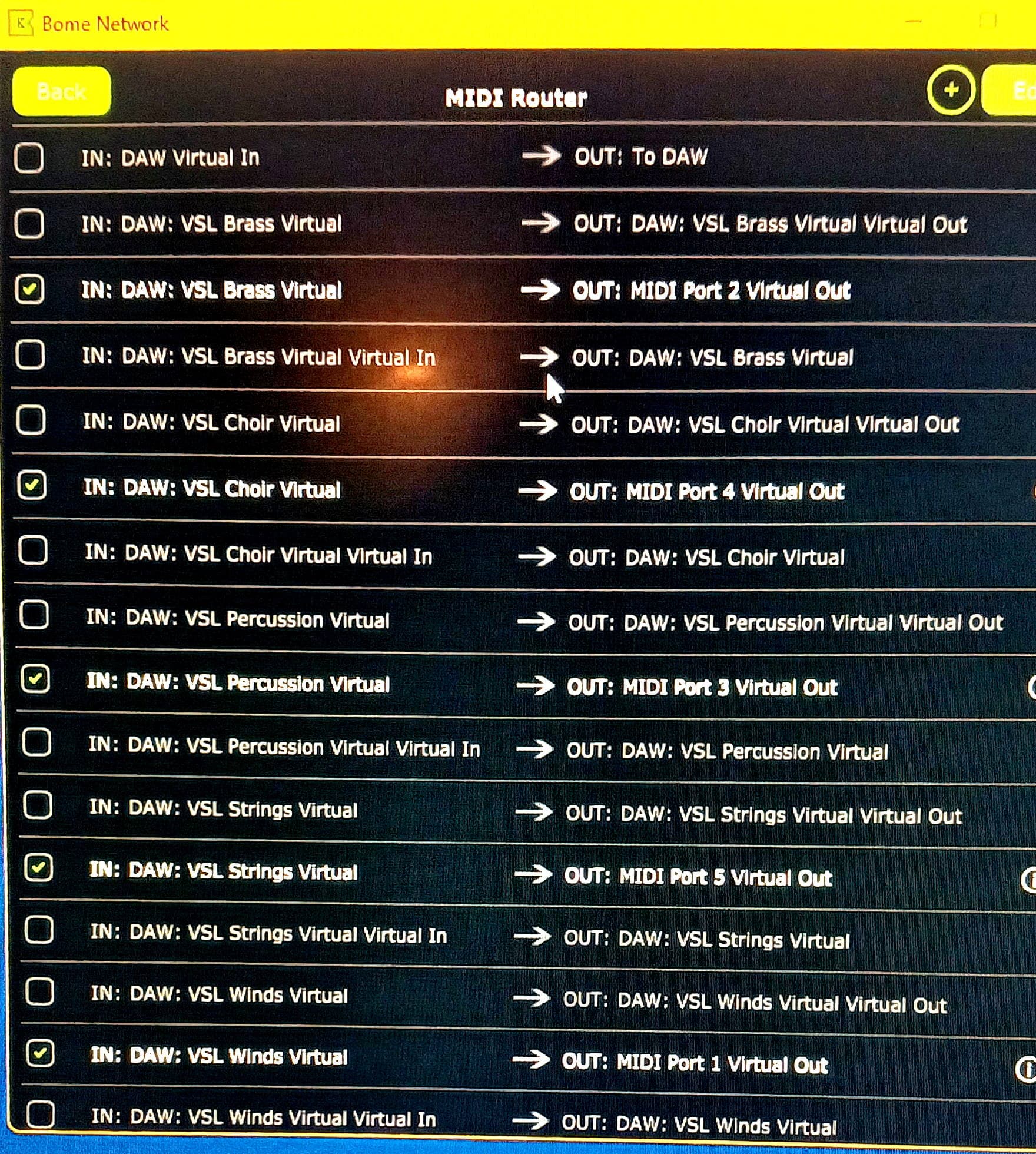
I do have a question though. See in the image below there are 3 routing possibilities for every virtual port I created in the VSL Network. I created MIDI Port 1-5, yet there are, in addition to these, references to the DAW ports “Virtual Out” and then there’s the “Virtual Virtual Out”. Why is this? Is there a way to hide these routings, which kind of clutter up the nice interface? I only need the routings to the MIDI Ports 1-5.
These virtual virtual ports seem rather strange, indeed! Here is an explanation:
If you have a standard (non virtual) port ‘Portname’ on ComputerA and then use Remote Direct MIDI to link to it on ComputerB, it will show as ComputerA:Portname Virtual In and …Out in Bome Network. Other applications on ComputerB will see it as ComputerA:Portname.
Now if you create a virtual port on ComputerA ‘Myport’, it will show as Myport Virtual In and Myport Virtual Out on ComputerA since it is a virtual port on that machine. Other applications on ComputerA will see it as Myport.
On ComputerB, if you use Remote Direct MIDI to Myport on ComputerA, it will show as ComputerA:Myport Virtual Virtual In and …Out. Because in fact, ComputerB again appends the “Virtual” suffix. It makes sense, because it is a virtual port of a virtual port. Other applications on ComputerB will see it as ComputerA:Myport Virtual (for both IN and OUT directions).
So essentially a Virtual Virtual port is a local virtual port of a remote virtual port that was created on the remote computer and exposed as a Remote Direct MIDI port.
Physical ports on the remote computer would have a name with only one virtual suffix since it is a virtual port on the local computer.