I have a translator that’s working: between two macs using Bome network. uses a midi input stream from one port (iac) on one mac, splits into four ports and sends to the other machine. I want to modify the translator to reside on the bomebox (to move the processing off the first mac). any ideas how to setup? trouble seeing how to address multiple ports on the bomebox and pickup on the second mac…
Hi,
You say you are splitting from IAC to 4 output ports. I assume 1 of the outputs goes to the second map. What do the other 3 output ports go to?
Steve Caldwell
Bome Customer Care
Also available for paid consulting services: bome@sniz.biz
don’t understand ‘second map’, but iac port comes from 1st mac (dorico output) thru bmtp (4 output ports) on same machine, thru Bome network to 2nd mac (vienna ensemble 4 ports)… want to move bmtp from 1st machine to bomebox…
thanks for response…
So you have Dorico on mac1 as one output and you want to send the same midi signal to 4 separate ports (Vienna ensemble) on mac2 ? Are the ports on Mac2 also IAC ports?
Are these all static routes or do you have Bome MIDI Translator Pro doing other processing?
Static routing can be done within the Bome Network MIDI router and if there is no additional dynamic processing, you wouldn’t need to run a MT Pro project on BomeBox.
I might need to look at your project file to understand what else you might be doing with the MT Pro project.
Steve Caldwell
Bome Customer Care
Also available for paid consulting services: bome@sniz.biz
yes, your 1st question is correct. I’m breaking the same midi content up using keyswitches in dorico to address different instruments in ve (by switching ports thru the translator, works fine).
2nd question: the way it’s working now vienna ensemble picks up the bome network ports (but if they change, ve must be restarted, probably better as aic). I thought the first step would be to get the ports to appear in bomebox?
for now there’s no other processing, but I planned on doing more; so to minimize processing on mac1 and use the bomebox (which I believe is not being used now), I want to move the translator there…
the translator is simple enough, I just need to figure out the correct way to get it to work using the bomebox…
if you want to see the project no problemo, just tell me how to get it to you. actually I could probably benefit from your critique…
thanks
Hi, you can post the project by uploading it in a reply. This is the upload icon:

If you don’t want it public, then either send me a private message with the uploaded file or send it as as an attachment in email
If there is currently no dynamic routing, you could just use Bome Network to route from Mac 1 to Mac2 using the Bome Network router. You could expose the additional VE ports on the Mac2 then route them to the exposed ports on Mac 1. Static routing does not consume much resource.
Alternatively you could do your routing on Mac1 and expose it’s ports on Mac2 and the have VE look at the exposed ports.
See this tutorial on how to use Remote Direct MIDI.
At such time you need dynamic processing, then you could load the dynamic stuff into a project file and run it on BomeBox.
Steve Caldwell
Bome Customer Care
Also available for paid consulting services: bome@sniz.biz
Steve,
I’ve already got it working as you suggest; I am wanting to move the processing to the bomebox; is this not possible?
I’m confused-static/dynamic?
if the translator runs fine on the network, and translators run on bomebox, why can’t I run the translator on my bomebox?
don’t mean to run you in circles - thanks again…
BomeBox requires physical ports and does not yet support Remote Direct MIDI connections from computer to BomeBox. You cannot route to ports that don’t exist on BomeBox, however you could send everything out the main network port to Mac2 and then put routing connections there in Bome Network to the desired ports for use by VE. All three ports would be receiving the same MIDI data.
Now in the other direction, Any local ports on the BomeBox can be accessed via Remote Direct MIDI on your Mac, but that really doesn’t help in your situation.
Steve Caldwell
Bome Customer Care
Also available for paid consulting services: bome@sniz.biz
ok, thanks Steve…
what about midi translator BN? any chance of running this scenario on the new funtcionality of the network?
Yes, it runs as an addon to Bome Network. I’m not sure if it would reduce the workload much though. You may also want to check the pricing as it is structured differently. Usually this is most useful for running a project on devices that don-t support Bome MIDI Translator Pro like iOS, Linux or Raspberry PI.
If you want to offload your Mac1, you can run the project on Mac2 as long as you don’t use the Bome MIDI Translator Pro project on both computers at the same time.
Steve Caldwell
Bome Customer Care
Also available for paid consulting services: bome@sniz.biz
One thing that may be causing the confusion about addressing multiple ports on the BomeBox: IAC ports are a macOS-only virtual driver, so they do not exist on the BomeBox at all. When the project moves onto the BomeBox, the four destinations have to be named Bome Network virtual ports on mac2 rather than IAC ports, and the BomeBox sees them as remote network ports rather than local ones. That is usually why a project that worked on mac1 appears to lose its outputs when you move it. Practically, I would set the four virtual ports up on mac2 first, confirm they appear in the BomeBox’s routing view before touching the translator project, then re-point the project’s output aliases to those names. Using port aliases rather than hard-coded port names in the project makes this much less painful, since you can re-map once instead of editing every translator. As Steve says, if Dorico’s output is genuinely just being fanned out to four destinations with no transformation, the Bome Network router alone will do it and you can leave MT Pro out entirely, which also removes a moving part from the signal path.
Yes, you can create 3 IAC ports on Mac 2 and expose them using Direct MIDI (If you have Bome Network 1.7.0) to other devices.
On BomeBox (Running 1.6.1) you should now be able to see those ports.
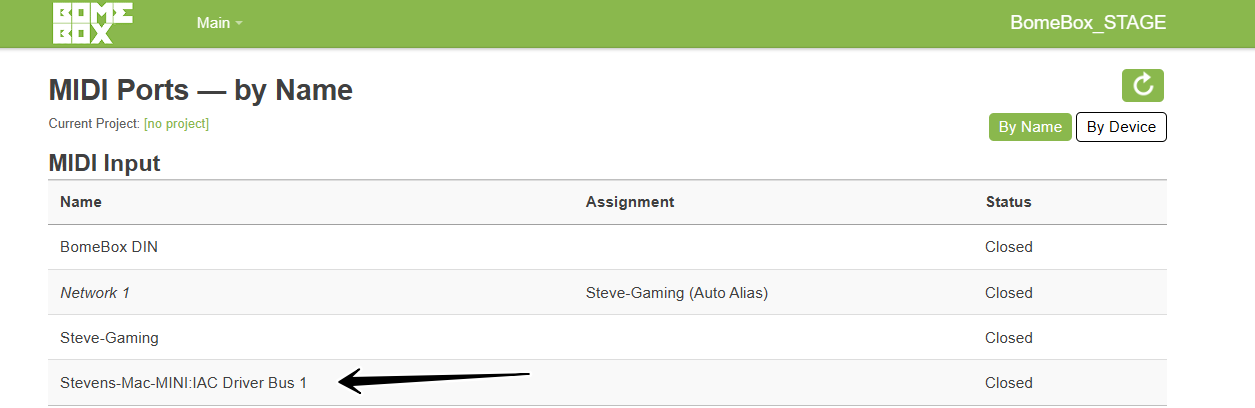
Note, however it appears that you have to manually connect to those ports via IP on the Network MIDI 2.0 page. This is an issue that we are currently working on.
Once it is fully working, they should just show up with no additional intervention.
Steve Caldwell
Bome Customer Care
Also available for paid consulting services: bome@sniz.biz
thanks Helen and Steve,
my original post arose as I was trying to use the bomebox to offload processing resources from the computer where translator ran… since I couldn’t make that work, I just moved the process to a different mac…
problem solved. as I’m not using the bomebox it’s disconnected now.
if i need it in future, i will re-address then. thanks for your insight!