where can I find information on the correct use of key strokes? I’m having trouble with the following:
I need a key stroke as text, followed by pressing the Enter key to trigger an event. I’ve created 200 Translator with Key Strokes “Text” with the words ‘01’ - ‘200’ as an incoming event (without ‘ ‘ ). When I type, for example, ‘110’ on a keyboard and press Enter, two MIDI notes are sent: one for the text ‘110’ and one for the text ‘10,’ because it appears in ‘110.’ How can I avoid this? How do I declare ‘text’ korrekt in MTP? Do I need to enclose the text in quotation marks, parentheses, or something else? I haven’t found anything that describes the exact procedure.
Thanks in advance for any tips and sorry for my English
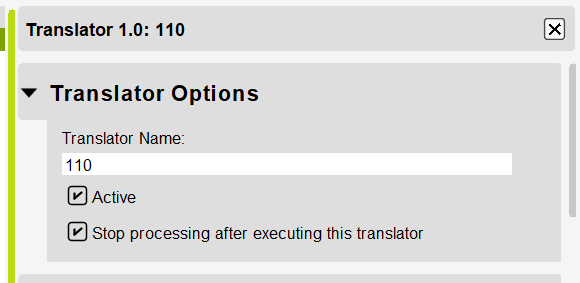
The trick for your situation is to put 110 first in the list of translators. Then set ‘Stop Processing’ so that the downstream translators are not evaluated.
I’ve attached the solution here.
Note that translator 1.0 has Stop Processing checked.
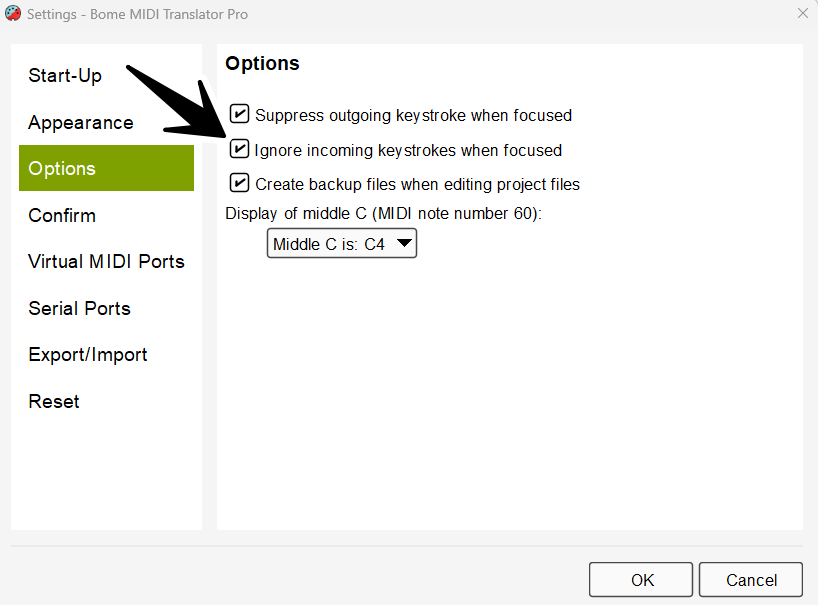
Note also that incoming keystrokes are not suppressed by Bome MIDI Translator Pro and that with default settings are only recognized with Bome MIDI Translator Pro does not have application focus.