Virtual Ports are duplicated

I am configuring my first virtual port in BMTP.

I am seeing that every input and output port is duplicated. It seems that the second port is an alias, but it is not editable and it is not an alias, so I am very confused.

These are the screenshots:

Captura de pantalla 2026-05-10 a les 15.06.23

Captura de pantalla 2026-05-10 a les 15.06.42

I haven’t find any explanation in the manual of this duplication.

I would appreciate it if someone who knows what this is about could explain it to me.

Thanks a lot!

Hi,

This was done for backward compatibility. An old version of Bome MIDI Translator pro used “Bome Virtual Port 1” and at some time later we created a newer version that is “Bome MIDI Translator 1 Virtual In”.

When we did that, we made an “auto alias” to the old port name so that it would not break someone’s existing project.

These “auto aliases” are automatically created by Bome MIDI Translator Pro and cannot be deleted.

So when selecting ports, select either one or the other, but not both unless you want duplicate messages.

Steve Caldwell
Bome Customer Care


Also available for paid consulting services: bome@sniz.biz

These virtuals ports are not shown in the “Audio MIDI Setup“ (macOS 15.7.5). Are they never shown by default? Is it possible to show them in this app?

Since the extra ports are aliases all that you will see is the physical virtual ports outside of Bome MIDI Translator Pro,

Steve Caldwell
Bome Customer Care


Also available for paid consulting services: bome@sniz.biz

Have you considered adding to ‘Preferences/Virtual Midi Ports’ a checkbox to choose either the old name or the new name, and only show one name in the port list?

I understand that you want to maintain compatibility with previous versions, but, as I see it, duplicating the same port in the port list is very unintuitive, apart from being dangerous if a user thinks they are two different ports.

Whether you add a preference to only show one of the two names or not, I think it would be very useful to document this in the manual. It would also be useful if you made an explanatory post in the Tips & Tricks section.

I hope you can improve this. I find it annoying to have two names for the same port.

I want to underline that this is pretty confusing (without the explanation given above) and there could be a backwards compatibility on/off buttons that handle this duplication.

However that’s ignoring the broader context, because similar duplication happens whenever we create port alias manually, so that’s a third instance of the same port. Furthermore with new multi-client support (Windows), we could even have even more good reasons than before to create additional named instances of the same port (fourth, fifth).

In any case, the USER named instances make MIDI Router more manageable. The backwards compatibility duplication there could ideally be switchable as suggested above.

However the Project MIDI Input / Output section is not good, it would be helpful it the aliases were nested under the “physical” ports there.

Hi,

At this point, we don’t want to break any functionality with users that may be using the old port names. In either case, I would recommend you always use aliases as that is best practice, especially when moving a project from one system to another.

You can learn more about aliases from this tutorial.

As far as nesting, you can define the ports (aliases) that you want to use at the project, preset and translator level. I typically do it at the preset level because it is easier to manage as I want to move things around.

For more information about device selection, see this tutorial.

In either case, I will pass your suggestion on.

Steve Caldwell
Bome Customer Care


Also available for paid consulting services: bome@sniz.biz

Two more cents…
As you know, MIDI Translator Pro allows creation of up to 9 virtual ports.

In MT Pro, the ports are named

  • Bome MIDI Translator 1 Virtual In and …Out
  • Bome MIDI Translator 2 Virtual In and …Out

etc.

Because MT Pro translation projects are also used in environments that are not named ‘Bome MIDI Translator’, like the BomeBox, we thought it’s a good idea to provide a generic way to access the virtual ports, no matter what they’re actually called.

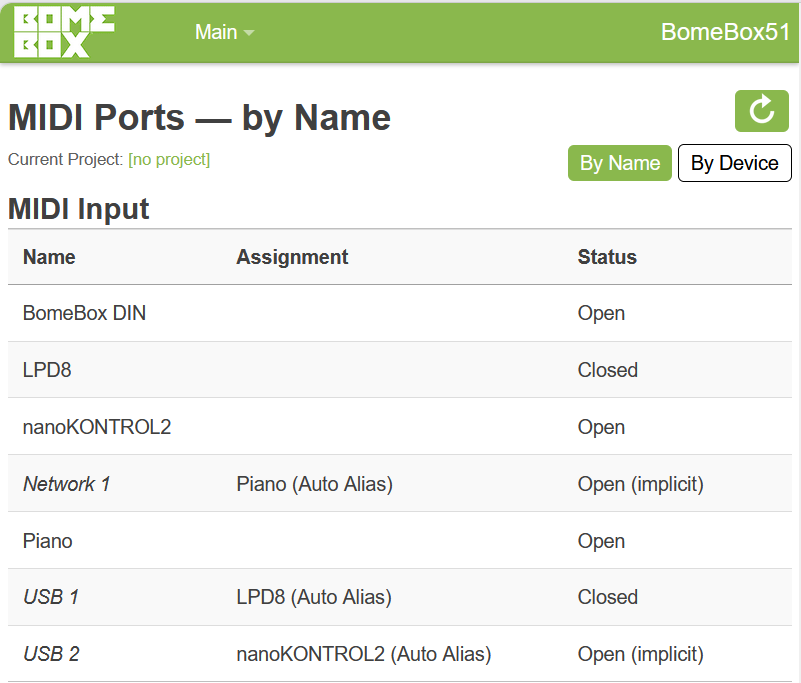
For that, auto-aliases are used (as Steve explained). Auto-aliases are dynamically created aliases that abstract out MIDI ports with other names. You cannot edit or delete them. In MT Pro, whenever there exists Bome MIDI Translator 1 Virtual In, you will also have the auto-alias Bome Virtual Port 1. If you configure MT Pro to not use virtual ports, the auto-alias will also go away.

I understand that for many use cases, having this port duplication and the additional abstraction layer is not needed. But except for the cluttered MIDI port list, I don’t see much harm. The user’s manual only mentions these auto-aliases briefly in chapter 3.2, with the recommendation to always use the auto-aliases and not the virtual ports directly.

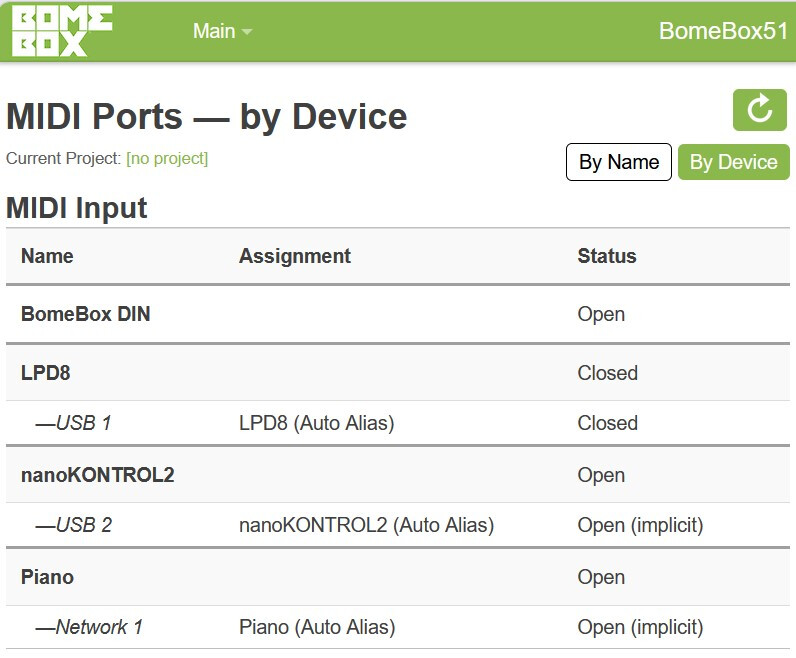
PS: Another example of auto-aliases is in the BomeBox: every plugged-in USB device can be accessed by name, or by numbered auto-aliases USB 1, USB 2, etc., and network connections via Network 1, Network 2. That allows you to create translation projects that always work, no matter what the exact name of the plugged in MIDI device is, or the remote network device name.

The BomeBox also offers a different ordering of the same, where aliases are sorted below their device:

I think such a reordering option will be very useful for MT Pro, too.