Is there some way whether via BOME or via other means to:
• prevent some applications to see / take some specific virtual / physical MIDI ports?
• force a specific app / port to be released?
• dedicate some port to some app (in those cases, where there is no explicit port choice in the app)
First port that opens the port wins. Others cannot open it. It is important that you open the application that you want to use with a given port first.
Unfortunately no without shutting down the application that is holding the port open. I’ve even found that some applications may not release the port properly. For example, if you use MIDI with Chrome, you have to shut down chrome completely (not just the tab that is using MIDI), before the MIDI port is released. Also ProTools often will not release a port unless you restart Windows. Hopefully the new drivers coming out from Windows (hopefully this quarter) will fix the problem. The new driver from what I understand is part of MIDI 2.0.
No but what I usually do is use Bome Unlimited Named MIDI Ports and set upt the appropriate routing and then use my apps only to use those ports. I can then change the routing as I want withing Bome Network to reduce conflicts. I typically only use these ports in my applications and have them routed to and from the physical ports, which essentially allows sharing ports (as a split or merge function).
Steve Caldwell
Bome Customer Care
Also available for paid consulting services: bome@sniz.biz
Thanks Steve. Yes, the Chrome situation is what annoys me the most. I might try some other non-chromium browser just to run the online MIDI editors and keep MIDI permissions completely blocked on Chrome / Vivaldi.
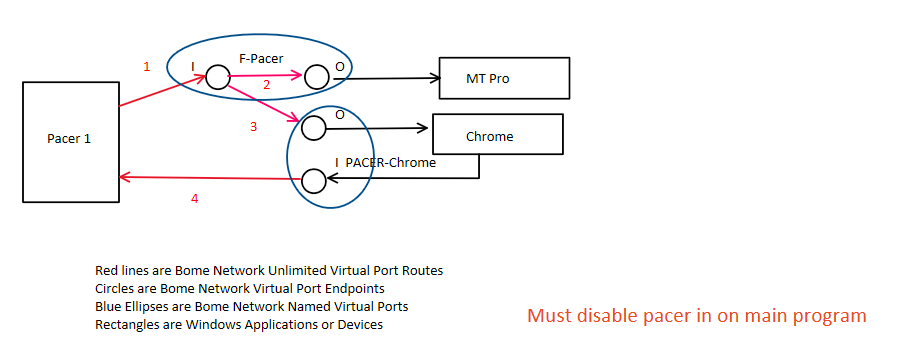
Here is how I use my Pacer Control Pedal with the online edit oand other applications using Bome Network. The red lines are my routes, the circles are endpoints and the ovals are virtual midi ports.
MT Pro is one app and Chrome is the other.
Steve Caldwell
Bome Customer Care
Also available for paid consulting services: bome@sniz.biz
Oh, I just realized, the problem in my case might be in the first place the editor itself, that simply grabs some available ports anytime the page loads. I will get in touch with the developer to try to hopefully only allow manual port assignment. Thanks for the stimulating back and forth.