Chord with Arpeggio

Hi Andy,

I incorporated the chord playing into your project.
If you allow multiple instances of Bome MIDI translator Pro then you can copy and paste the preset.
I had to edit it a bit to make it work. For instance, I only want to trigger the sequence with a note-on. I disabled the original translator 1.0 and added translator 1.1 as a perform trigger. It is called in the rules of translator 2.0 just prior to triggering the chorde, that is where I added the 410ms delay to start the sequence.

Here are the rules of translator 2.0.

// Look for note
rr=oo&224
if rr!=128 then exit rules, skip Outgoing Action
//Look for MIDI CH 1
rr=oo&15
if rr!=0 then exit rules, skip Outgoing Action
// Send Major Chord

// calculate third
rr=pp+4
// calulate fifth
ss=pp+7

//adjust velocity for note-on only
tt=oo&240
// command byte 144 means note-on unless velocity =0
if qq==0 then skip next 2 rules
// it is a note-on message
//so set to loudest velocity or 127
if tt==144 then qq=127
// skipped rule means note-off
// send notes but make sure they are within range
// Delayed arpeggio
if qq>0 then Perform "Start Sequence",pp,410

// Send the chord
if pp<128 then Perform "Note",oo,pp,qq
if pp<128 then Perform "Note",oo,rr,qq
if pp<128 then Perform "Note",oo,ss,qq


The chord will only be held down for as long as you have the note pressed down. Don’t press another key while a sequence is running otherwise it will interrupt the currenty sequence and through the timing off.

V2 1_3_5_8_5_3_1.bmtp (5.8 KB)

Note, I will split this response into a new topic.

Steve Caldwell
Bome Customer Care


Also available for paid consulting services: bome@sniz.biz

Good morning Steve,

First off,

Hello Steve,

Well sir, I’m impressed. This project is a thing of beauty and it works almost exactly the way I want. The only place it falls short of perfection is at the very beginning, with the initial keystroke, variable pp, that triggers the chord. Now, I can definitely use the project exactly as is, but if I had my druthers the arpeggio would delay 410ms after Note Off, rather than coming in so quickly after the Note ON midi signal. At least, looking at Rule 4 of preset 1, that’s what I think is happening. I don’t understand the programming well enough…yet…to be certain.

Pardon my ignorance, but the order of the presets also has me a bit confused. The sequence works. It plays in the correct order: Keynote, major chord, arpeggio. But the Presets appear in an inverted order! From a logical standpoint this seems totally bass-ackwards…but it definitely works!

Lastly, at least for now, I fired up a second instance of Bome MT and copied the project over, as you suggested. When I tried to play it, all I got was an endless repetition of the keynote. At the time I didn’t think to look at the log window….DOH!…so I’m not sure what was happening. To remedy that oversight, I just fired up a BMTP2 and again tested the project. And of course it’s working perfectly! Go figure.

I’m going to go ahead now and program the remaining arpeggiator iterations from copies of this original. Allowing that I am able to properly adjust the variables for each of the different sequences, I look forward to reporting the success of your and my efforts.

Thank you again for all that you’ve done. Please come to the Hill Country so I can buy you dinner. It’s the least I can do.

Respectfully yours,

Andy

I changed the rules in translator 2.0 to trigger on note-on other than note off. You can change the initial delay in this line in the rules.

// Delayed arpeggio
if qq==0 then Perform "Start Sequence",pp,410

Yes, this is the normal flow but we can change the flow with the new perform action so the order really doesn’t matter for perform actions.

If both instances are running at the same time, indeed they will interfere with each other. As I explained earlier, it is probably best to have each sequence in a different preset and then select the preset(s) that you want to use for a given sequence.

See the below example.

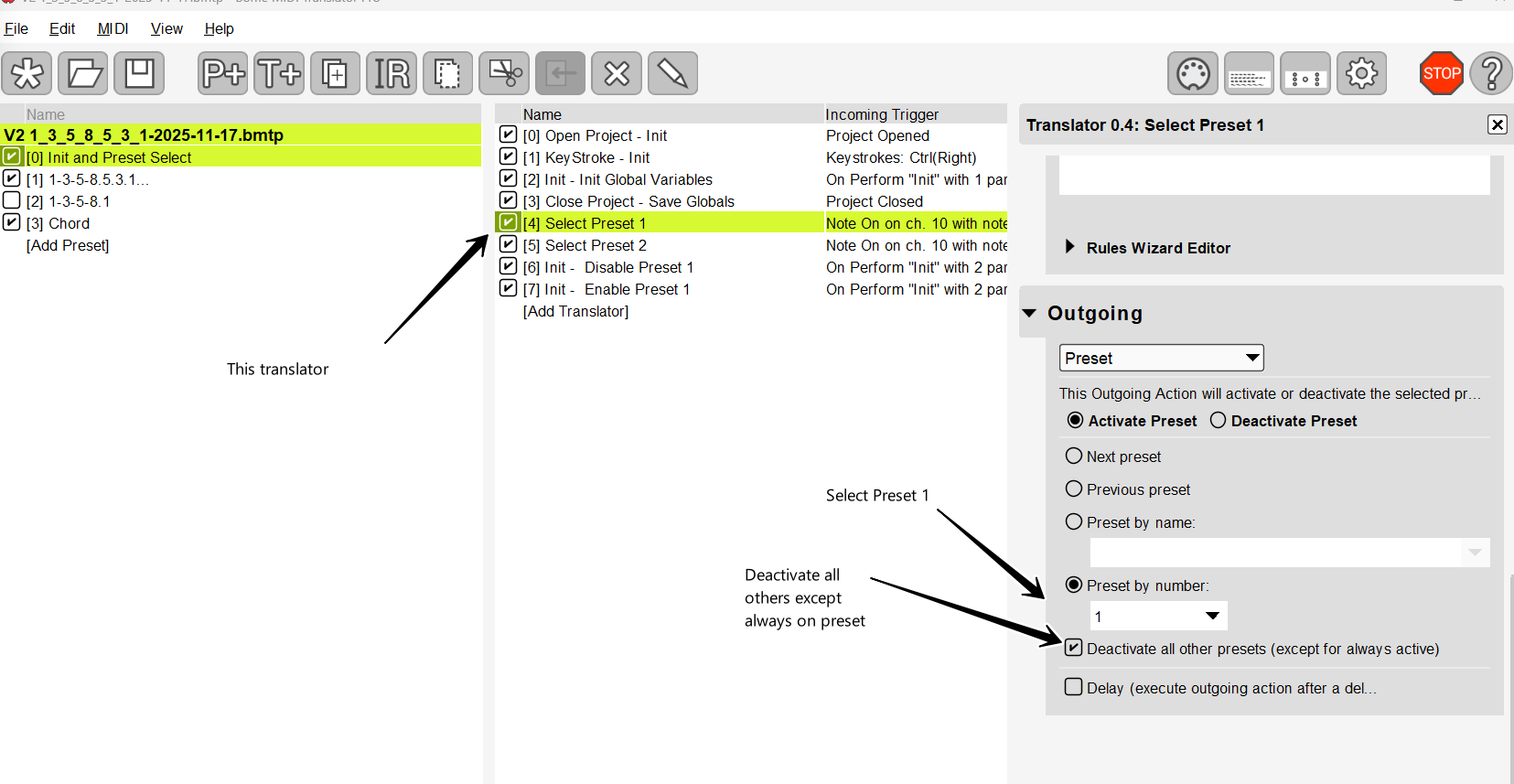
I added translators 0.4 and 0.5 to select the desired preset

I duplicated preset 1 and made it preset 2. Then I edited the rules of 2.1 to set the number of notes to 10 in the rules.
Then I edited the rules of 2.2 to change the note numbers that I wanted.

I added translator 0.6 and 0.7 so that preset 1 is deactivated and activated activated 100 ms later when you start the project. De-activating preset 1 and reactivating it will ensure that preset 2 is deactivated as set by translator 1.5.

Since I’m calling presets by number, if you move your presets around things will break so maybe you can instead activate and deactivate them by name.

V2 1_3_5_8_5_3_1-2025-11-17.bmtp (9.7 KB)

Steve Caldwell
Bome Customer Care


Also available for paid consulting services: bome@sniz.biz
Hi…

Ok. I’m going to download this new version and ā€œplayā€ with it a bit…while studying your notes. I’m particularly interested in the ability to efficiently and quickly move between arpeggiators with your Preset arrangement in this new project.

Thanks again, and again, and again…

Andy

PS I’ll post the finalized set of arpeggio/vocalises to the forum when we’ve got the bugs all worked out. I’d be happy to explain what they’re designed to accomplish, vocally speaking. I’d love it if anyone else finds them useful.

1 Like

Good morning Steve,

My part time CAD job kept me busy most of the day. I haven’t had time to work on ā€˜our’ project. I got that floorplan done…and then I got another, priority, design project that’s going to keep me tied up for who knows how many days. It’s good to have the supplement to my SS ā€˜benefits’, but it’s also frustrating. I REALLY, REALLY want to get this Voice lesson project in the bag.

Recapping what I’m trying to accomplish: I have a list of six, basic, arpeggio-like piano scales I need to prepare. The format for the use of these ā€˜vocalises’ is 1) On my Midi keyboard I press and hold the Root note of the scale. 2) This triggers a major triad which plays until the key is released, that’s an ~1230ms duration. 3) 410ms after the Note off message, the note sequence executes, and 4) The scale plays through one time. 5) This sequence of events is repeated, generally by half-step increments, up and down the scale, as necessary, through the student’s vocal range. 5) The next exercise in the student’s lesson plan is loaded up and steps 1-5 are repeated until the day’s lesson plan is completed.

What you’ve developed for me to this point is SO CLOSE…but sadly no cigar. Steps 1) - 3) just aren’t executing according to plan. I feel like I’ve already taken unfair advantage of you and am uncomfortable with asking for any more of your time. You’ve done so much for me already. Maybe it’s just my pride, but I feel like you’ve given me such a great start, now I need to put my shoulder to the wheel, learn what I need to know, and get it finished.

Thanks again Steve. You’re the best!

With highest regard,

Andy

OK, Andy, Yes I think we’ve reached the end for free services so you are at the point of either taking what you have and trying to move it forward on your own or if you want paid support, you can reach out to me at the email below:

Steve Caldwell
Bome Customer Care


Also available for paid consulting services: bome@sniz.biz
Hello Steve,

Regarding project V2 1_3_5_8_5_3_1-2025-11-17.bmtp, at the start of this thread: I don’t know what happened when I ran it the first time around, but just now I loaded it up…to study it…and it works perfectly! This is SO weird! I have no idea what’s going on. I’m just overjoyed that it’s working!

Actually…I’m wondering if just maybe I had multiple instances of Bome running without realizing it!!! You said that could cause strange problems…

Anyway, now I need to add the other scales. That should be straight forward and easy enough. My challenge will be figuring out how to program the ā€œActivate-Deactivateā€ Translators to work for more than two Presets. That might get ā€œinterestingā€.

Note: I’m not too proud to beg…and I’ll understand if your answer is ā€œno!ā€ā€¦ but could you give me a hint how to approach it?

So, thanks again Steve for all your help. Please forgive me for ever doubting you.

With highest regards and deepest respect,

Andy

PS Now I REALLY owe you that BBQ dinner!

Hi,

To switch presets.

  1. Set whichever presets you want to never turn off to always on. This is an option in the shown on the right when you select the preset.

  1. In the Select Preset translators make the option to disable all other presets. Do this for any translators the enable the preset you want. In my example, I’m doing it with an incoming MIDI message but you can use any incoming trigger that you want.

  1. The translators for deactivating othe presets when activing its preset will no longer be required unless you are activating the preset by a different means.

This is not the only way it can be done but it is usually the most straight forward.

Here is an example.

note-progression-example1.bmtp (9.9 KB)

You could, instead have a Perform translator that deactivates the target presets that you want.

You would have a translator with an incoming trigger that you want to switch the preset. Then in the rules of that translator you could have.

The outgoing action would be to activate the the given preset.

// Deactivate selected presets
Perform "Deactivate", 1
Perform "Deactivate", 5

And then a translator with incoming trigger of Perform with a paramter of say pp

The outgoing action would be to deactivate the numbered preset.

If I have time later today, I can send you an example

Steve Caldwell
Bome Customer Care


Also available for paid consulting services: bome@sniz.biz

Here is the second method. In this case none-of the presets need to be set to always on. We target the preset by number and change the rules of ā€˜On Activation - Deactivate other presets’. That way the translator can deactive as many presets that you want selectively. The only downside I see of this method is that as you add presets, there are more rules you need to add to the similar translators in all other presets so there is more overhead when you make changes but it give you finer control.

The Perform Disabe preset is in preset 0 so you should never disable preset 0.

The additional presets I added are at this point just dummy presets for illustrative purposes. You should able to add translators (from one of the 2 working presets), and then alter the rules for the note sequence that you want for that preset.

note-progression-example2.bmtp (11.3 KB)

Steve Caldwell
Bome Customer Care


Also available for paid consulting services: bome@sniz.biz

Good evening Steve,

I’m so grateful to hear from you again!

I’ve spent the day working on my project, with some gratifying success…but I’m not completely satisfied with it. I incorporated some of your latest tip. I eliminated some rules that were redundant. I fixed some problems with scales that had noise issues. I’m happy to say that it’s functional now, but not as complete as I’d like it to be.

Scales for Voice Lessons.bmtp (22.1 KB)

Three non-critical issues remain: The most annoying is in Preset 5, ā€˜All Notes (Leaps)’. See rule 1, At rr==10 there is a brief, low volume rumble. I experienced the same problem in a couple of the other scale presets and was able to resolve them by matching the ā€œ# of notesā€ variable in rule 0 to rr= in rule 1 . I can live with this issue if I have to, but I’d rather not. Just can’t figure out what’s happening there.

Issue two is likewise annoying, but I can live with it. In the Chord preset there is a noticeable delay between ā€œnote onā€ of the trigger and the chord playing. I messed with it for a fair amount of time without being able to affect it. Heck with it! I can live with it…unless you know how to tighten it up.

The last item is not really an ā€˜issue’, it’s more of a feature I’d like to have. For simplicity sake, while teaching I’d like to be able to select/deselect scale presets with the black keys, C#5-A#6, on my Novation. I’m thinking something like this might work:

Select preset:

pp+24=vv

if vv==97 then perform ā€˜activate preset’ 02

if vv==99 then perform ā€˜activate preset’ 03

and so on for all presets, 02-08.

Deselect preset:

if vv!=97 then perform ā€˜deactivate preset’ 02

if vv!=99 then perform ā€˜deactivate preset’ 03

etc…

It seems kind of clunky, but if I can figure out how to write the ā€˜activate’ and’ deactivate’ rules I think it might actually work.

So… What do you think? Would love your input.

Andy

Oops. I need to look at that second project. That may be just what I need!

I think this happens if the delay between note-off and the next note on is too short.

This is probably the latency of the sound module that you are using if you are using Microsoft internal synth, it is pretty slow so maybe you should try some other soft synth. Most plugins for DAW’s are much quicker.

If you use the second method that I showed you, then when a preset is selected there is a different translator that deactivates the other presets. Just change the rules there using perform.

Steve Caldwell
Bome Customer Care


Also available for paid consulting services: bome@sniz.biz

Good afternoon Mr. Steve. God’s blessing to you on this overcast, but otherwise lovely Hill Country Sabbath Day.

I’ve been looking at ā€˜Note-progression-example2’. I see what you did there. I see how it works and I think I can take advantage of it. I’ll give it a try and let you know how it goes.

I still have bunches of general programming questions I’d like to ask. I’m studying the product manual and searching the threads for answers. I’ll try not to make too much of a nuisance of myself along the way.

Thanks again,

Andy

PS. I really don’t wish to be a nuisance, but can I ask you about specifics of your programming the above example? Or, should I rather open them as new topics?

You are not being a nuisance. If your questions are related to this original project, you can ask them here. If they are general Bome questions about specific functionaly, then create new topics with the title of the functionality you are asking about

Steve Caldwell
Bome Customer Care


Also available for paid consulting services: bome@sniz.biz

Ok. I want very much to understand the logic behind your programming. So, specific to this project; In Preset [0], ā€˜Init and Preset Select’, what are the purposes of Rule [1], ā€˜Keystroke -Init’ and Rule [3] ā€˜Close Project - Save Globals’?

And what is the variable ā€˜ps’ related to?

0.1 is part of a standard template that I use that allows me to restart the project when pressing the specified keystroke. It calls perform ā€˜Init’ which is translator 0.2 and in the rules of that translator I set all of my global variables to a known state. Although the perform function didn’t exist at the time, this tutorial on best practices should give you and idea on how it works.

Translator 0.3 is actually for functionality that is not yet in Bome MIDI Translator Pro. It is something I’m testing for an upcoming release so it can be safely deleted. The hope is that we can use something like this to store and retrieve global variables between sessions. The global variable is just the one I picked and I called it ps to remind me it would be for ā€˜persistent storage’. You can safely delete that as well. I should have left it out of the project. The idea is to be able to save the project state (global variables) to disk when you save the project and then reload them from disk when re-opening the project. This does not yet exist in any production release.

Steve Caldwell
Bome Customer Care


Also available for paid consulting services: bome@sniz.biz

Thanks Steve. Makes total sense now.

Yah know, it’s been said that ā€œimitation is the sincerest form of flatteryā€. Well sir, I’m trying to learn how to program BMT and imitating your work seems like the quickest way to do it. I don’t know if you should feel flattered by that though. LOL.

Andy

Well, I’m happy to show what I know. I’ve been using Bome MIDI Translator Pro since 2016. When ā€˜Perform’ came into the picture about 1 1/2 years ago, it was a total game changer for me. It was always a very useful program.

Steve Caldwell
Bome Customer Care


Also available for paid consulting services: bome@sniz.biz
1 Like

Happy early Monday morning Steve,

I have a Novation Launchpad 61 midi controller keyboard. Instead of programming note keys in translators to activate/deactivate Presets, I’m considering the possibility of using the onboard launchpads for that function. In your humble opinion, would that be more trouble than it’s worth?

Regards, Andy

Hi, I assume you mean the Launchkey 61, right? I think you could do that. It is possible that that area of the keyboard has a different input MIDI port so you would just need to find out what MIDI each of the pads send. I’m not sure if there are difference between then MK3 and the MK4 but in either case, it should probably work.

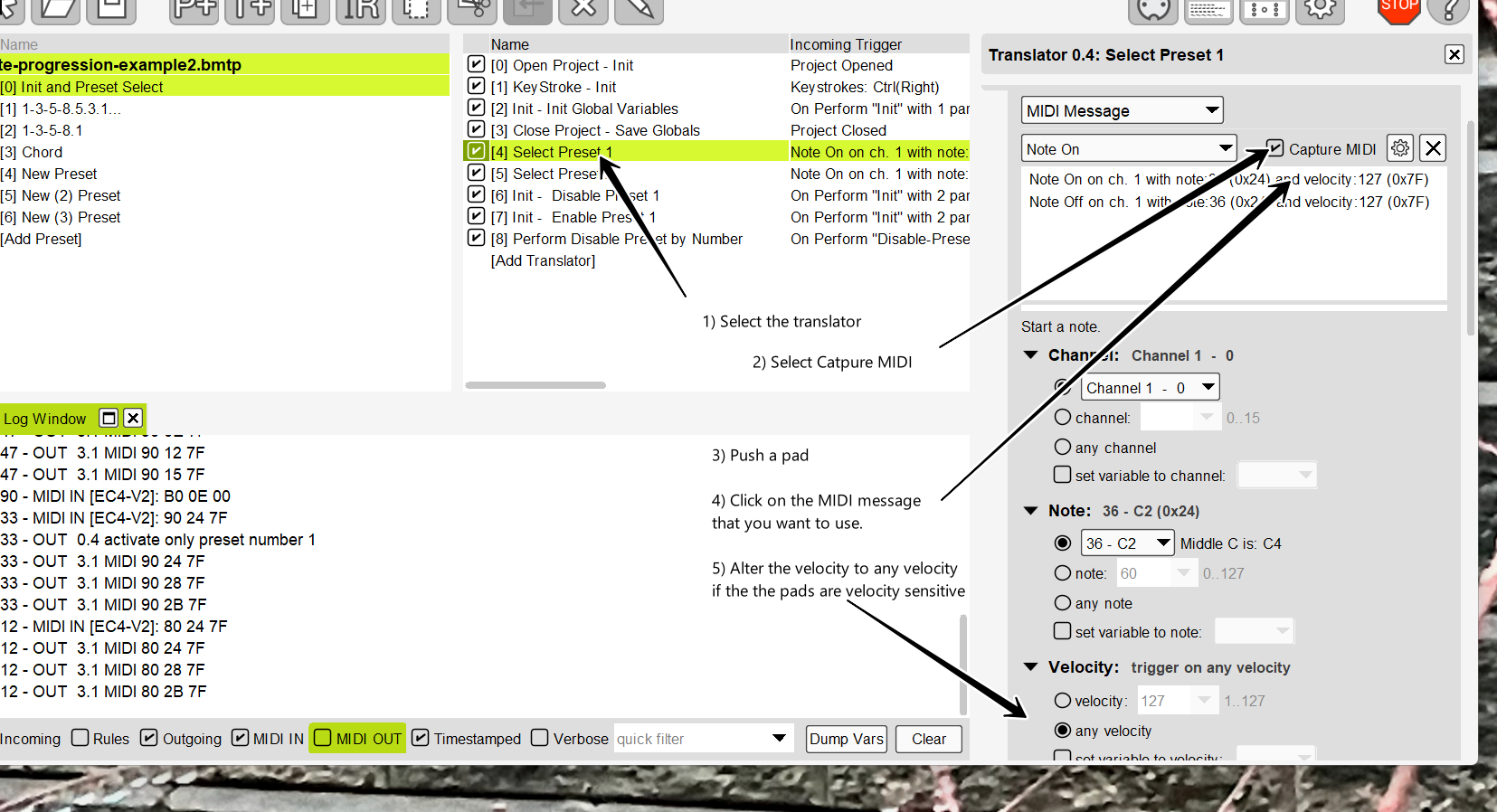
For example, translator 0.4 you could select it and select capture MIDI then press a pad.

You would see something like this. In this case, a Note-on with note 36 and any velocity would trigger the action to select preset 1.

You could then do similar for each translator or you could evaluate the note number in the trigger and use 1 translator and then rules to determine the preset that you want to trigger.

Steve Caldwell
Bome Customer Care


Also available for paid consulting services: bome@sniz.biz

Thanks Steve. I’ll give this a try.
Happy Thanksgiving to you and yours!
Andy

| SteveC Steve staff
November 24 |

  • | - |

Hi, I assume you mean the Launchkey 61, right? I think you could do that. It is possible that that area of the keyboard has a different input MIDI port so you would just need to find out what MIDI each of the pads send. I’m not sure if there are difference between then MK3 and the MK4 but in either case, it should probably work.

For example, translator 0.4 you could select it and select capture MIDI then press a pad.

You would see something like this. In this case, a Note-on with note 36 and any velocity would trigger the action to select preset 1.

You could then do similar for each translator or you could evaluate the note number in the trigger and use 1 translator and then rules to determine the preset that you want to trigger.

image

Steve Caldwell
Bome Customer Care

1 Like