Create Rules CC to NRPN

Hi Steve,

Currently, I’m using one translator to mute a console channel and another to unmute it. I need to create 96 of these for 48 channels.

But to simplify things, would it be possible to create just two translators with the following rules:

  • from CC#1 to CC#48 value 127 = play NOTE ON vel 1 from C-2 to B1
  • from CC#1 to CC#48 value 0 = play NOTE OFF vel 0 from C-2 to B1

Hi, if I understand you correctly this should work.

Translator 1.0 handles the mute function and translatore 1.2 handles the unmute function.

The rules are similar. First we make sure the CC is within range. Then we adjust the outgoing note and then send the value based on the desired outgoing note. The outgoin note number is pp and value is qq.

// Make sure it is within range
if pp<1 then exit rules, skip Outgoing Action
if pp>48 then exit rules, skip Outgoing Action
// Set value for mute
qq=1
// adjust for outgoing note
pp=pp-1

I set up my aliases as follows:

You can learn more about aliases from this tutorial.

Mute-Unmute-48-with-CC.bmtp (2.9 KB)

Steve Caldwell
Bome Customer Care


Also available for paid consulting services: bome@sniz.biz

Oops, my apologies, I made a mistake. The ON/OFF notes were used before with MIDI Control.

Now, with BOME, I control the mutes using CC values ​​127/0 which are changed to 1/0.
It’s the LSB value that should change depending on the channel being muted. But the IN/OUT values ​​shouldn’t change.

To mute: from CC#1 to CC#48 value 127 => LSB from 0 to 47 value 1
To unmute: from CC#1 to CC#48 value 0 => LSB from 0 to 47 value 0

…is it possible to make the LSB change depending on the CC # ?

So you are using 7 bit CC incoming and 14 bit CC outgoing?

If so the below should work. All I had to do is change outgoing from note to 14 bit CC.

Mute-Unmute-48-with-14bit-CC.bmtp (2.9 KB)

Steve Caldwell
Bome Customer Care


Also available for paid consulting services: bome@sniz.biz

So you are using 7 bit CC incoming and 14 bit CC outgoing?

I have absolutely no idea.

I found it hard to believe that this transforms the outgoing LSB number using the incoming CC number. In any case, the .bmtp file doesn’t work for me.

What does work is this:

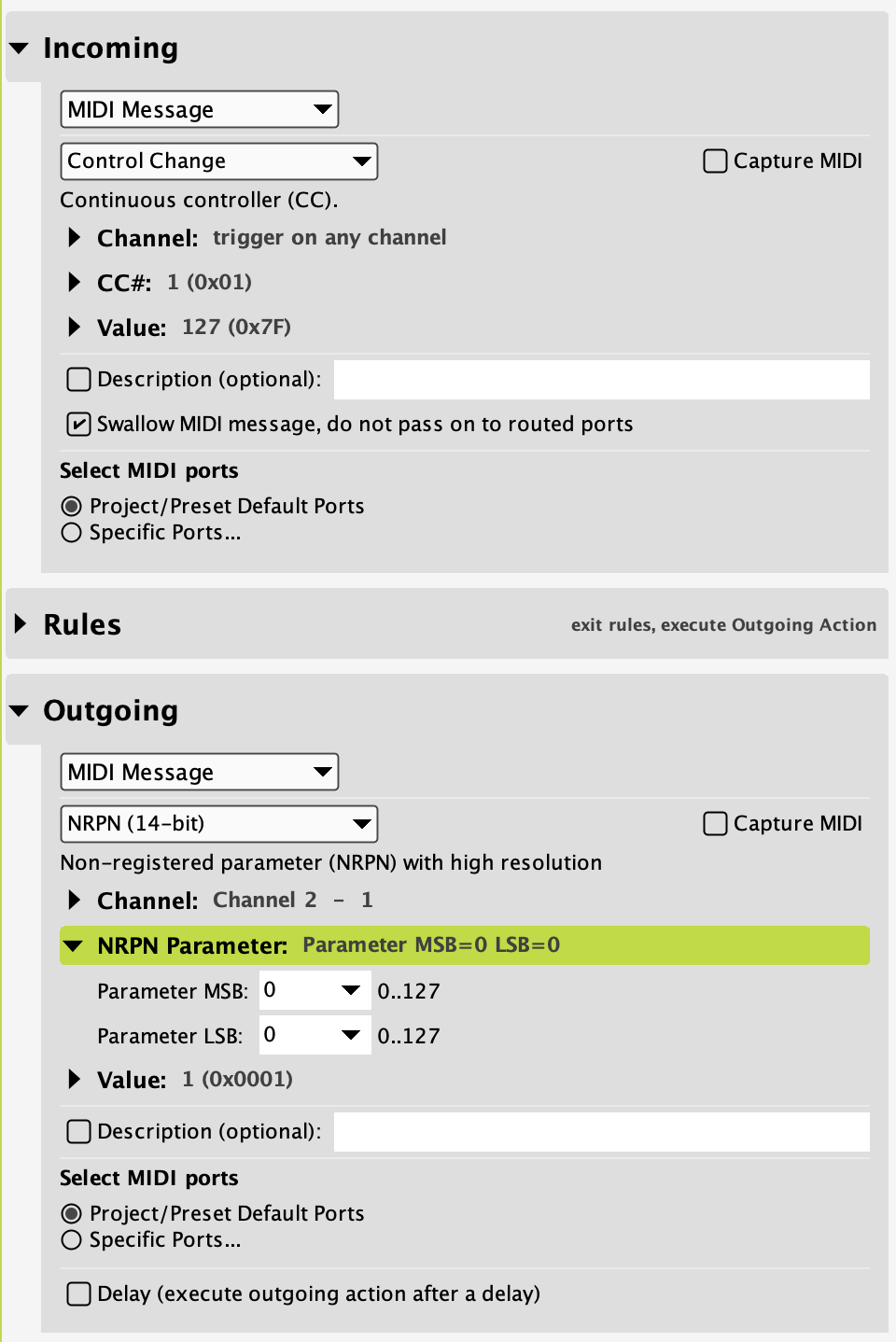
Channel 1 Mute:

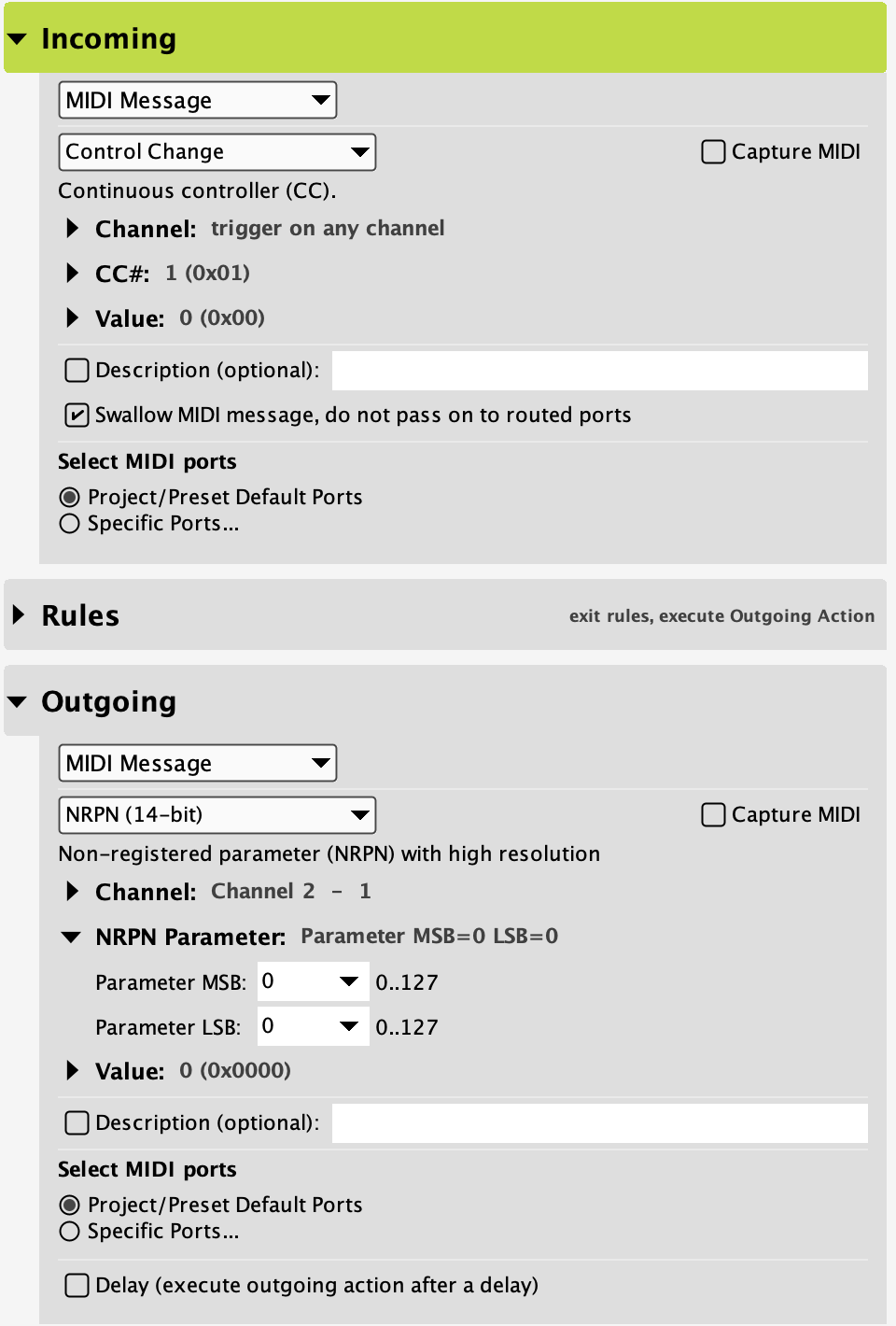
Channel 1 Unmute:

It should be that when the incoming CC is #1, the outgoing LSB is 00

and so on:
CC#2 ==> LSB:01
CC#3 ==> LSB:02
CC#4 ==> LSB:03 … etc

but it always sends the values ​​1 or 0 depending on the CC value (127 or 0).
(for information, MSB should always remain at 0)

OK, so you are not sending 14 bit CC but sending 14 bit NRPN. For using a single translator you will need to make the NRPN raw so that we can manipulate just the NRPN lsb and value. Please find the attached.

Mute-Unmute-48-with-14bit-NRPN-Raw.bmtp (2.7 KB)

Steve Caldwell
Bome Customer Care


Also available for paid consulting services: bome@sniz.biz

Thanks Steve, but it doesn’t work like it does with my simple translators.
Are we sure about
b0 63 00 b0 62 pp b0 06 00 b0 06 qq
?
Where can I find the meaning of each number?

Whoops it should be

b0 63 00 b0 62 pp b0 06 00 b0 26 qq

This arcticle disusses NRPN format. There may be other better ones as well. I just google searched ‘NRPN Format’.

Sorry, it’s not working either :frowning:
I’ll take a look at the article…

// NRPN MSB 
b0 63 00 
// NRPN LSB
b0 62 pp 
// NRPN MSB Value
b0 06 00 
// NRPN LSB value 
b0 26 qq

OK, all I had to do was write ‘b1’ (the mixer receives messages on channel 2).

So that fixes the mutes, thanks for your responsiveness, Steve!
Now I just need to transcode the panning.

For that, I created a second port, ‘Bome MIDI Translator 2 Virtual In,’ which only receives messages from channel 3 (to distinguish it from the ‘Bome MIDI Translator 1 Virtual In’ port (channel 2)).

The pan translator needs to both convert 7 bits to 14 bits to get the full range of the pan, and also use the ‘NRPN raw’ to manipulate the LSB (channel).

MSB: 80 (for all channels)
from CC#1 to CC#68 => from LSB:00 to LSB:67

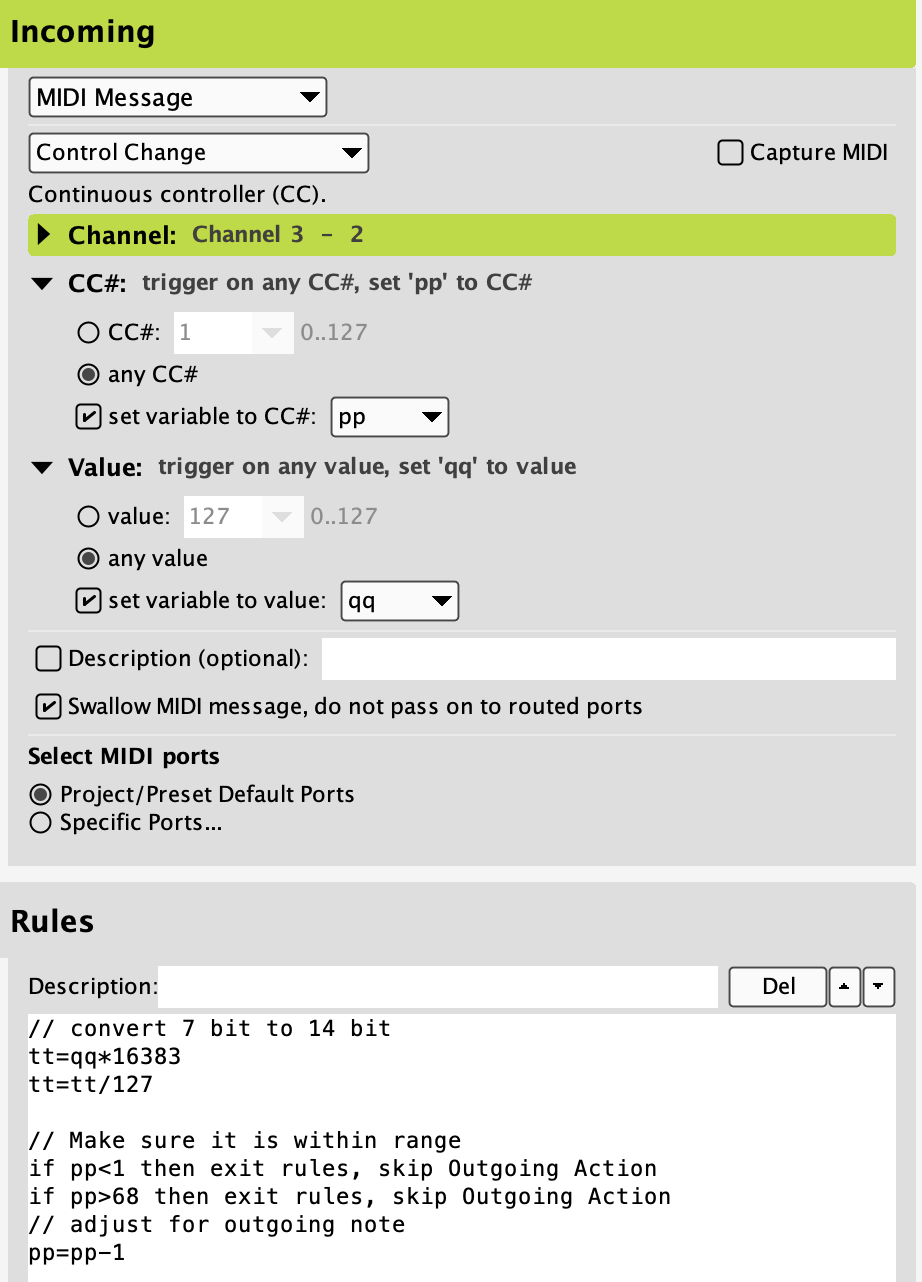
Here’s what I tried:

.. but it doesn’t work, I must have missed something…
are we sure that outgoing messages are actually being sent through channel 2 (mixer),
is the 7>14bit conversion positioned correctly, and even necessary, ….
?

You shouldn’t need to use a different port since the channel is also different.

Please post your project file, and I will have a look.

For detecting and directing MIDI messages to the correct port you may want to look at the tutorial on device selection.

For more information about device selection, see this tutorial.

Steve Caldwell
Bome Customer Care


Also available for paid consulting services: bome@sniz.biz

You shouldn’t need to use a different port since the channel is also different.

Perhaps, but for simplicity and clarity, I’ve assigned the same CCs for muting and panning tracks:

Port 1 (MIDI channel 2): ​​CCs 1 to 68 for muting mix channels 1 to 68 (inputs, groups, and effects returns).

Port 2 (MIDI channel 3): CCs 1 to 68 for panning mix channels 1 to 68.

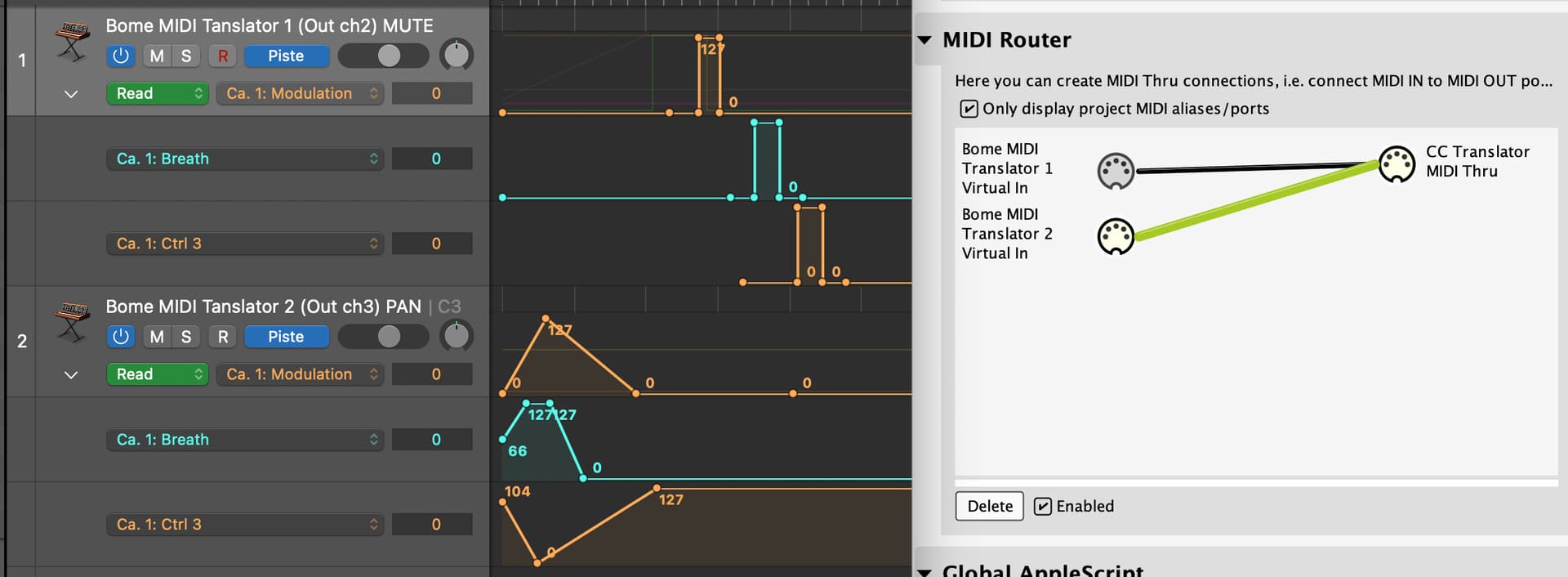
The routing is very simple..

… and it works! I tested panning from Port 2 (individually, without the LBS rule. translator3 on this bmtp:

SQ-5 Mute & Pan.bmtp (2.5 KB)

So you have it working?

It is important to note that the MIDI router as you picture is only for MIDI messages that aren’t using translators with the “swallow” option set. You need to use device selection in the translators if you want to convert from CC to NRPN otherise the MIDI router will just pass through the CC messages untouched.

Steve Caldwell
Bome Customer Care


Also available for paid consulting services: bome@sniz.biz

Translator [0] works,
translator [1] works,
translator [3] works,

it’s translator [2], the one that should pan ALL SQ channels, that isn’t working.

Yet panning works fine with translator [3] as long as it controls one track only.
This translator [3] uses Port 2, that’s why I suspect my rules are the issue, rather than my routing.

Can you post your project file, or is the one you just posted the latest?

Steve Caldwell
Bome Customer Care


Also available for paid consulting services: bome@sniz.biz

Try the attached, you need to define the input port that you want for the given translator.

I use BMT 1 for translators 0 an 1
I use BMT 2 for translator 2 and 3

I defined them at the translator level but I usually define them at the preset level. It is all about device selection which I beleive I mentioned earlier. Your MIDI router has nothing to do with routing of translators. It is only used for MIDI thru messages that are not handled by translators.

For more information about device selection, see this tutorial.

SQ-5 Mute & Pan-sjc.bmtp (2.8 KB)

Steve Caldwell
Bome Customer Care


Also available for paid consulting services: bome@sniz.biz

Whether the routing is set to ‘Default Ports’ or ‘Specific Ports’ makes no difference:

translator [3] works
translator [2] doesn’t work

I really think my rules are incomplete or incorrect.

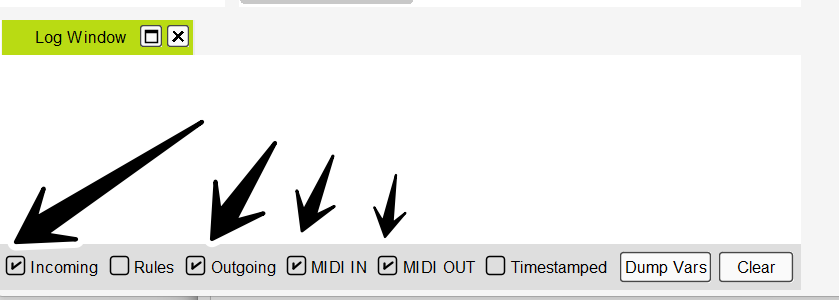
Did you use the project file I sent? Please open the log window in Bome MIDI Translator Pro and select the following options.

MIDI IN, MIDI OUT, Incoming, Outgoing.

Then move the knob and paste the results.

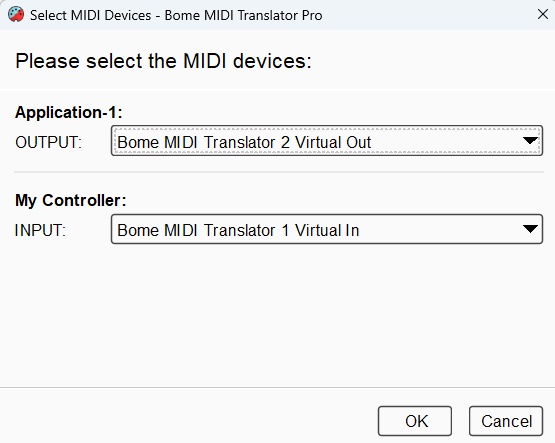
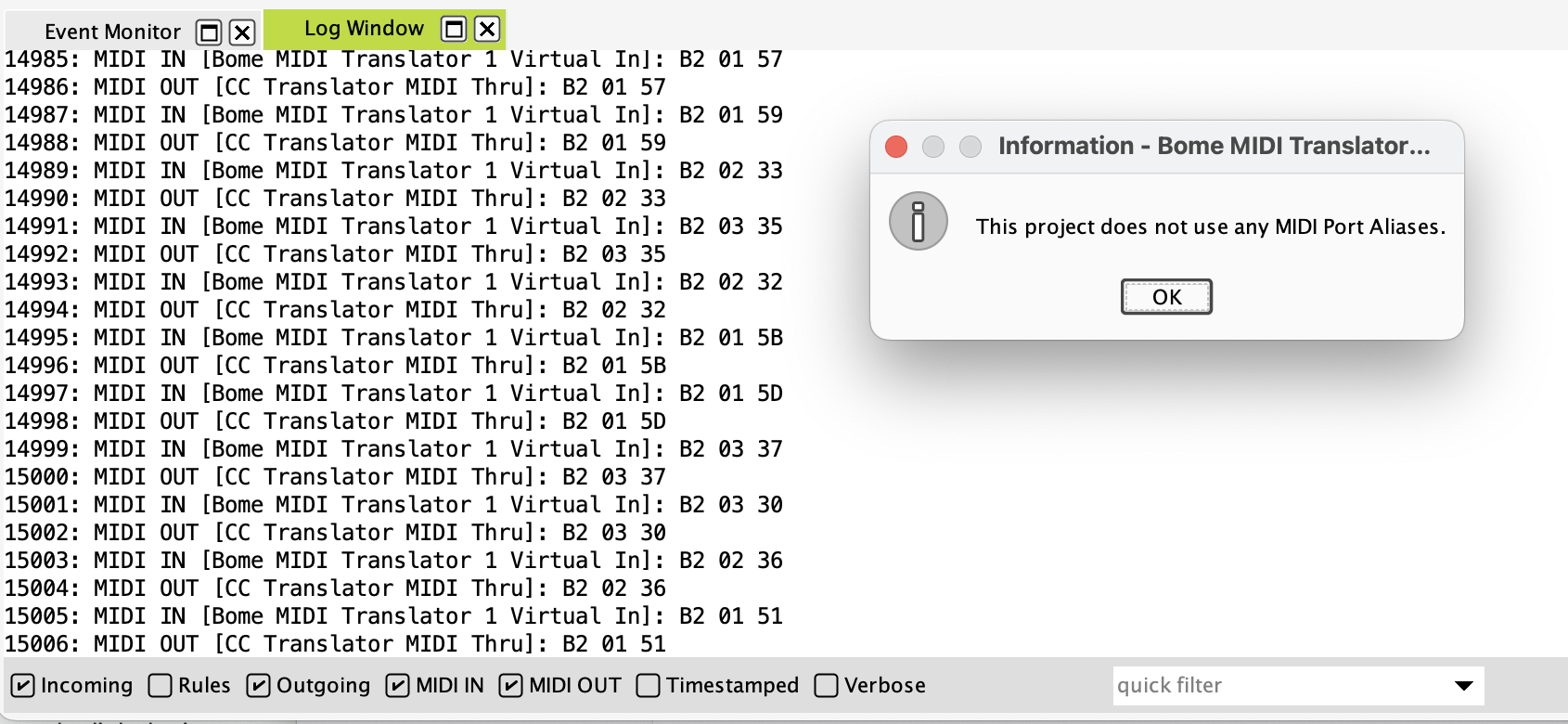
Also, show me how your aliases are set. From the MIDI Menu select Edit Project Port Aliases Aliases. The post a screenshot.

Steve Caldwell
Bome Customer Care


Also available for paid consulting services: bome@sniz.biz

Yes, your “SQ-5 Mute & Pan-sjc.bmtp”.

Here I am only moving three CCs (#1, #2, #3) outgoing via MIDI channel 3:

and here they are:

PS. In the future I’m not going to do much pan automation; for the little I will do, I prefer to create individual translators and stop stressing ourselves out, I know that works.