EaganMatrix Micro input not exposed via Bome Network on Raspberry Pi

Hi all,

I"m using Bome Network Pro on a Raspberry Pi to bridge USB MIDI devices to a Windows 11 PC.

Setup:

  1. EaganMatrix Micro → Raspberry Pi → Bome Network → Win
  2. Rob O"Reilly MIDI Guitar → Raspberry Pi → Bome Network → Win

The MIDI guitar works just fine - I can seet it as a MIDI port in various Windows MIDI apps.
The EaganMatrix Micro, on the other hand, doesn"t seem to work. I don"t see it in as a MIDI port in Windows MIDI apps. It does not appear as an input/source port in Bome"s Add Route page on Windows, only as an output/destination.

On the Pi side, ALSA shows the Micro as both input and output.

32:0 EaganMatrix Micro 010524 MIDI 1

With Bome stopped, this works and receives data when I change presets on the Micro:

aseqdump -p 32:0

With Bome running, the same command fails:

Cannot connect from port 32:0 - Resource temporarily unavailable

So it seems Bome is opening the Micro input on the Pi, but not exposing it back to Windows as a usable input/source port.

What do I need to do to fix this?
Thanks!

This is curious! Before considering what happens on the Windows side, let’s first check what’s happening on the Pi.

  • is the EaganMatrix appearing in the port list when trying to add a MIDI route?
  • if yes, add a test route with the EaganMatrix to see if it can be opened by Bome Network
  • in the main window’s log area, enable verbose and check if the log shows anything suspicious
  • restart Bome Network, check the log file(s) in /tmp (see here for more info)

Please get back to us, this is not anything we’ve ever seen. Please post the log file (or the content), too.
Thanks!

is the EaganMatrix appearing in the port list when trying to add a MIDI route?

Yes

if yes, add a test route with the EaganMatrix to see if it can be opened by Bome Network

in the main window"s log area, enable verbose and check if the log shows anything suspicious

I can successfully create a route from EaganMatrix to my Win PC and can see MIDI messages on the PC when changing EaganMatrix presets.

restart Bome Network, check the log file(s) in /tmp (see here for more info)

What do you want me to look for in the log files?

Not sure what happened, but after a couple of restarts and reconnects I can now see EaganMatrix in the list of MIDI port on Windows.

Thanks a lot for looking into this!

Are you on Windows 11?

Yes, I am.

So it’s possible that your problem was related to the new Windows MIDI Services on Windows 11. Our own virtual MIDI drivers are usually not affected, but sometimes a reboot is necessary. Microsoft is actively working on improvements, so making sure that you always install the latest Windows Update is a good idea.
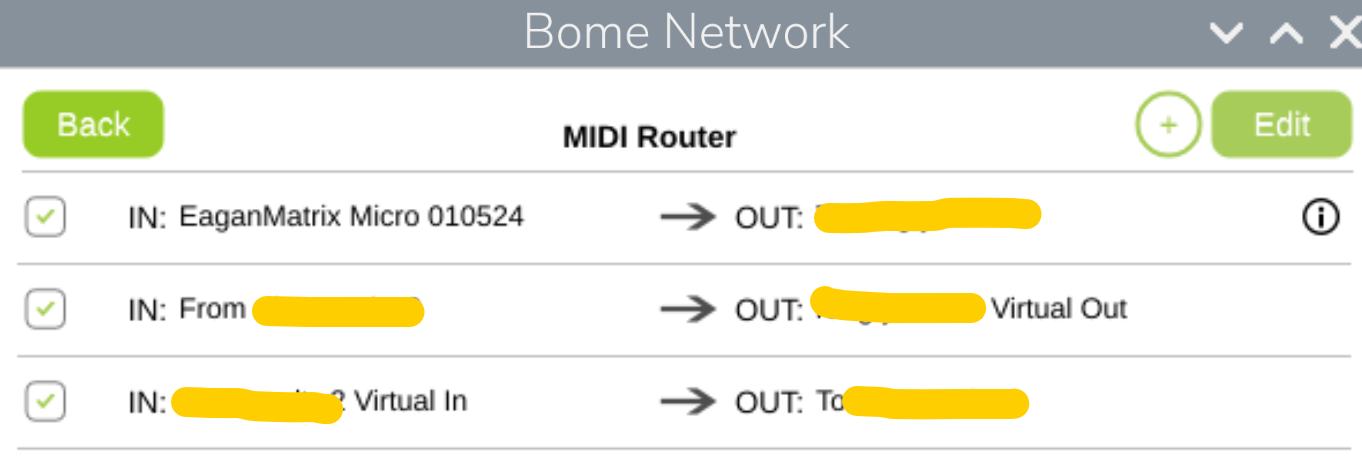
More info: