Dear SteveC I tried also to connect the novation launch control to an Allen &heath qu sb and with the option Allen & heath midi it seems to work but only the faders , but I’d like to assign some knobs for additional channel volumes bit the react not Linear additional I’d like to t have a button for tapping my delay bur I honestly had no chance to run it properly.
I assume you are using BomeBox and are running a Bome MIDI Translator Pro project to convert CC to A&H over a network connection. If this is not the case, please tell me how you are connecting the Launch Control and how have you set up your translators? I’m sure the QU SB has MIDI documentation for what needs to be sent. Most A&H mixers have combination of NRPN and SysEx messages, so before I answer your questions, I think I need to have a little more detail.
Also, I moved this to a new thread to address your specific configuration.
Steve Caldwell
Bome Customer Care Also available for paid consulting services: bome@sniz.biz
Indeed I’m using a bome box and the bome translator pro software.
I also had contact to Allen and heath support they recommended me to use a bomebox for this. My configuration is in detail a wifi router connected to the a&h qu-sb via network cable then with Poe network connected the bomebox and here the usb connection to the novation launch control.
The noviation is able to send nrpn protocol and there I’m able to define the msb lsb and values that I’d like to send-is that a good way or shall I send non nrpn commands and let bome translate everything?
This works fine with the faders of noviation when I activate the Allen&heath midi in Bomebox
But with the knobs and buttons I’m struggling. I tried different things but nothing worked.
The a&h support send me the midi protocol for the qu-sb
is it possible to see in the bome translator pro software the midi command that is sent by noviation and the one sent to a&h online?
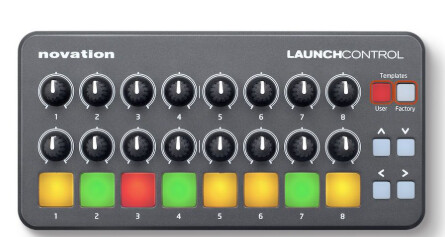
Hi, I’m not sure if we are talking about the same controller as the Novation Launch Control does not send NRPN as I understand it. I have one and it looks like below. Maybe there is a newer model with the same name.
There is a logging feature within BomeBox but it is not real time so I find it of limited use.
Rather I suggest you develop your application using Bome MIDI Translator Pro on a computer and then send it to your BomeBox and allow BomeBox to route the outgoing messages to your Allen & Heath using the BomeBox MIDI router. You can then see what you are sending by looking at the log window of Bome MIDI translator Pro .
You could also router the A&H back to the computer to see return messages.
Controller → Computer running MT Pro → BomeBox → Route to A&H → A&H
A&H → Bomebox - Route to Computer → Computer running MT Pro → Controller
Then you can check the appropriate options in the log window to monitor MIDI traffic.
Steve Caldwell
Bome Customer Care Also available for paid consulting services: bome@sniz.biz