I’m trying to use Bome’s midi translator to get my DAW to recognize my Allen & Heath GSR24M using Mackie or HUI. So far I can get it to work but Fader 1 won’t stop sending a constant signal. I’ve made sure the Pro Tools tick was off and checked all my ports but to no avail. I’m really praying it isn’t a busted midi card…
Hi and welcome to the Bome community!
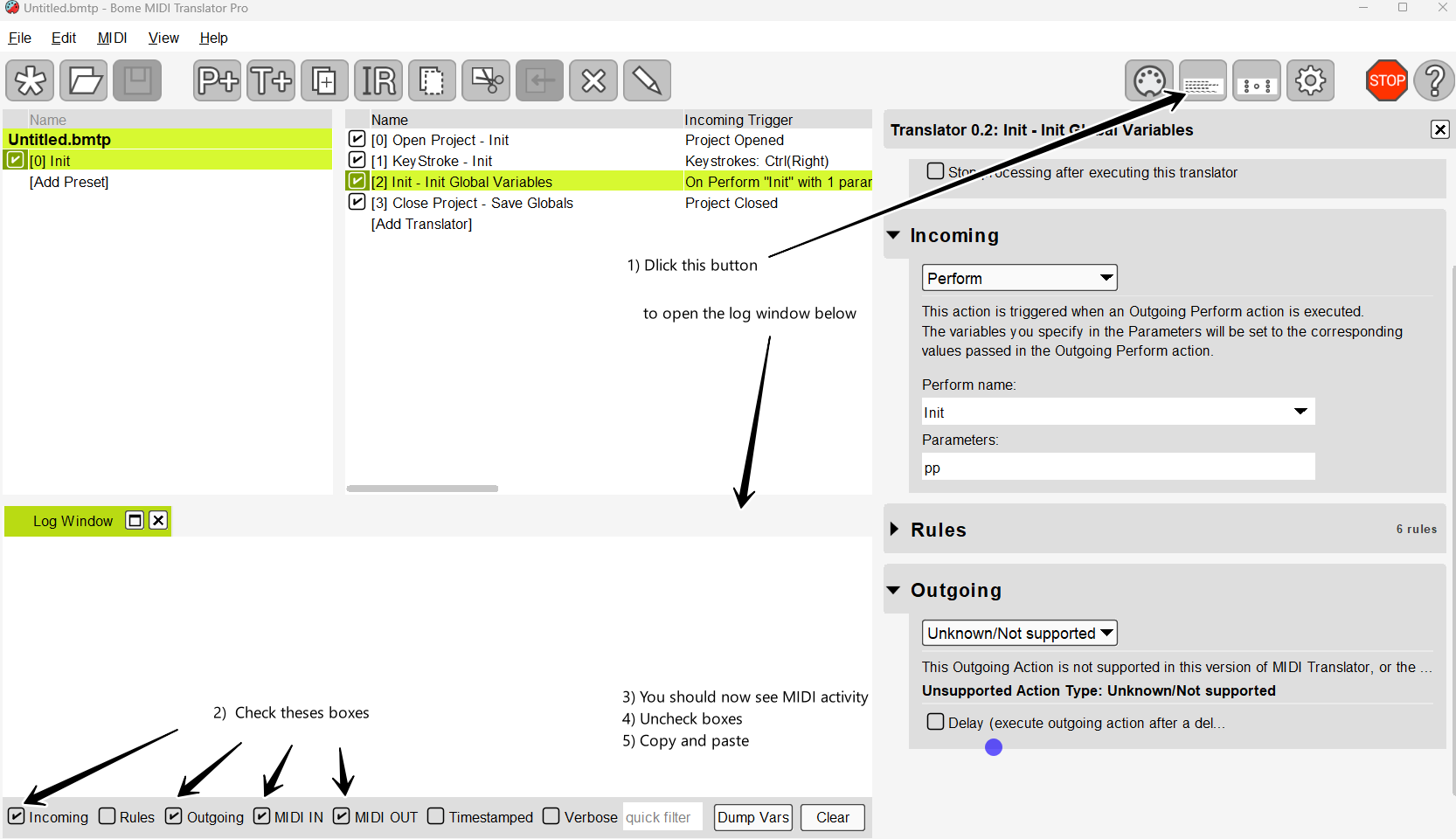
I would need to take a look at your project file. Also open the log window and check MIDI IN and MIDI OUT. Then move your fader and capture the results. Copy and paste. I suspect you have A MIDI loop somewhere.
Steve Caldwell
Bome Customer Care
Also available for paid consulting services: bome@sniz.biz
Did you get this figured out?
Steve Caldwell
Bome Customer Care
Also available for paid consulting services: bome@sniz.biz
Hi Steve! I’m sorry for the delayed response, life got crazy. I have not figured this out yet. Channel 1 is still sending a constant signal. I can record a video showing the issue and I can record the log as well as soon as I get home 
Yes, I would need to see the log window to determine what is being sent and where.
the forum isn’t letting me upload a video of the problem. Keeps telling me invalid format 
Basically, wherever I leave fader 1, that signal keeps being sent every second or so. It’s a steady pattern too which leads me to believe there could just be a setting out of whack
I would still need to look at the log because I have no idea why it would continue to send messages.
Steve Caldwell
Bome Customer Care
Also available for paid consulting services: bome@sniz.biz
Hi Steve, I apologize but I am not able to figure out how to get a video uploaded and the text log is huge if I were to copy paste it. If I were to upload the videos to my YouTube page could I link you to that? It’s just showing the bomes window with the log and the faders on camera so you can see when I move them.
Steve, I apologize the for long delay. I have figured out that my console has a HUI heartbeat or “tick” in the midi mode that I was on. When I set the console to a different mode the issue went away. I DO have another question about a MCU template or possibly modifying a HUI template I already have for the console. There is a HUI template for my console (Allen & Heath GS R24M) that does “GS-HUI” and then “HUI-GS”. Could I simply use that as a starting off point and just change the incoming and outgoing midi in each translator to be a MCU value instead (outgoing messages in the GS-HUI and then the reverse, incoming messages in HUI-GS)? Is there an even easier way to do it? I have a copy that I tried to use Grok and Chat GPT to help convert line by line but I’m not confident with it… I could share that if it helps though. I appreciate your time.
If you have a template to convert from A&H to HUI and back again, you should not need anything else. MCU is different than HUI and Pro Tools will not support that.
Yes, as an emulated HUI device, ProTools is looking for a ping response for every ping it sends. 90 00 7F is the raw ping message and the controller would respond with 90 00 00.
There are various HUI templates on or forum you could start with. You might start here.
Steve Caldwell
Bome Customer Care
Also available for paid consulting services: bome@sniz.biz
The software I’m using requires MCU for full functionality, it does not support HUI  . I guess my question should be would it be worth it to use the HUI template but change every outgoing message from a HUI message to whatever the MCU equivalent would be and vise versa for the incoming messages on the returning midi template, or is there maybe a simpler way of doing it? The board sends simple “midi CC” according to the manual and if there is a complete HUI translation for the console already then I would assume the same could be done with Mackie? As for the DAW, I’m going to be using Reaper and Logic, no pro tools for me
  but I’ll be using the console to control the Universal Audio console app and use the “DAW MODE” function to bounce back and forth between that and the DAW but yeah, that only works with MCU
This example shows a DM2000 (which supports HUI) controlling Ableton Live which doesn’t support HUI but supports MCU.
I’m thinking something like this is what you are looking for.
Now if your software supports MCU and your controller sends CC or some other type of message. Then you would need to either use this or adapt it to what your controller sends. I have not reviewed what the GSR24M sends or receives.
Steve Caldwell
Bome Customer Care
Also available for paid consulting services: bome@sniz.biz
That example seems similar to what I’m trying to do but not quite the same. I DO have a MIDI chart for the console if that helps. I figured building a fresh template or converting a HUI template but that seems a little over my head. Would it be feasible to just edit the HUI template and change the ”HUI” to a “MCU” in the outgoing message? Here’s an example of what I was doing does it look right? This is the incoming template so “MCU → CC”
Translator 1.1: Fader 1 Motor (Bank 1)
Options: swallow
Incoming: E0 pp qq , on port Bome MIDI Translator 1 Virtual In
Rules:
oo = qq * 128
oo = oo + pp
ms = oo / 128
ls = oo % 128
Outgoing:
B0 0F 00
B0 2F 40
B0 00 ms
B0 20 ls
B0 0F 00
B0 2F 00
And here is what I have for the opposite direction: x] Translator 0.1: Fader 1 Options: swallow Incoming: MIDI BF 01 pp Outgoing: MIDI E0 pp pp, to port Bome MIDI Translator 1 Virtual Out
GS_R24_DAW_Functionality_Issue_1.0.pdf (1.2 MB)
GS_R24_Default_MIDI_Issue_1.0.pdf (1.2 MB)
GS_R24_Bome_DAW_Functionality_Issue_1.0.pdf (1.2 MB)
MCU_to_GS.bmtp (3.5 KB)
Hi and thanks for your documentation! So it looks like the GSR24 sends CC1 through 24 for its 24 faders. If you have it set for MIDI Channel 10, then the below project file will work for the first 8 faders.
Translator 1.0 handles converting CC1-CC8 to faders.
We set the fader number to pp. We convert the CC# to fader 0-7 (0xe0-0xe7) as the MCU only supports 8 faders. This goes in the the variable “tt”.
For the value, we take the value (qq) and put it in both the MSB and LSB for the outgoing fader values
CC1 - E0 qq qq
CC2- E1 qq qq
So essentially we are sending pitch bend messages for faders.
Rules
//GSR24 starts with one so we will need to adjust
pp=pp-1
// Don't allow negative CC numbers
if pp<0 then exit rules, skip Outgoing Action
if pp>7 then Log "Log MCU only supports 8 faders"
if pp>7 then exit rules, skip Outgoing Action
// Not lets set tt to the pitch bend MIDI channel
tt=0xe0|pp

// For scaling wee will just use the value for both
// MSB and LSB
For reverse translation we take the input and convert only the MSB value back to CC1
Rules
// Look for pitch bend
rr=oo&0xe0
if rr!=0xe0 then exit rules, skip Outgoing Action
// get cc number
tt=oo&15
// adjust to start with CC1
tt=tt+1
Midi aliases for my example are as follows
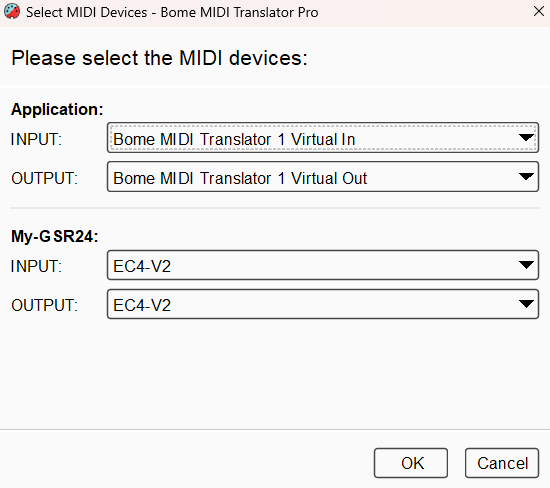
You can learn more about aliases from this tutorial.
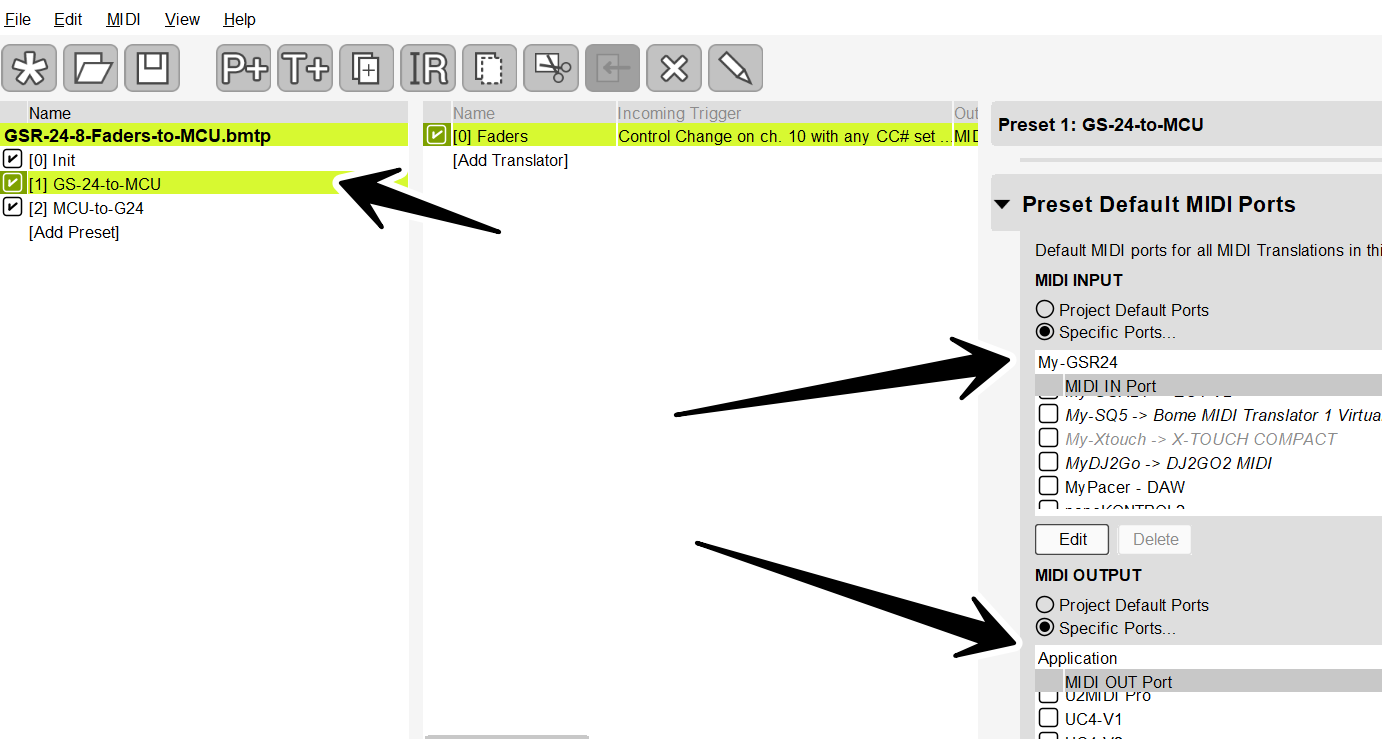
Each preset (1 and 2) have their own default ports set as needed.
Preset 1
Preset 2
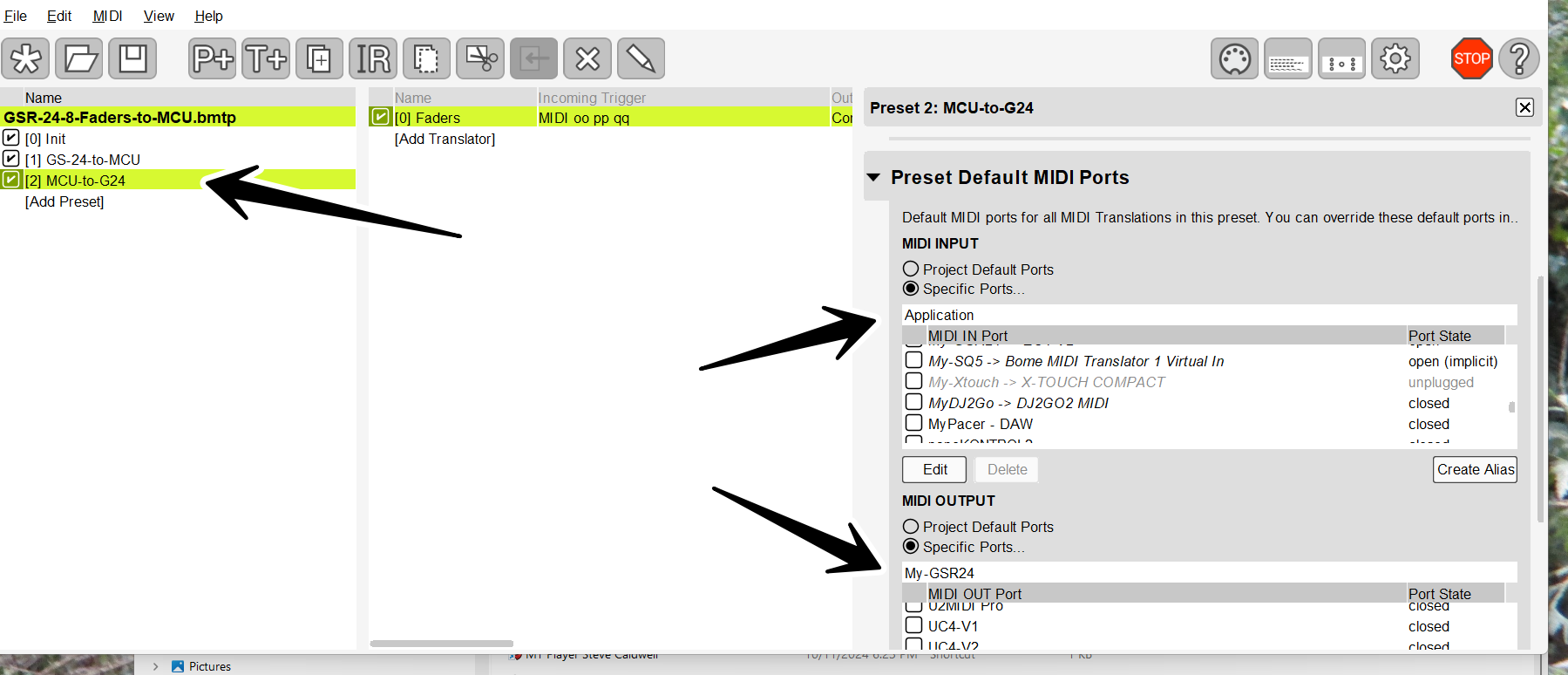
For more information about device selection, see this tutorial.
You are right, doing this for your project will take some time. This is just an example for the first 8 faders. Setting it up for all 24 faders and associated switches (mute, solo,select and record-arm) will take more time. I can offer assistance here on a paid basis (as an independent programmer/consultant).
Since HUI doesn’t look like it is involved here at all, the earlier project file I pointed to you will not work. What you want is GSR24 to Mackie MCU.
If you are using different MIDI channel for your controller, you will need to set this up in the input of translator 1.0 and the output of translator 2.0.
GSR-24-8-Faders-to-MCU.bmtp (3.1 KB)
I hope this gets you started in the right direction.
Drop me an email if you are interested in paid support for a full solution.
Steve Caldwell
Bome Customer Care
Also available for paid consulting services: bome@sniz.biz